Deployment Guide 145
EXAMPLE 1: MAPPING LOCATIONS AND INSTALLING HIVEAPS
When a HiveAP connects to HiveManager, HiveManager checks its SNMP locationand automatically associates it with
the map specified in its SNMP location description. You can then click the icon to see its location and drag it to the
specified location on the map. Also, on the Monitor > Access Points > HiveAPs page (view mode: Config), you can
sort detected HiveAPs by map name to assign them more easily to WLAN policies.
EXAMPLE 2: IEEE 802.1X WITH AN EXTERNAL RADIUS SERVER
You can configure HiveAPs to act as RADIUS authenticators, also known as RADIUS clients or NAS (network access
server) devices. They forward IEEE 802.1X/EAP user authentication requests and responses between wireless
supplicants and up to four RADIUS authentication servers (a primary and three backups). In this example, you
configure two HiveAPs to act as RADIUS authenticators. They provide network access to wireless clients/RADIUS
supplicants and pass authentication requests between the supplicants and a RADIUS authentication server.
You also configure an SSID that makes use of IEEE 802.1X/EAP authentication on the HiveAP authenticators. Because
an SSID using 802.1X/EAP authentication can support numerous user profiles, the example shows how two groups of
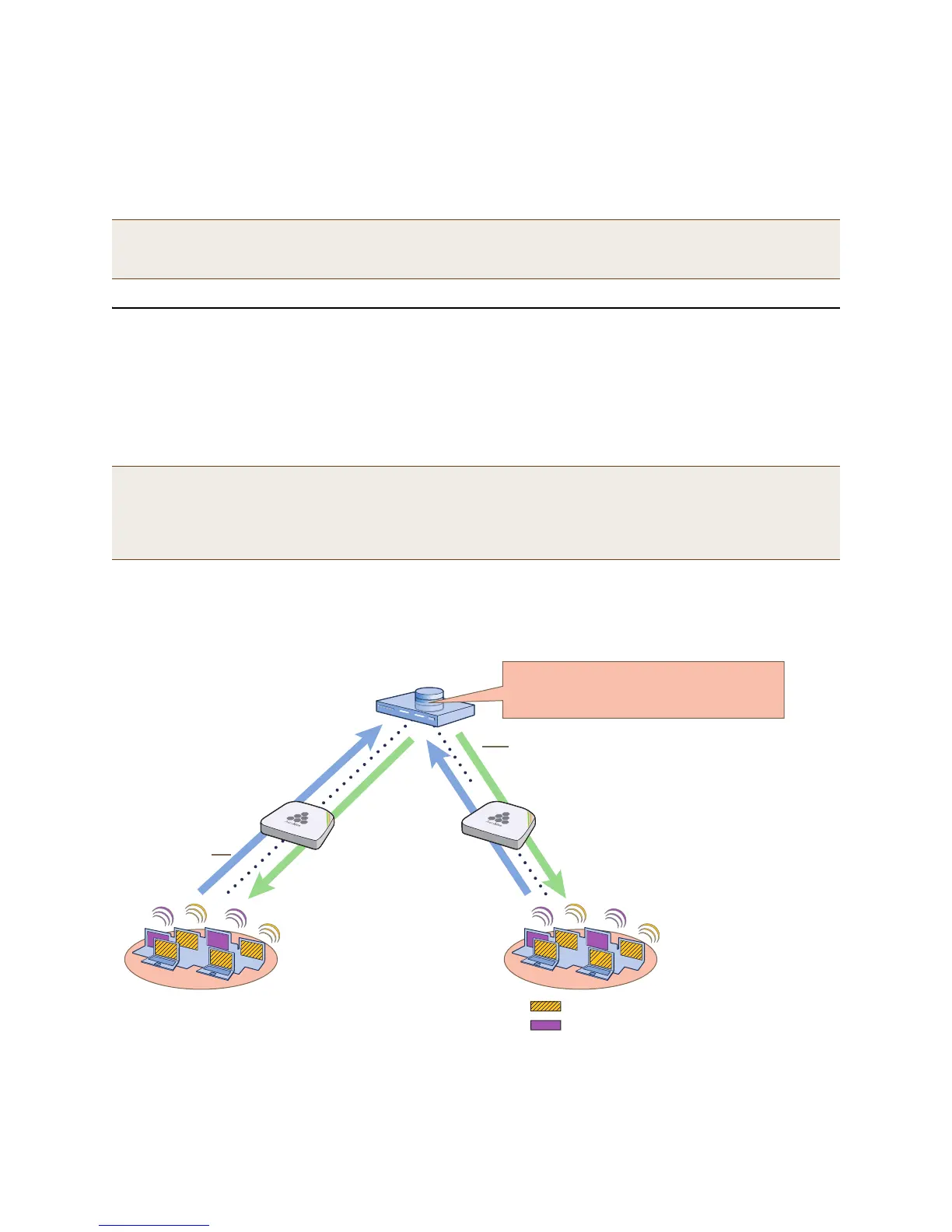
users—employees and IT staff—can access the same SSID but be assigned to two different VLANs. See Figure 6.
Figure 6 Authentication requests and replies for wireless clients on two HiveAPs
Note: The first approach—using MAC addresses—makes the deployment considerably easier for installers,
whereas the second approach—using SNMP—makes new HiveAP management easier for the HiveManager
administrator. You can decide which approach makes the most sense for your team.
Note: This example makes several assumptions about the RADIUS authentication server: (1) user accounts are
already stored on it; (2) it listens on UDP port 1812 for authentication requests; (3) it uses
"t6bEdmNfot3vW9vVr6oAz48CNCsDtInd" as its shared secret; (4) it allows RADIUS authentication requests
from NAS devices in the 10.1.1.0/24 subnet. For configuration details, consult the product documentation
for your RADIUS server.
RADIUS Authentication Server
IP Address: 10.1.1.10
Authentication Port: 1812
Shared Secret: radius123
HiveAP RADIUS
Authenticators
(NAS Devices)
10.1.1.0/24 subnet
SSID: corp-wifi
Auto-(WPA or WPA2)-EAP (802.1X)
Supplicants
(Wireless Clients)
User Profile, Attribute, and VLAN:
Emp(1), 1, VLAN 10 (striped yellow)
IT(2), 2, VLAN 20 (solid purple)
Authentication
Requests
Authentication
Replies
The RADIUS authentication server checks
authentication requests against user
accounts stored in its database.
The HiveAPs act as RADIUS authenticators,
forwarding authentication requests and
replies between supplicants and the
RADIUS authentication server.
Based on the attributes that the
RADIUS authentication server
returns, the HiveAPs
assign employees
(user profile = Emp) to
VLAN 10 and IT staff
(user profile = IT) to
VLAN 20.



 To Next Page