Deployment Guide 151
EXAMPLE 3: PROVIDING GUEST ACCESS THROUGH A CAPTIVE WEB PORTAL
EXAMPLE 3: PROVIDING GUEST ACCESS THROUGH A CAPTIVE
W
EB PORTAL
A captive web portal is a way to control network access by requiring users to authenticate their identity or complete
a registration form before assigning them network and user profile settings that allow them network access beyond
the HiveAP with which they associated. A captive web portal provides registered users with network access while
containing unregistered users. Because the Aerohive captive web portal feature is very flexible, you will have a
number of choices to make when configuring it. Several of these are examined first—"Registration Types", "Providing
Network Settings", and "Modifying Captive Web Portal Pages"—and then a complete configuration example is
presented.
Registration Types
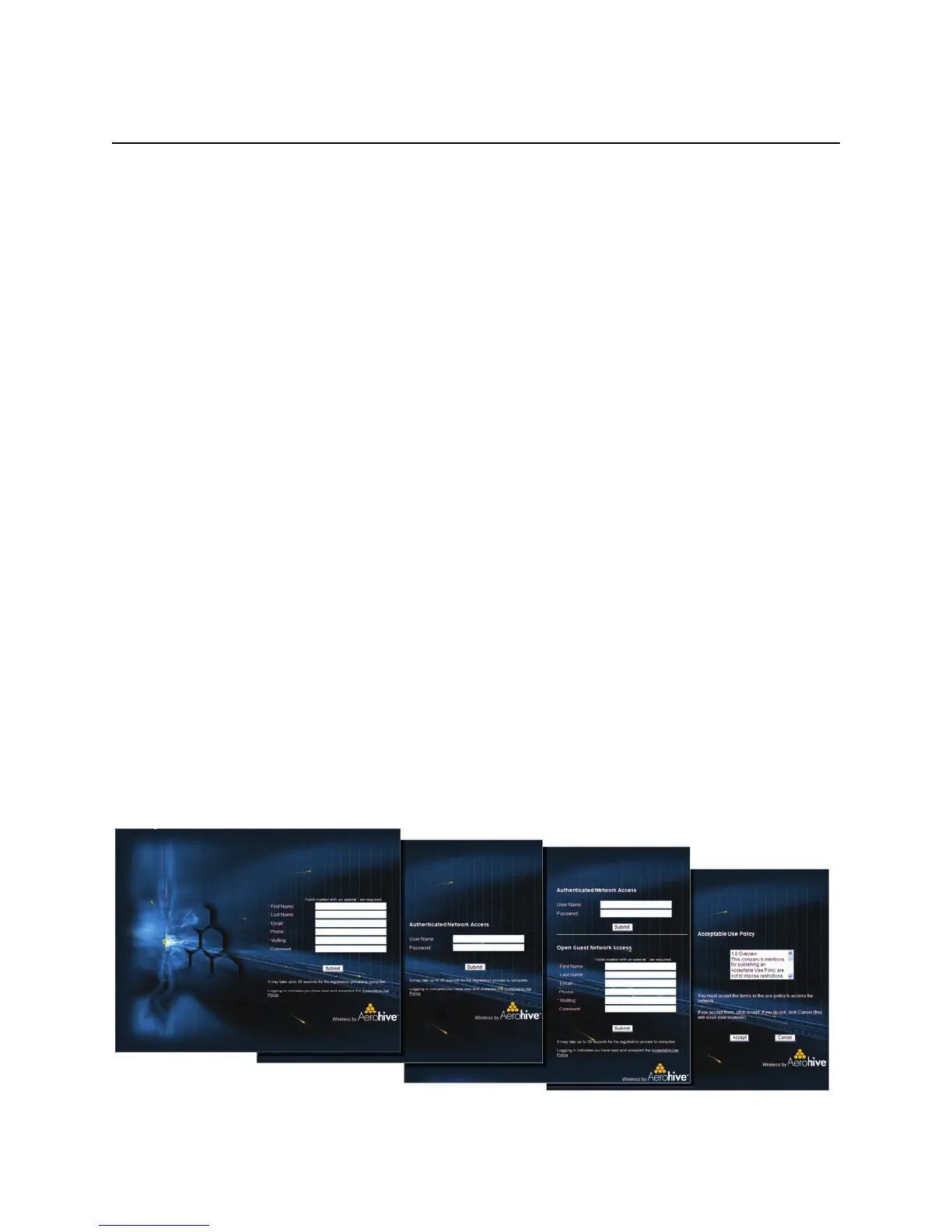
There are five types of registration (four are shown in Figure 7) that a captive web portal can require of users:
Self-Registration: With this option, users must complete a registration form and accept a network use policy
before being allowed to pass through the captive web portal. This is a good choice when you cannot know in
advance who will be attempting to make a network connection through the captive web portal and simply want
to keep a record of the users, or if user authentication is unimportant.
User Authentication: With this option, users must enter and submit a valid user name and password to log in.
The HiveAP acts as a RADIUS authenticator or RADIUS client and forwards the submitted login credentials to a
RADIUS server for authentication. The RADIUS authentication server can either be an internal server on a HiveAP
or an external RADIUS server on the network. This is a good choice when you can set up a RADIUS authentication
server with user accounts before the users attempt to access the network.
Both (Auth/Self-reg): This is a combination of the previous two registration types. Users can authenticate
themselves by submitting a user name and password or complete and submit a registration form.
Use Policy Acceptance: With this option, the user is presented with a network use policy, and only has to click
Accept to gain network access.
External Authentication: HiveAPs redirect unregistered users’ HTTP and HTTPS traffic to a captive web portal
on an external server, such as the amigopod Visitor Management Appliance.
Figure 7 Four types of registration through a captive web portal running on a HiveAP
Self-Registration
The user self-registers by entering data
that can then be saved to a syslog
server for tracking and auditing.
User Authentication
The user submits a name
and password, which are
sent to a RADIUS server
for authentication.
Both (Auth/Self-reg)
Authentication at the
top and self-registration
at the bottom (the user
submits one of them)
Use Policy
Acceptance
The user must accept a
network use policy to
gain network access



 To Next Page