Chapter 3 The HiveAP 28 Outdoor Platform
38 Aerohive
HIVEAP 28 PRODUCT OVERVIEW
The HiveAP 28 is a multi-channel wireless AP (access point) for outdoor use. It is compatible with IEEE 802.11b/g
(2.4 GHz) and IEEE 802.11a (5 GHz) standards and supports a variety of Wi-Fi (wireless fidelity) security protocols,
including WPA (Wi-Fi Protected Access) and WPA2.
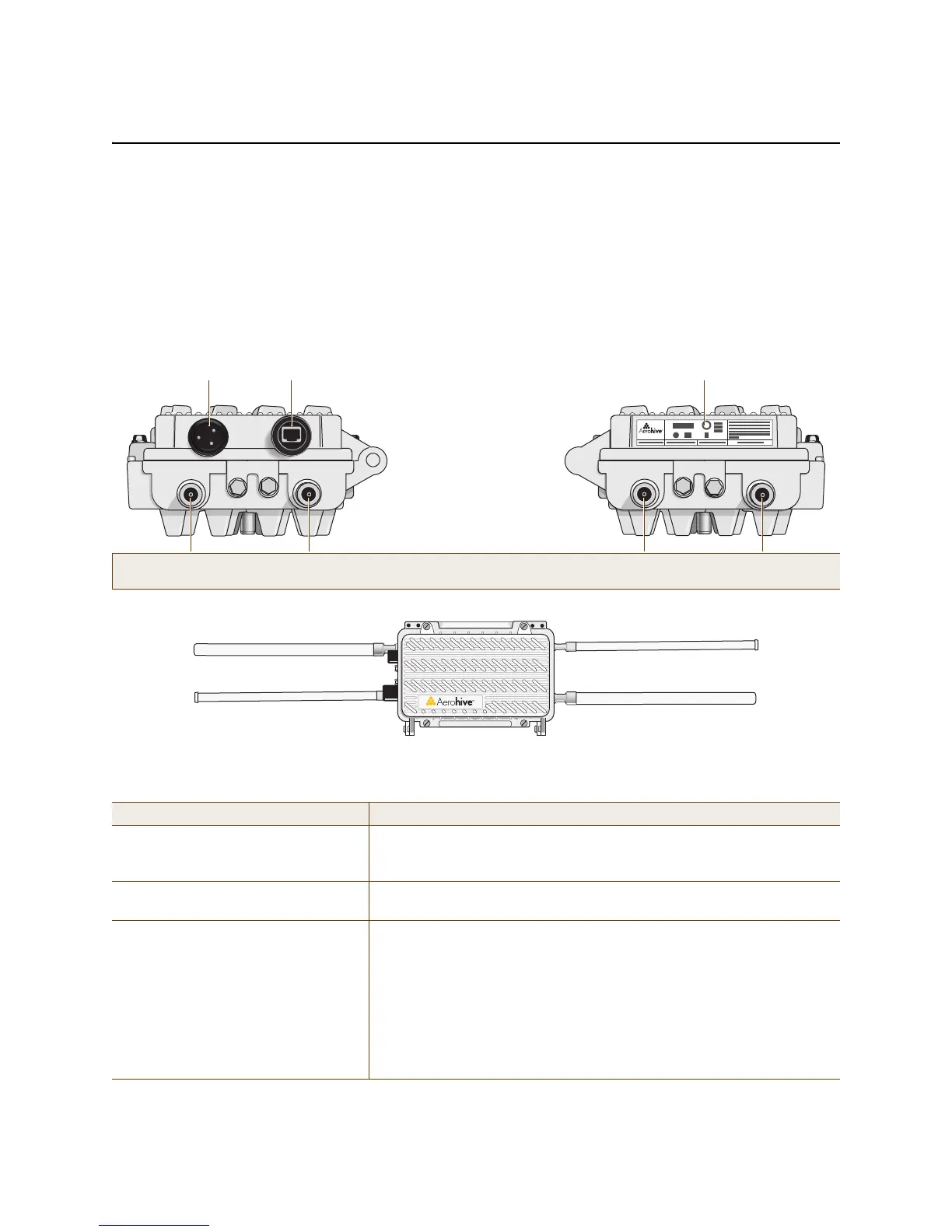
You can see the hardware components on the HiveAP 28 in Figure 1. Each component is described in Table 1.
Figure 1 HiveAP 28 hardware components
Table 1 HiveAP 28 component descriptions
Component Description
Detachable Single-Band Antennas The two pairs of detachable omnidirectional dipole antennas operate at
two radio frequencies: one pair at 2.4 GHz (for IEEE 802.11b/g) and the
other at 5 GHz (for IEEE 802.11a). For details, see "Antennas" on page 41.
Type N Connectors (Female) Attach antennas to the HiveAP 28 through these connectors. For details,
see "Attaching Antennas" on page 46.
Waterproof Power Connector Using the power connector is one of two methods through which you can
power the HiveAP 28. To connect it to a 100 – 240-volt AC power source,
use the power cable that ships with the product as an extra option.
Because the HiveAP does not have an on/off switch, connecting it to a
power source automatically powers on the device. The power source
must have a readily accessible service disconnect switch incorporated
into the fixed wiring installation so that you have the ability to turn the
power on and off. (The other method that the HiveAP can obtain power is
through its PoE port.)
5 GHz 2.4 GHz 5 GHz 2.4 GHz
Power
Connector
10/100 Mbps
Power-over-
Ethernet Port
Type N female connectors for
detachable single-band antennas
For the 802.11a
Radio Antenna
For the 802.11b/g
Radio Antenna
For the 802.11a
Radio Antenna
For the 802.11b/g
Radio Antenna
FCC Compliance Label
(Plus model, serial number, MAC
address, and FCC ID number)
802.11a Auxiliary Antenna (5 GHz) 802.11b/g Auxiliary Antenna (2.4 GHz)
802.11b/g Main Antenna (2.4 GHz) 802.11a Main Antenna (5 GHz)



 To Next Page