Deployment Guide 55
HIVEAP 340 PRODUCT OVERVIEW
Console Port
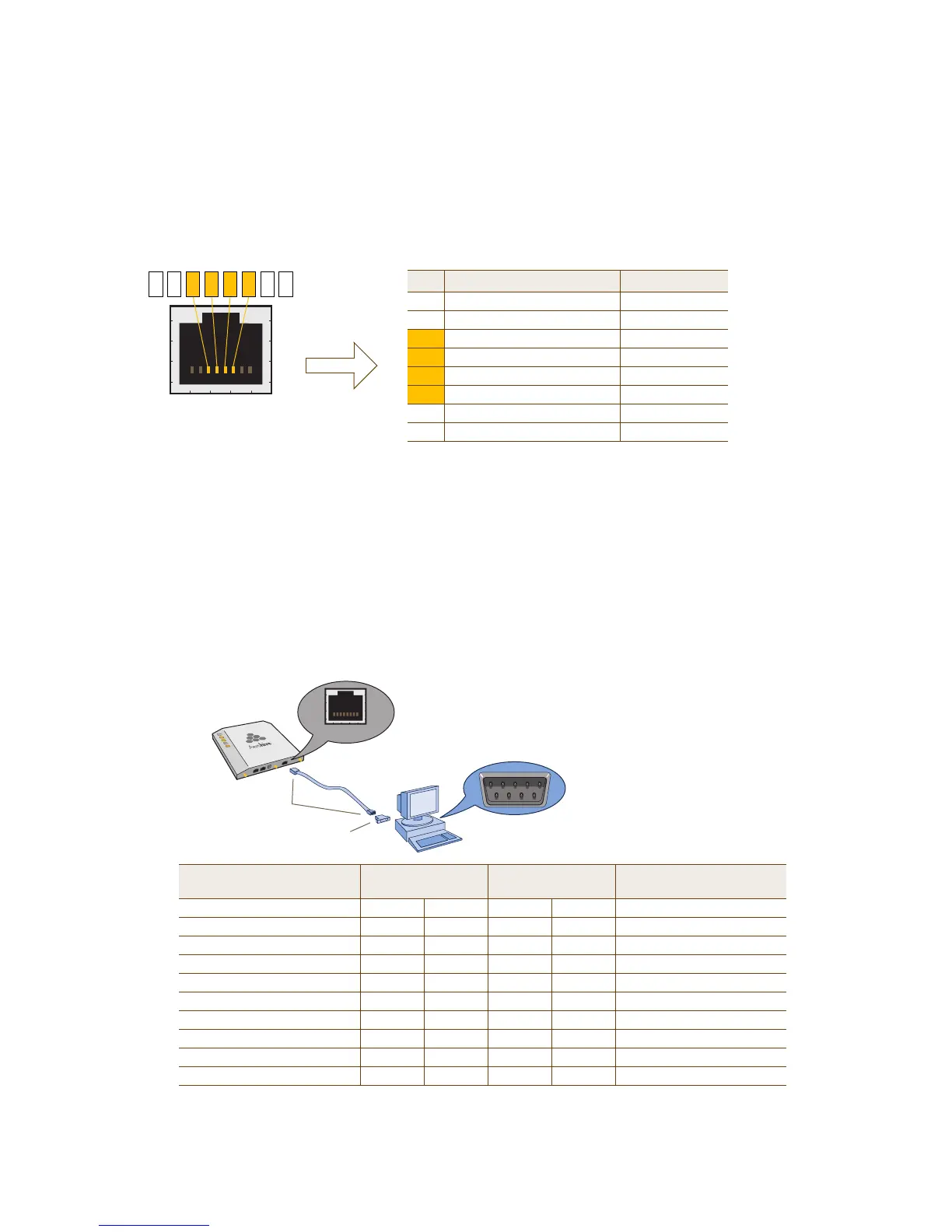
The pin-to-signal mapping in the RJ-45 console port is shown shown in Figure 3.
Figure 3 Console port pin assignments
To make a serial connection between your management system and the HiveAP, you can use the console cable that
is available as an extra accessory. Insert the RJ-45 connector into the HiveAP 340 console port, and attach the DB-9
connector to the serial (or COM) port on your management system. The management system must have a VT100
terminal emulation program, such as Tera Term Pro
©
(a free terminal emulator) or Hilgraeve Hyperterminal
®
(provided with Windows
®
operating systems). If you want to make your own serial cable and adapter, refer to
Figure 3.
Figure 4 Wiring details for making a serial cable with an RJ-45-to-Female DB-9 adapter
CONSOLE
Pin Signal Direction
1 RTS (Request to Send) Output, unused
2 DTR (Data Terminal Ready) Output, unused
3 TXD (Transmitted Data) Output
4 Ground Ground
5 Ground Ground
6 RXD (Received Data) Input
7 DSR (Data Set Ready) Input, unused
8 CTS (Clear to Send) Input, unused
RJ-45 Console Port
(View of the console
port on the HiveAP)
Because this is a console port, only pins 3, 4, 5, and 6 are currently in use.
Console Port Pin Assignments
6 13457 28
Rollover Cable with
RJ 45 Connectors
RJ 45 to Female DB 9 Adapter
Console Port
COM Port
(on Back Panel)
CONSOLE
Management System
HiveAP 340
Console Port
(HiveAP 340)
RJ-45-to-RJ-45
Rollover Cable
RJ-45-to-Female
DB-9 Adapter
Management
System
Signal RJ-45 Pin RJ-45 Pin RJ-45 Pin DB-9 Pin Signal
RTS (Request to Send) 1 8 1 8 CTS (unused)
DTR (Data Terminal Ready) 2 7 2 6 DSR (unused)
TXD (Transmitted Data) 3 6 3 2 RXD
Ground 4 5 4 5 Ground
Ground 5 4 5 5 Ground
RXD (Received Data) 6 3 6 3 TXD
DSR (Data Set Ready) 7 2 7 4 DTR (unused)
CTS (Clear to Send) 8 1 8 7 RTS (unused)
- - - - 9 RI (Ring Indicator, unused)



 To Next Page