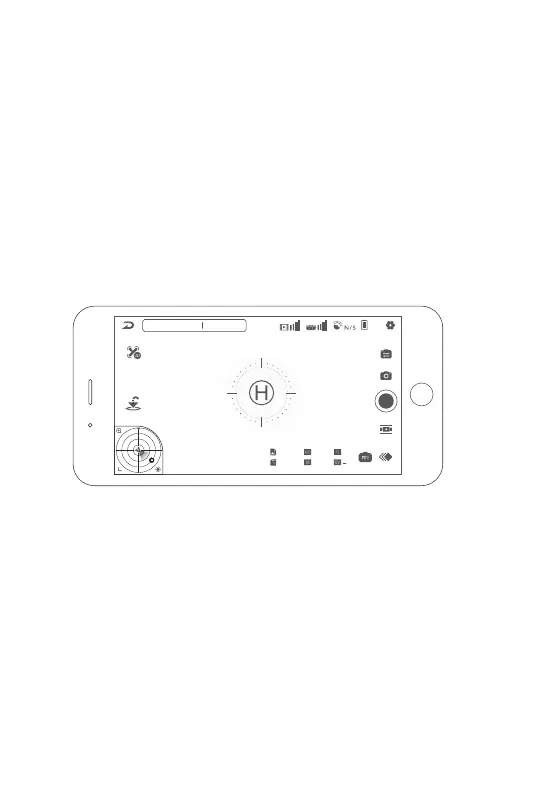
AI Search for Landing Pad:
When turned on, the aircraft will intelligently search for a landing pad at around
10m altitude. Please note this can be turned on in Settings > Aircraft.
• At approx 10m altitude, the camera will automatically tilt down to identify
an “H” symbol below. Ensure sharp contrast, "H" lettering and an
unobstructed landing pad.
• Once the aircraft has identified the landing pad, it will descend to ~3m
• Then, the aircraft camera will tilt forward and the aircraft will complete its
final descent.
• This mode can be stopped anytime in the app.
• If the aircraft cannot find the landing pad or on critical battery, the aircraft
will land directly below.
• The AI landing pad search function cannot be performed while video is
being recorded.
Speed 0.0m/s H: 0.0m D: 0.0m
N
8.2V
100%
RTH
Aeroo Pro
1/30
+ 0
100
4800K
J+RAW
120
• Do not repeatedly press the RTH button on the remote, this will cancel the
RTH procedure.
• The remote will beep twice every 2 seconds while the aircraft is automati-
cally returning home.
• If the aircraft has weak/no GPS signal and no home point is recorded,
triggering RTH will cause it to land directly below.
37


 To Next Page