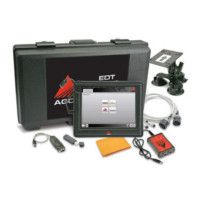
Cigarette Lighter Adapter
Recharge the diagnostic terminal battery in the field by plugging the DC adapter into the terminal. The DC adapter ca
remain plugged into the diagnostic terminal for extended periods, and is recommended for use during vehicle software
reflashing procedures where loss of terminal power during the procedure could lead to vehicle controller damage.
The docking station provides a pass
allowing the ability to charge and connect easily with the terminal in a secure storage position.
and push back to make the connection. An
Pull from the top of the ter
After removing the diagnostic terminal from the docking station, insert the terminal into the bump case.
Connect the 90 degree USB to diagnostic terminal. Attach the cable to the
Cigarette Lighter Adapter
cigarette lighter adapter by plugging into the 12V cigarette lighter adapter receptacle of the machine. Do not use
Recharge the diagnostic terminal battery in the field by plugging the DC adapter into the terminal. The DC adapter ca
remain plugged into the diagnostic terminal for extended periods, and is recommended for use during vehicle software
reflashing procedures where loss of terminal power during the procedure could lead to vehicle controller damage.
The docking station provides a pass
allowing the ability to charge and connect easily with the terminal in a secure storage position.
g station can be connected to an external monitor, keyboard, mouse, AC power, and internet connection.
and push back to make the connection. An
Pull from the top of the ter
After removing the diagnostic terminal from the docking station, insert the terminal into the bump case.
Connect the 90 degree USB to diagnostic terminal. Attach the cable to the
Cigarette Lighter Adapter
cigarette lighter adapter by plugging into the 12V cigarette lighter adapter receptacle of the machine. Do not use
Recharge the diagnostic terminal battery in the field by plugging the DC adapter into the terminal. The DC adapter ca
remain plugged into the diagnostic terminal for extended periods, and is recommended for use during vehicle software
reflashing procedures where loss of terminal power during the procedure could lead to vehicle controller damage.
The docking station provides a pass
allowing the ability to charge and connect easily with the terminal in a secure storage position.
g station can be connected to an external monitor, keyboard, mouse, AC power, and internet connection.
erminal to be docked, recharged
al, remove from the bump case. Place the lower edge of the diagnostic terminal into the dock first
and push back to make the connection. An
Pull from the top of the ter
After removing the diagnostic terminal from the docking station, insert the terminal into the bump case.
Connect the 90 degree USB to diagnostic terminal. Attach the cable to the
Cigarette Lighter Adapter
cigarette lighter adapter by plugging into the 12V cigarette lighter adapter receptacle of the machine. Do not use
Recharge the diagnostic terminal battery in the field by plugging the DC adapter into the terminal. The DC adapter ca
remain plugged into the diagnostic terminal for extended periods, and is recommended for use during vehicle software
reflashing procedures where loss of terminal power during the procedure could lead to vehicle controller damage.
The docking station provides a pass
-
thru of all functional ports on the diagnostic terminal, including power and internet,
allowing the ability to charge and connect easily with the terminal in a secure storage position.
g station can be connected to an external monitor, keyboard, mouse, AC power, and internet connection.
erminal to be docked, recharged
al, remove from the bump case. Place the lower edge of the diagnostic terminal into the dock first
and push back to make the connection. An
After removing the diagnostic terminal from the docking station, insert the terminal into the bump case.
Connect the 90 degree USB to diagnostic terminal. Attach the cable to the
cigarette lighter adapter by plugging into the 12V cigarette lighter adapter receptacle of the machine. Do not use
Recharge the diagnostic terminal battery in the field by plugging the DC adapter into the terminal. The DC adapter ca
remain plugged into the diagnostic terminal for extended periods, and is recommended for use during vehicle software
reflashing procedures where loss of terminal power during the procedure could lead to vehicle controller damage.
thru of all functional ports on the diagnostic terminal, including power and internet,
allowing the ability to charge and connect easily with the terminal in a secure storage position.
g station can be connected to an external monitor, keyboard, mouse, AC power, and internet connection.
erminal to be docked, recharged
and receive required updates for the software without connection of
al, remove from the bump case. Place the lower edge of the diagnostic terminal into the dock first
and push back to make the connection. An
After removing the diagnostic terminal from the docking station, insert the terminal into the bump case.
Connect the 90 degree USB to diagnostic terminal. Attach the cable to the
cigarette lighter adapter by plugging into the 12V cigarette lighter adapter receptacle of the machine. Do not use
Recharge the diagnostic terminal battery in the field by plugging the DC adapter into the terminal. The DC adapter ca
remain plugged into the diagnostic terminal for extended periods, and is recommended for use during vehicle software
reflashing procedures where loss of terminal power during the procedure could lead to vehicle controller damage.
thru of all functional ports on the diagnostic terminal, including power and internet,
allowing the ability to charge and connect easily with the terminal in a secure storage position.
g station can be connected to an external monitor, keyboard, mouse, AC power, and internet connection.
and receive required updates for the software without connection of
al, remove from the bump case. Place the lower edge of the diagnostic terminal into the dock first
sound from the system will verify connection to the dock if the
sound from the system will verify disconnection.
After removing the diagnostic terminal from the docking station, insert the terminal into the bump case.
Connect the 90 degree USB to diagnostic terminal. Attach the cable to the
cigarette lighter adapter by plugging into the 12V cigarette lighter adapter receptacle of the machine. Do not use
Recharge the diagnostic terminal battery in the field by plugging the DC adapter into the terminal. The DC adapter ca
remain plugged into the diagnostic terminal for extended periods, and is recommended for use during vehicle software
reflashing procedures where loss of terminal power during the procedure could lead to vehicle controller damage.
thru of all functional ports on the diagnostic terminal, including power and internet,
allowing the ability to charge and connect easily with the terminal in a secure storage position.
g station can be connected to an external monitor, keyboard, mouse, AC power, and internet connection.
and receive required updates for the software without connection of
al, remove from the bump case. Place the lower edge of the diagnostic terminal into the dock first
sound from the system will verify connection to the dock if the
sound from the system will verify disconnection.
After removing the diagnostic terminal from the docking station, insert the terminal into the bump case.
Connect the 90 degree USB to diagnostic terminal. Attach the cable to the
cigarette lighter adapter by plugging into the 12V cigarette lighter adapter receptacle of the machine. Do not use
Recharge the diagnostic terminal battery in the field by plugging the DC adapter into the terminal. The DC adapter ca
remain plugged into the diagnostic terminal for extended periods, and is recommended for use during vehicle software
reflashing procedures where loss of terminal power during the procedure could lead to vehicle controller damage.
thru of all functional ports on the diagnostic terminal, including power and internet,
allowing the ability to charge and connect easily with the terminal in a secure storage position.
g station can be connected to an external monitor, keyboard, mouse, AC power, and internet connection.
and receive required updates for the software without connection of
al, remove from the bump case. Place the lower edge of the diagnostic terminal into the dock first
sound from the system will verify connection to the dock if the
sound from the system will verify disconnection.
After removing the diagnostic terminal from the docking station, insert the terminal into the bump case.
cigarette lighter adapter by plugging into the 12V cigarette lighter adapter receptacle of the machine. Do not use
Recharge the diagnostic terminal battery in the field by plugging the DC adapter into the terminal. The DC adapter ca
remain plugged into the diagnostic terminal for extended periods, and is recommended for use during vehicle software
reflashing procedures where loss of terminal power during the procedure could lead to vehicle controller damage.
thru of all functional ports on the diagnostic terminal, including power and internet,
allowing the ability to charge and connect easily with the terminal in a secure storage position.
g station can be connected to an external monitor, keyboard, mouse, AC power, and internet connection.
and receive required updates for the software without connection of
al, remove from the bump case. Place the lower edge of the diagnostic terminal into the dock first
sound from the system will verify connection to the dock if the
sound from the system will verify disconnection.
After removing the diagnostic terminal from the docking station, insert the terminal into the bump case.
cigarette lighter adapter by plugging into the 12V cigarette lighter adapter receptacle of the machine. Do not use
Recharge the diagnostic terminal battery in the field by plugging the DC adapter into the terminal. The DC adapter ca
remain plugged into the diagnostic terminal for extended periods, and is recommended for use during vehicle software
reflashing procedures where loss of terminal power during the procedure could lead to vehicle controller damage.
thru of all functional ports on the diagnostic terminal, including power and internet,
g station can be connected to an external monitor, keyboard, mouse, AC power, and internet connection.
and receive required updates for the software without connection of
al, remove from the bump case. Place the lower edge of the diagnostic terminal into the dock first
sound from the system will verify connection to the dock if the
sound from the system will verify disconnection.
cigarette lighter adapter by plugging into the 12V cigarette lighter adapter receptacle of the machine. Do not use
Recharge the diagnostic terminal battery in the field by plugging the DC adapter into the terminal. The DC adapter ca
n
remain plugged into the diagnostic terminal for extended periods, and is recommended for use during vehicle software
thru of all functional ports on the diagnostic terminal, including power and internet,
g station can be connected to an external monitor, keyboard, mouse, AC power, and internet connection.
and receive required updates for the software without connection of
al, remove from the bump case. Place the lower edge of the diagnostic terminal into the dock first
sound from the system will verify connection to the dock if the


 To Next Page
 Loading...