Cleaning the print head
WARNING:
Print head cleaning must be done when image quality problems
occur.
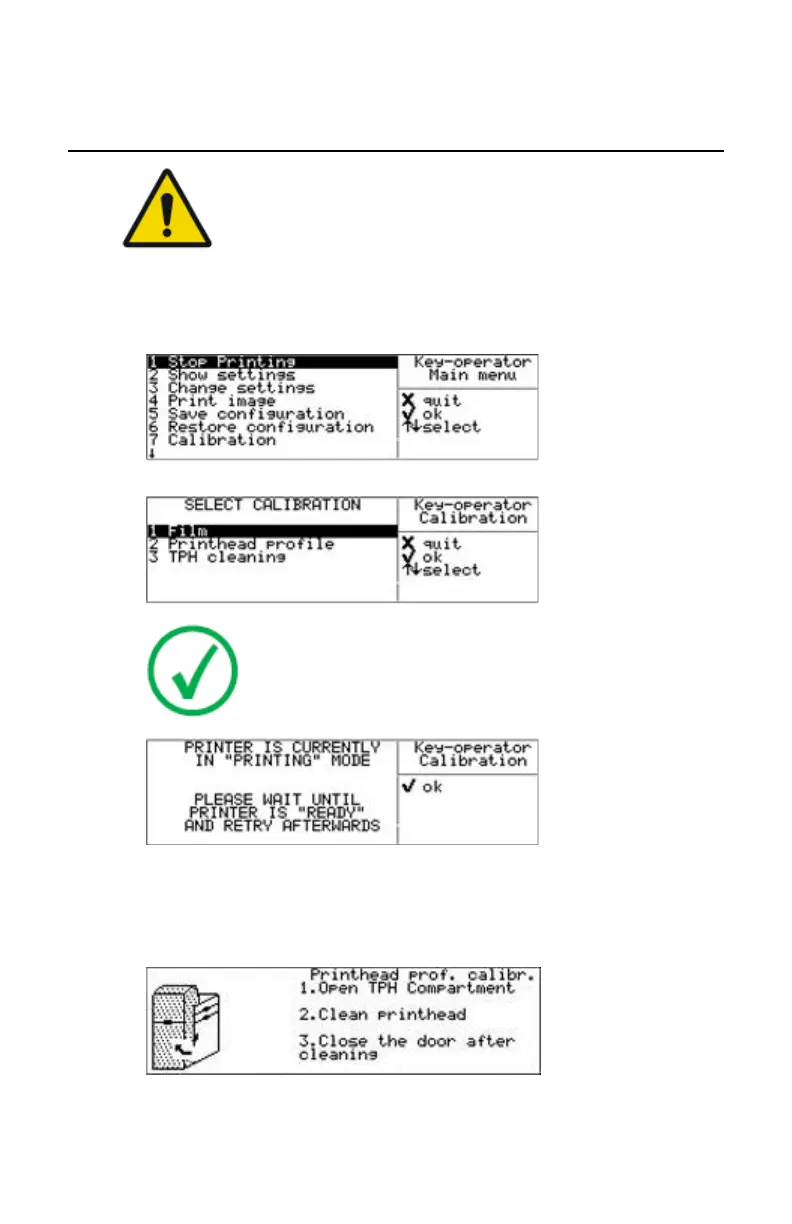
1. Press the Key-operator key to enter the Key-operator mode.
2. Press the Down key six times, followed by the Confirm key to select
‘Calibration’.
Note: In case the printer is in printing mode, a screen will be
presented that the calibration cannot be done now, but has
to be reactivated later.
3. Press the Down key twice to select ‘TPH cleaning’ and press the Confirm
key.
The printer will automatically shut down.
4. The ‘print head cleaning’ screen will give instructions on what to do:
5. Open the drum compartment door by pulling its handle.
Drystar 5500, Drystar 5503 | Preventive maintenance and replacements | 113
2901J EN 20191018 0826






 To Next Page