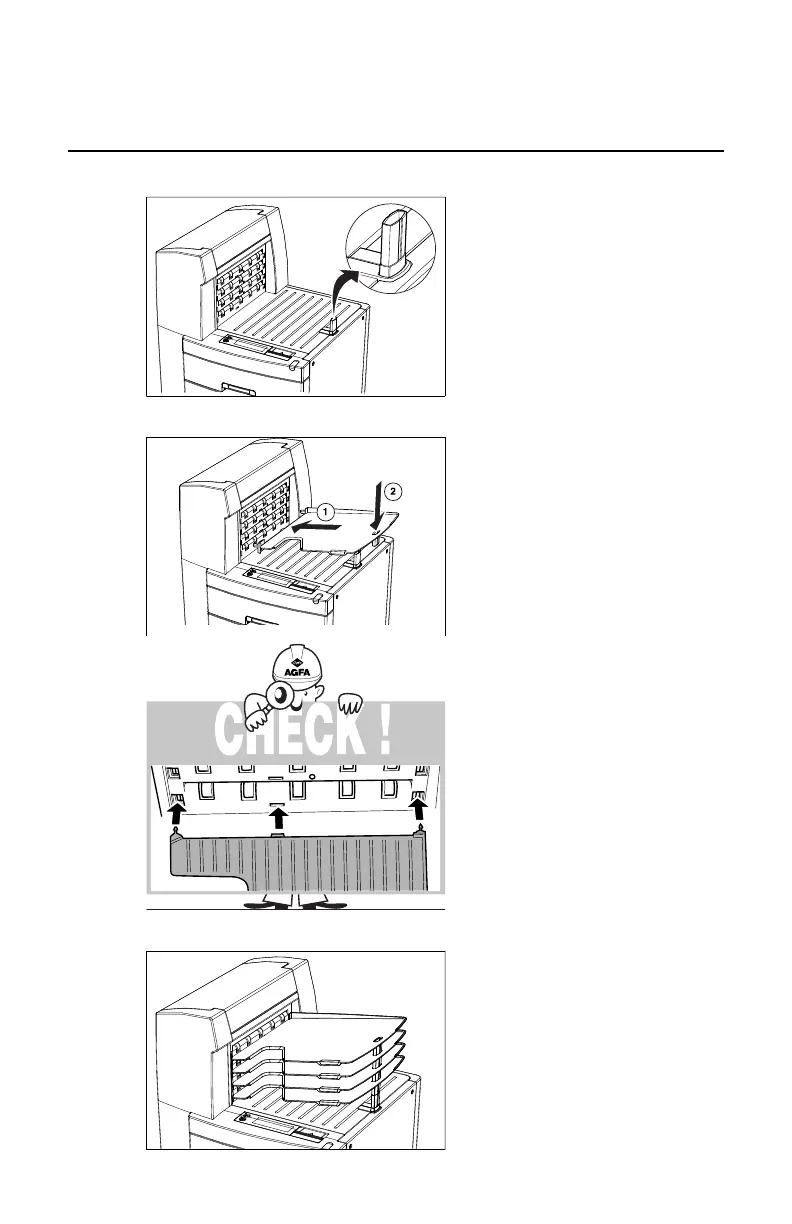
Install output trays
1. Put tray support block into place.
12/20
2903S EN 20121207
9
Install output trays
1 Put tray support block into place.
4 Use support block(s) if tray(s) not
installed.
2 Install lower output tray.
3 Repeat step 2 for 3 other trays.
5 Put an empty label on each output tray.
2. Install lower output tray.
12/20
2903S EN 20121207
9
Install output trays
1 Put tray support block into place.
4 Use support block(s) if tray(s) not
installed.
2 Install lower output tray.
3 Repeat step 2 for 3 other trays.
5 Put an empty label on each output tray.
12/20
2903S EN 20121207
9
Install output trays
1 Put tray support block into place.
4 Use support block(s) if tray(s) not
installed.
2 Install lower output tray.
3 Repeat step 2 for 3 other trays.
5 Put an empty label on each output tray.
3. Repeat step 2 for 3 other trays.
12/20
2903S EN 20121207
9
Install output trays
1 Put tray support block into place.
4 Use support block(s) if tray(s) not
installed.
2 Install lower output tray.
3 Repeat step 2 for 3 other trays.
5 Put an empty label on each output tray.
Drystar 5500, Drystar 5503 | Plug & Play Installation Manual | 155
2901J EN 20191018 0826













 To Next Page