AgfaPhoto OPTIMA 8328m
13
Basic Operation
Turning the Power On and Off
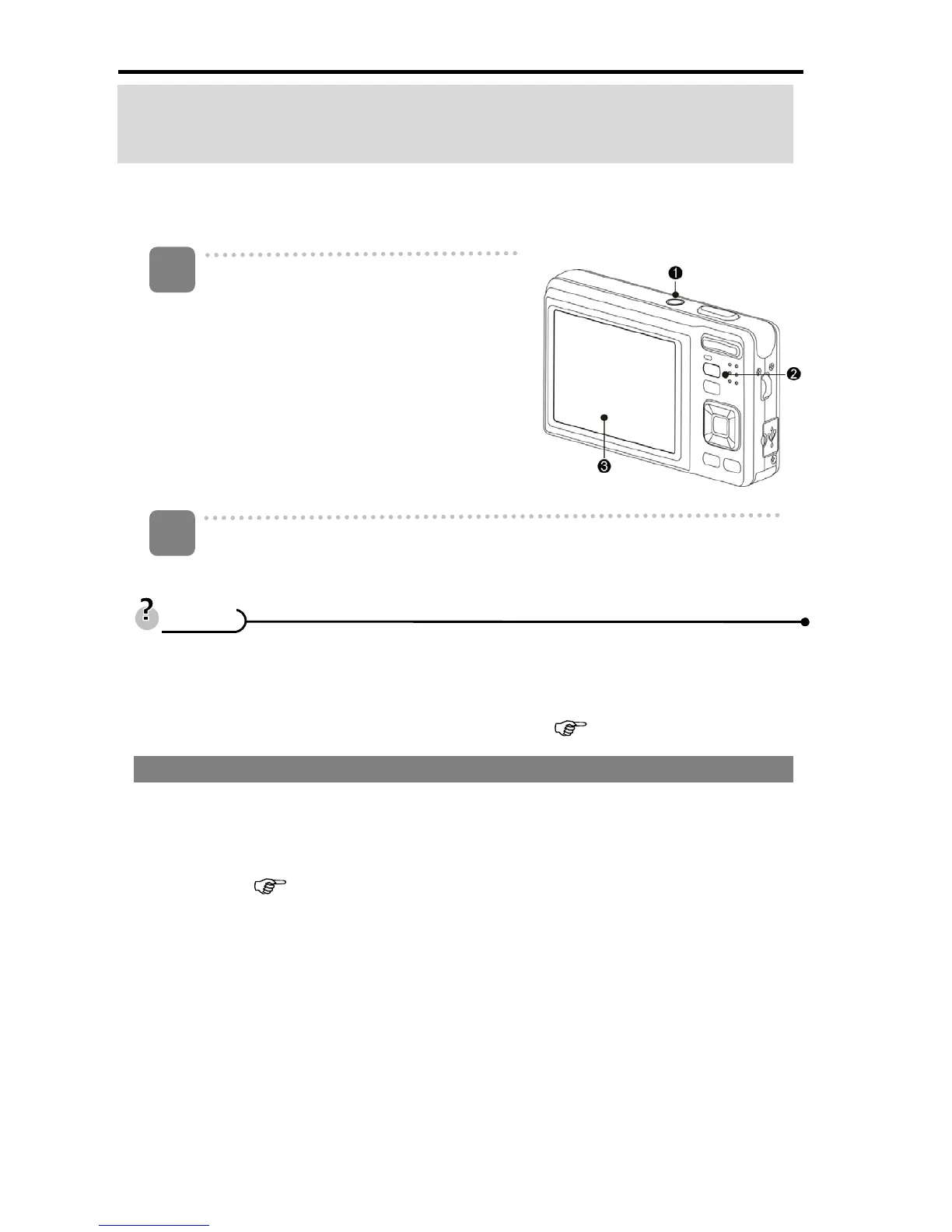
Press the POWER button (n) to turn on
the camera in the REC mode.
y The power turns on, the lens extends
and the LED lights in green.
Press the Playback button (o) to turn
on the camera in the Playback mode.
y The power turns on, and an image
displays on the LCD monitor (p).
Press the POWER button (n) again to turn the power off.
y The power turns off, the lens retracts and the LED turns off.
y You can turn on the camera without the start-up and operating sound by
pressing and holding the POWER (n) or the Playback (o) button over 1.5
seconds.
y Switch between REC mode and Playback mode (
page 14).
Power Saving Function
For saving the battery power, the LCD monitor automatically turns off 1 minute after
the last control accessed (factory-preset setting). Press any button other than the
power button to turn on the LCD monitor. You can change the power save setting in
Setup menu (
page 19).
After the power saving function has been active for 1 minute, the power will turn off
completely. Press the POWER (n) or the Playback (o) button to restore the power.
The power save feature will not activate in the following situation:
y Recording movie clips or audio files
y Playing movie clips or audio files
y Playing the slideshow
y Connecting the camera to a computer or printer with the USB cable
1
2
T
T
i
i
p
p
s
s












 To Next Page