Edition 02.97 Power Mower 5400 29
3. Devices and Operating Elements
Rocker Arm Mowing
Attachment
Mowing Knife Attachment/Removal
W
Stop the engine, remove
spark plug connector! Wear
safety gloves!
Removal
l
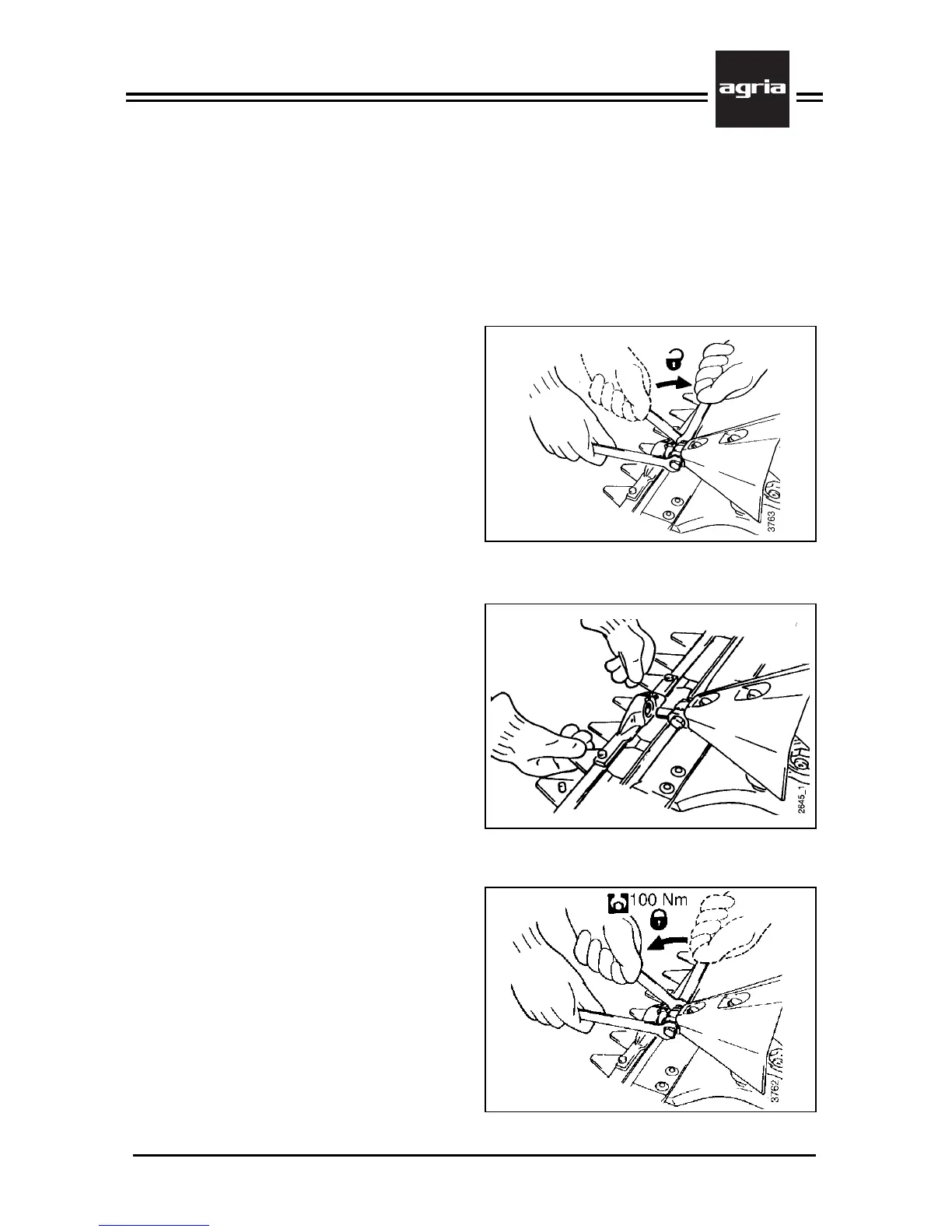
Loosen the clamping screw (K/5)
which holds the link pin.
l
Open the individual knife guiding de-
vices on the various cutter bar versions
or remove the knife driver (for instruc-
tions see pages 5053).
l
Pull the mowing knife out to the front
or to the side, as required by the indi-
vidual cutter bar version (for instructions
see pages 50–53).
W
Always attach the knife guard
before you lay the mowing
knife aside.
Attachment
l
Loosen clamping screw (K/5) so the
link pin can move up and down.
l
Open the individual knife guiding de-
vices on the various cutter bar versions
(for instructions see pages 50–53).
l
Attach the mower knife to the link pin
by aligning the pin in the knife driver’s
hole.
– Finger cutter bar version: Attach the
mowing knife from the side by inserting
it into the knife guiding devices and then
attaching the knife driver (for instructions
see page 52).
l
Tighten the clamping screw (K/5)
which holds the link pin (100 Nm).


 To Next Page