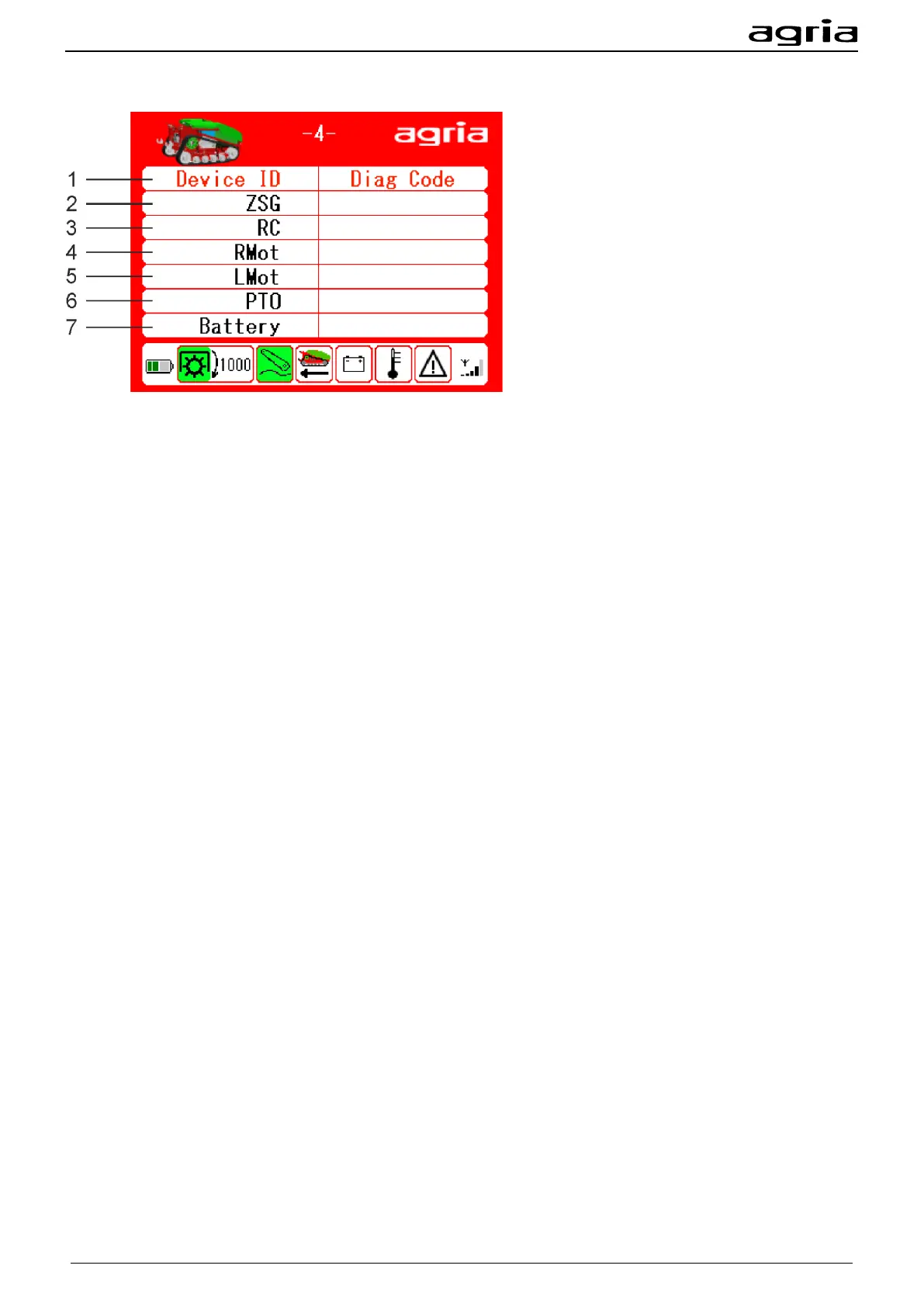
Menu page 4 Error codes
The display shows error codes of individual components in the hexadecimal system:
(1) Central control unit
(2) Remote control
(3) Wheel motor right
(4) Wheel motor left
(5) PTO shaft drive
(6) Battery
There may be temporary errors, or errors with little effect.
You can reset these errors without switching off the machine completely:
• Stop the machine, ensure a safe stand and a clear environment.
• Press the green release button (6) on the remote control.
• After three seconds, the error memories of all drives are reset.
• The machine is steerable again and can continue to be operated as usual.
• If the machine does not continue to run, contact the -agria Customer Service- or read out the errors
and report them to your dealer, see page 53.
If the errors cannot be remedied with this procedure, -agria-Service-
The complete list of error codes can be found in the repair manual or at -agria-service-


 To Next Page