4. Web Configuration
37
AirLive N.MINI User’s Manual
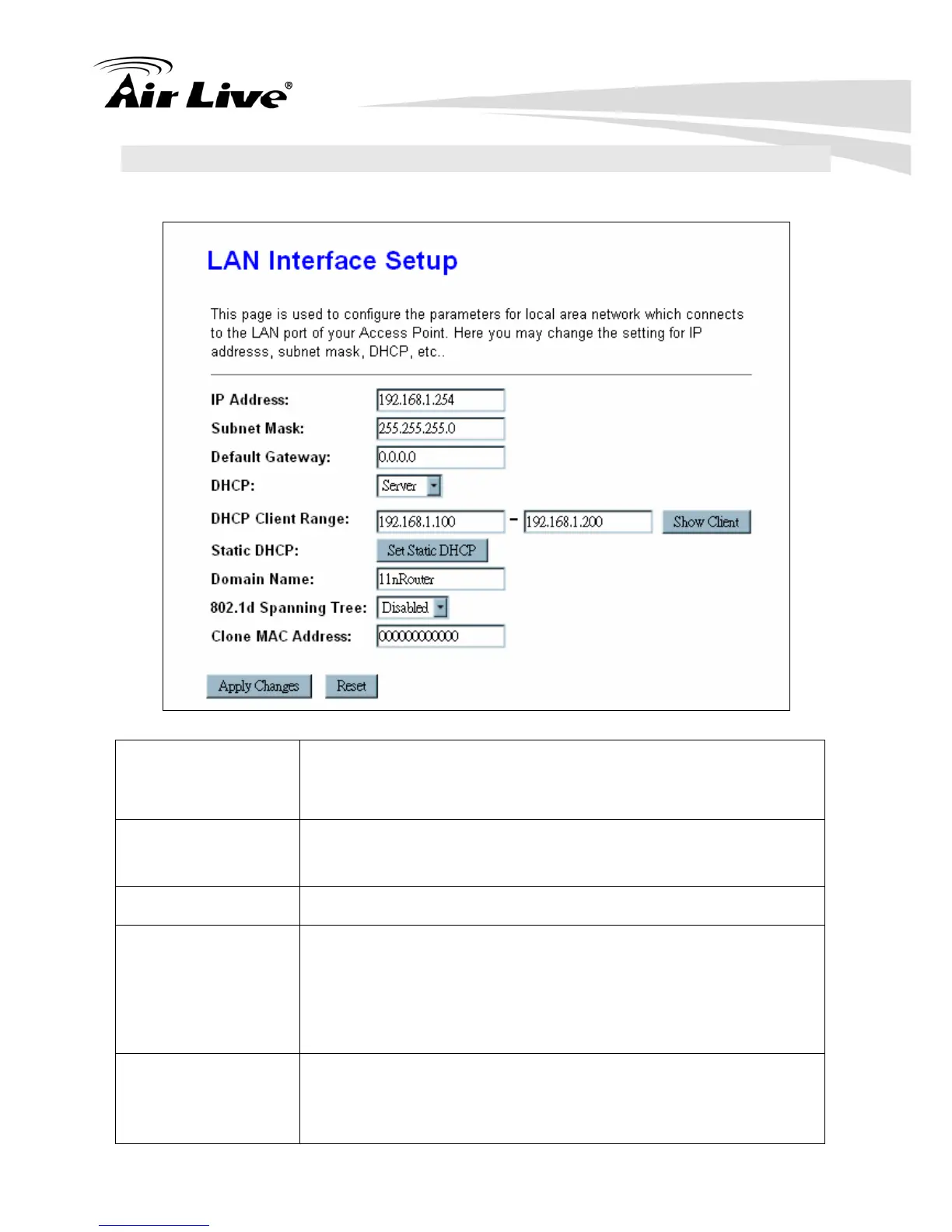
4.3 TCP/IP Settings
4.3.1 LAN Interface
IP Address Shows the IP address of the Wireless Router. Default IP address
is 192.168.1.254 (Router/AP mode) or 192.168.1.253 (Client
Mode).
Subnet Mask The subnet mask of the Wireless Router (Default subnet mask is
255.255.255.0.)
Default Gateway Enter the Gateway IP address here.
DHCP Disable: Select to disable this Wireless Router to distribute IP
addresses to connected clients.
Server: Select to enable this Wireless Router to distribute IP
Addresses (DHCP Server) to connected clients. And the following
field will be activated for you to enter the starting IP address.
DHCP Client Range The starting address of this local IP network address pool. The
pool is a piece of continuous IP address segment, the device will
distribute IP addresses from 192.168.1.100 to 192.168.1.200 to
all the computers in the network that request IP addresses from



 To Next Page