Io XT/4K Capture, Display, Convert v14.0 15 www.aja.com
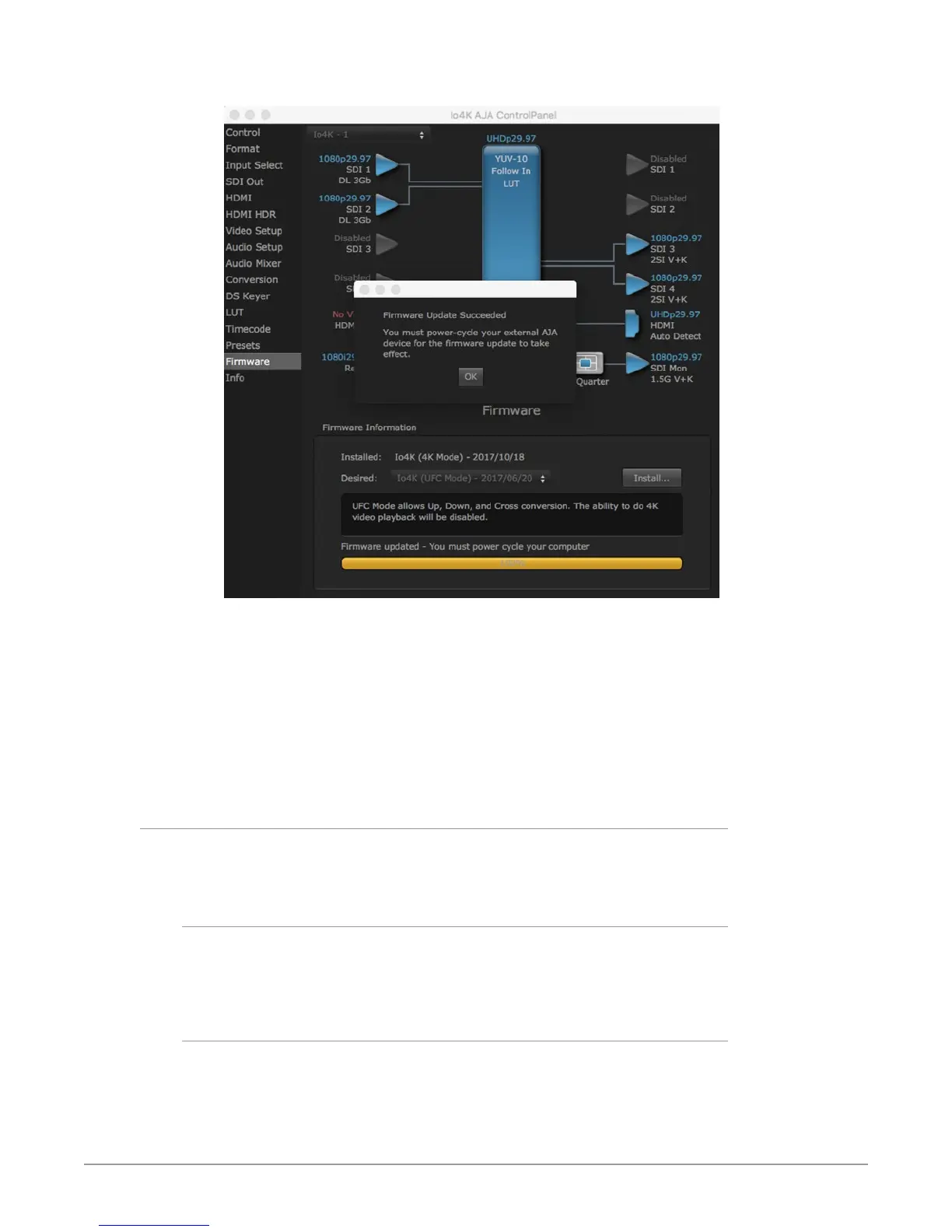
Figure 3. Update Completed Messages
6. Click OK and then power cycle the computer by shutting it down
completely.
7. After the computer has shut down, power cycle the AJA device by
disconnecting and reconnecting it's power plug. If the unit is an Io XT, press
the front power switch.
8. Restart the computer.
9. Open AJA Control Panel. The AJA hardware with the updated rmware
should be recognized by the Control Panel application.
Firmware Versions
Io 4K supports two different versions of firmware that have different capabilities.
One version of firmware can be installed at a time.
Io 4K (UFC Mode)
When UFC firmware is installed, Io 4K supports up, down and cross conversion
between 2K, HD, and SD video formats. This version does not support UltraHD/4K
playback or capture.
Io 4K (4K Mode)
When 4K firmware is installed, Io 4K supports input and output of UltraHD/4K, 2K,
HD, and SD video, and down-conversion of UltraHD/4K to 2K/HD video on the
monitor output BNC. In 4K Mode Io 4K also provides the Audio Mixer screen, to
control audio monitoring.


 To Next Page