Connecting the AC Power Supplies Chassis and Power Supplies
page 3-34 OmniSwitch 6465 Hardware Users Guide December 2019
Warning. Do not insert the NEMA 5-15 plug or power connector into the power supply or any live power
source until prompted to do so. Failure to follow these instructions may result in bodily injury and/or
equipment damage.
Be sure to properly install the power cords by following the steps below.
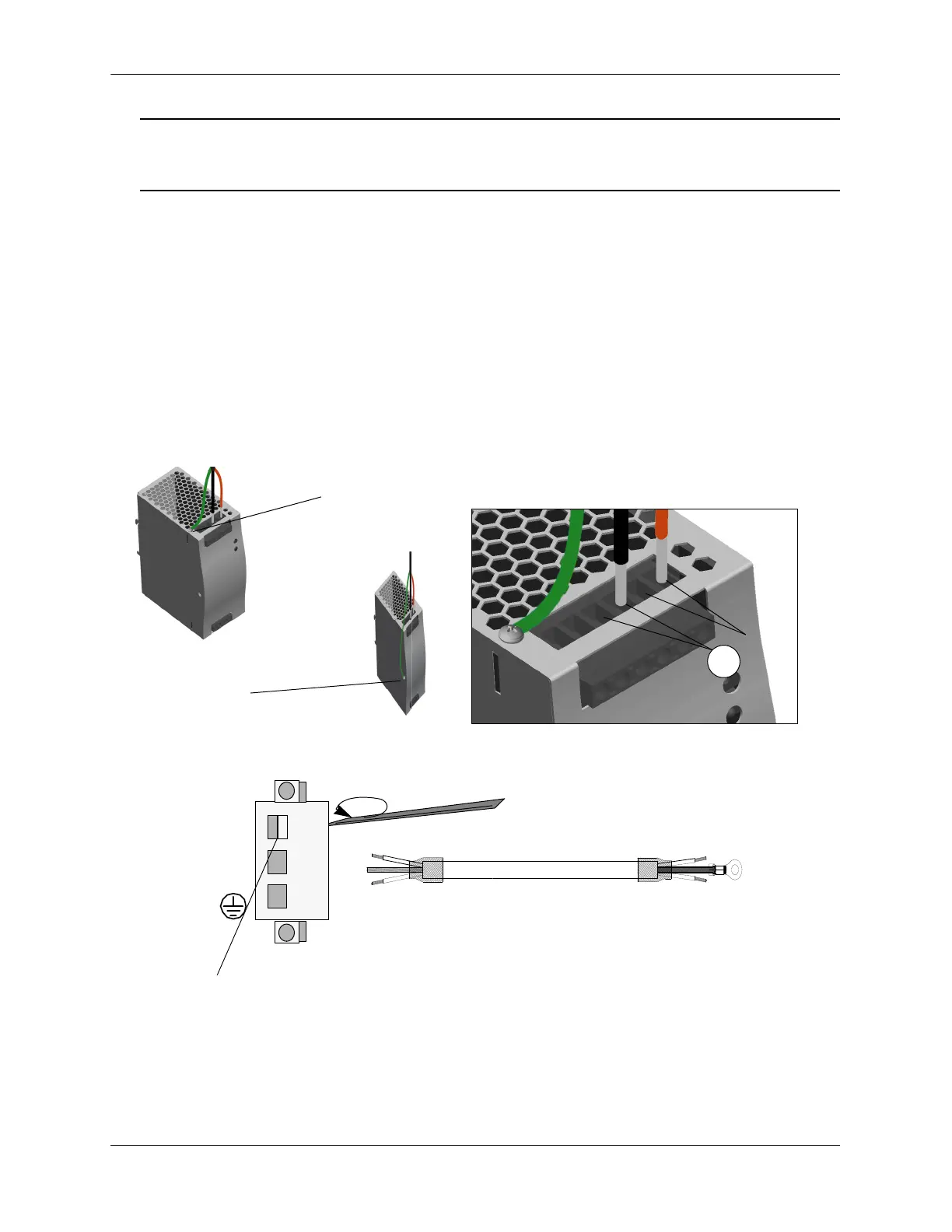
1 To install the output power cord, begin by inserting the RED wire into either of the V- terminals
located at the top-front of the power supply and the negative terminal (-) on the switch power supply
connector.
2 Next, insert the BLACK wire into either of the V+ terminals on the power supply and the positive (+)
terminal on the switch power supply connector.
3 Using a screwdriver torque each terminal to approximately 3.5 inch-pounds.
4 Secure the remaining ground wire to the power supply using the supplied attachment screw. Insert the
screw through the ground wire connector and tighten firmly. Connect other end to ground terminal on
switch power connector.
Output Power Terminal Locations
OS6465-BPN-H
Grounding location
OS6465-BPN
Grounding location
OS6465-BPN/OS6465-BPN-H Connection Examples
Top-Front of Power Supply - OS6465-BPN-H (shown)
+ -
Clamp inside square hole will open
when screw is loosened.
Loosen Screw.
Switch Connections
Power Supply Connections
Black
Red
Green




 To Next Page