Chassis and Power Supplies Connecting the AC Power Supplies
OmniSwitch 6465 Hardware Users Guide December 2019 page 3-35
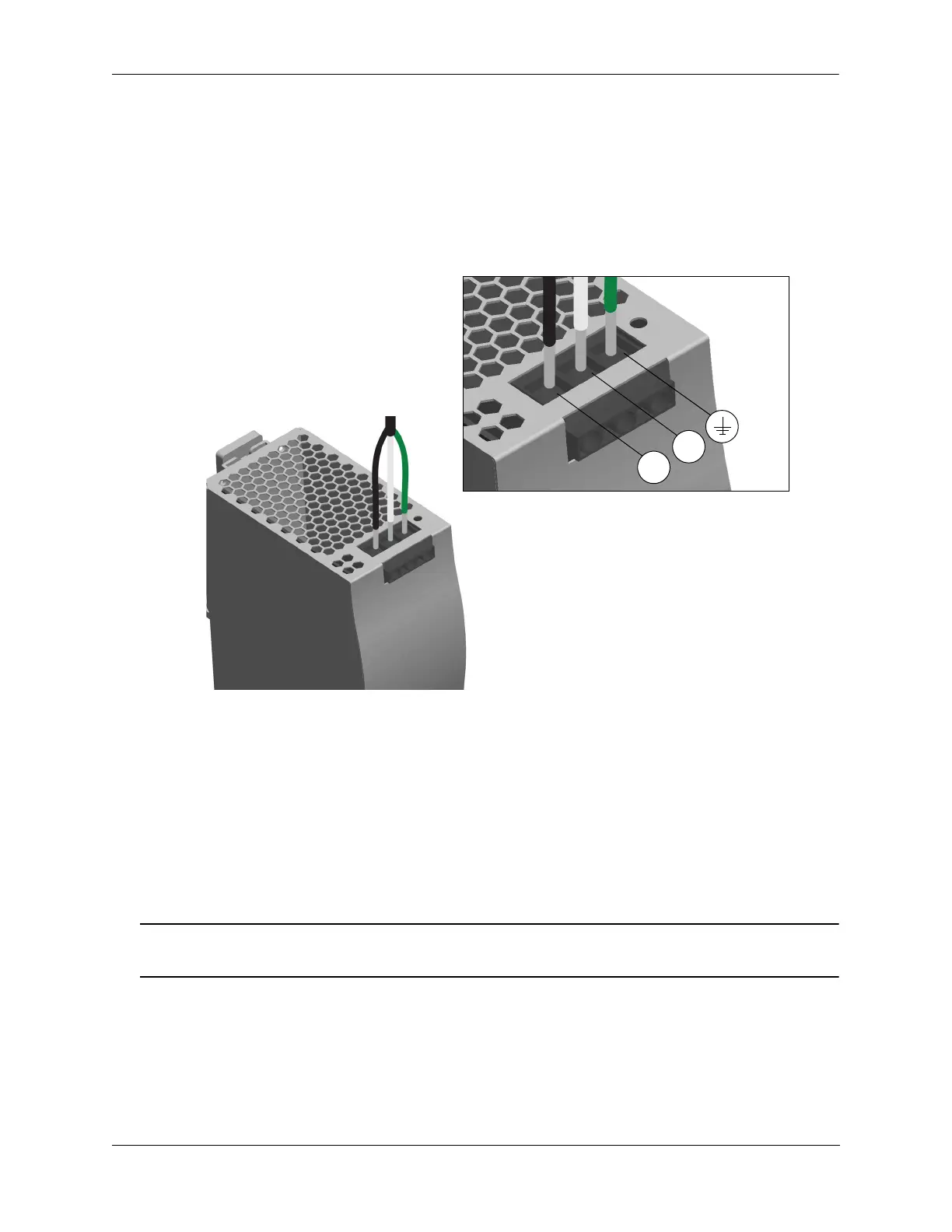
5 To connect the AC power cord, begin by inserting the BLACK (North America) or BROWN (Interna-
tional) wire into the Line (L) terminal located at the bottom-front of the power supply.
6 Next, insert the WHITE (North America) or BLUE (International) wire into the Neutral (N) terminal.
7 Insert the GREEN (North America) or GREEN/YELLOW stripe (International) ground wire into the
terminal marked with the protective ground symbol.
Input Power Terminal Locations (North America wire color shown)
8 Using a screwdriver torque each terminal to the inch-pounds labeled on the power supply.
Final Power Cord Connections
1 Insert the output power cord into the power connector (PS1 or PS2) located on the front of chassis (if
required).
2 Plug the AC power cord’s NEMA 5-15 into an easily accessible AC power source.
Caution. The product uses a Pluggable Type A power cord; therefore, please make sure that the power
socket is located near the equipment and is easily accessible.
Configuring a Power Supply
The OmniSwitch 6465 cannot auto-detect the type of power supply connected. The type of power supply
connected must be configured so that the system and PoE power information is correctly displayed and
utilized. Use the powersupply type command to configure the power supply, for example:
Bottom-Front of Power Supply




 To Next Page