24Ver. 1.01
5.1 — Assigning the Rock an Access Group
It is not necessary to create a new access group for onboarding. If none is specified during onboarding, the Rock will be assigned the default access
group that can be changed after it has been onboarded.
To check for an existing or default Access Group, or create a new Access Group, go to Access Groups.
SN: G2CD200800001
ID: XXXXXX COO: US
QTY: 1
2
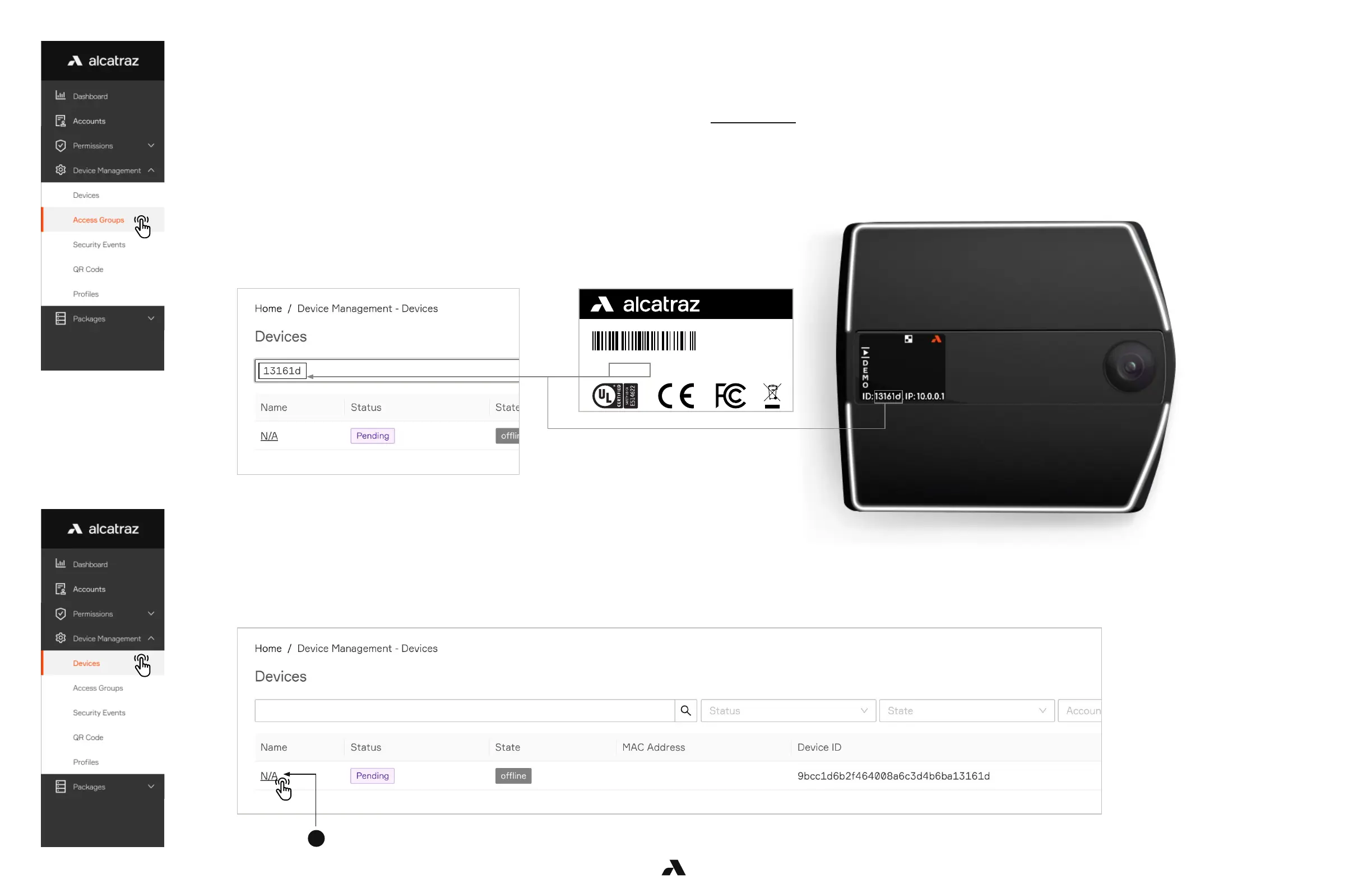
1. Enter the 6 digit Device ID in the search bar to filter the Rock. The 6 digit Device ID can be found:
On the outside of the package the Rock was shipped in (indicated by ID, as seen on label here)
On the back of the Rock under the QR code (indicated by ID)
On the Rock’s display at the beginning of the scrolling text
2. The Rock will display Name = N/A, Status = Pending, State = Offline.
Authenticating the device will establish the connection with the Rock.
1. Go to Device Management and select Devices.
2. Click on Name N/A to open the Rock’s info page.
5.5 — Find the Rock to Onboard by Search
5.6 — Authenticate the Device



 To Next Page