2
3
2
40Ver. 1.01
The Rock supports any Video Management System (VMS) that adheres to the ONVIF standard.
Please use the following info to connect with the VMS:
Username: admin
Password: (the last 6 digits of the device ID)
To locate the last 6 digits:
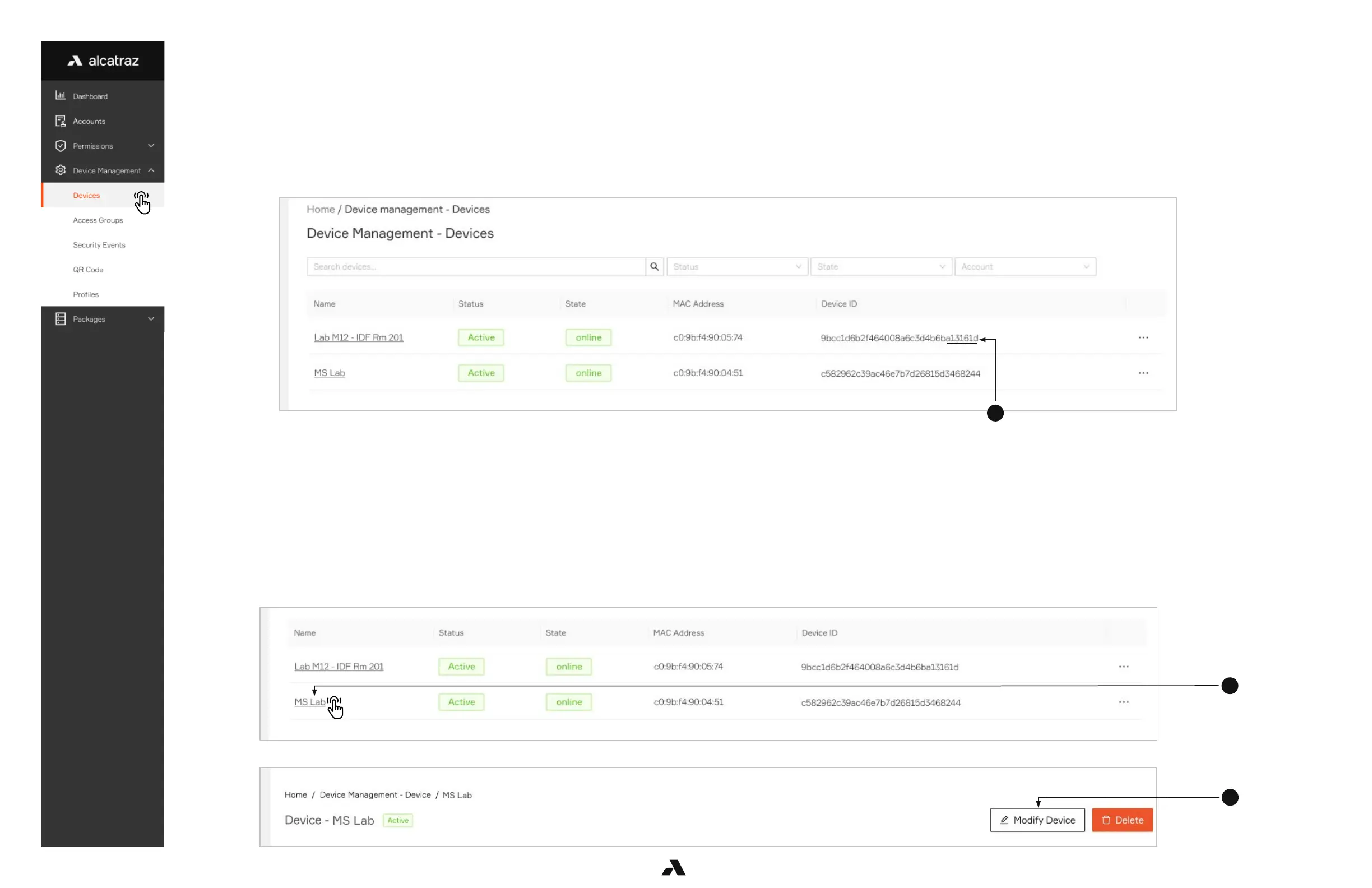
1. Go to Device Management and select Devices.
2. Locate the Rock to be connected to the VMS from the list and take the last 6 digits of the Device ID as the password.
The HOLD signal works for both Wiegand and OSDP.
Asserting the HOLD signal will suspend operations
no authentications
no badge numbers sent to the ACS
no new events displayed in the portal
1. Go to Device Management and select Devices.
2. Click on the Name of the Rock to open the Rock’s info page.
3. Click on Modify Device to open up the configurations page.
6.1.3.1 — Adding a Rock to the VMS (ONVIF)
6.1.4 — HOLD Signal Detection



 To Next Page