AMDV960H4 User Manual
www.amcrest.com 34
11 SYSTEM SETTINGS
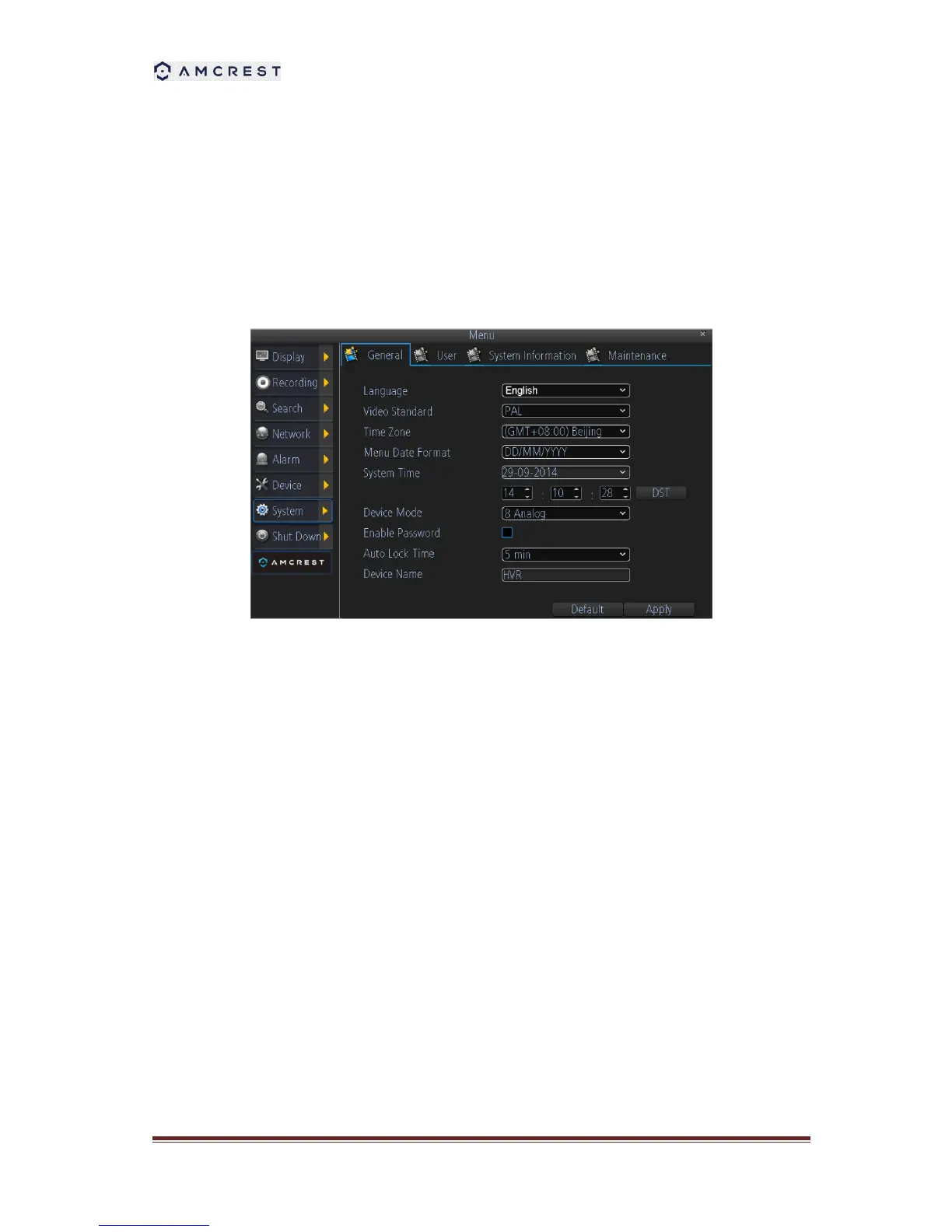
11.1 General
General menu contains many of the settings you’ll need to configure to get the most out of your
DVR system:
1. Language: You can select the language you want for the menus/GUI.
2. Video Standard: Here you can choose between PAL and NTSC.
3. Time Zone: Particularly important if you’ve enabled NTP - set this to the time zone where
you happen to be.
4. Menu Date Format: The format of the date (eg. DD/MM/YYYY or MM/DD/YYYY and so on).
5. System Time: This can be edited manually, or set to update automatically by using NTP
6. DST Setting: As the standards for daylight savings differ from country to country, and often
state to state, you might need to manually tell the DVR exactly when it commences and
ends in your locality. First, turn DST on. We suggest setting the Daylight Saving Time Mode
to Date, and manually entering the dates and times that daylight savings time applies to and
from, in your locality.
7. Device Mode: DVR supports several modes, including 4CH analog mode, 4Ch analog +
4Ch IP mode. Changing the mode will reboot the system.
8. Enable Password: When enabled, the DVR will require a password to access, even for
local users. It’s advisable to enable password protection
9. Auto Lock Time: When the password protection is enabled, the DVR will automatically
time-out, thereafter it will ask for a password before returning to normal functioning. The



 To Next Page