UDM-RX02N Wiring and Connections
46
UDM-0808-SIG, UDM-RX02N and UDM-ABB-8-SIG Operation /Reference Guide
AUDIO & VIDEO Output Connectors
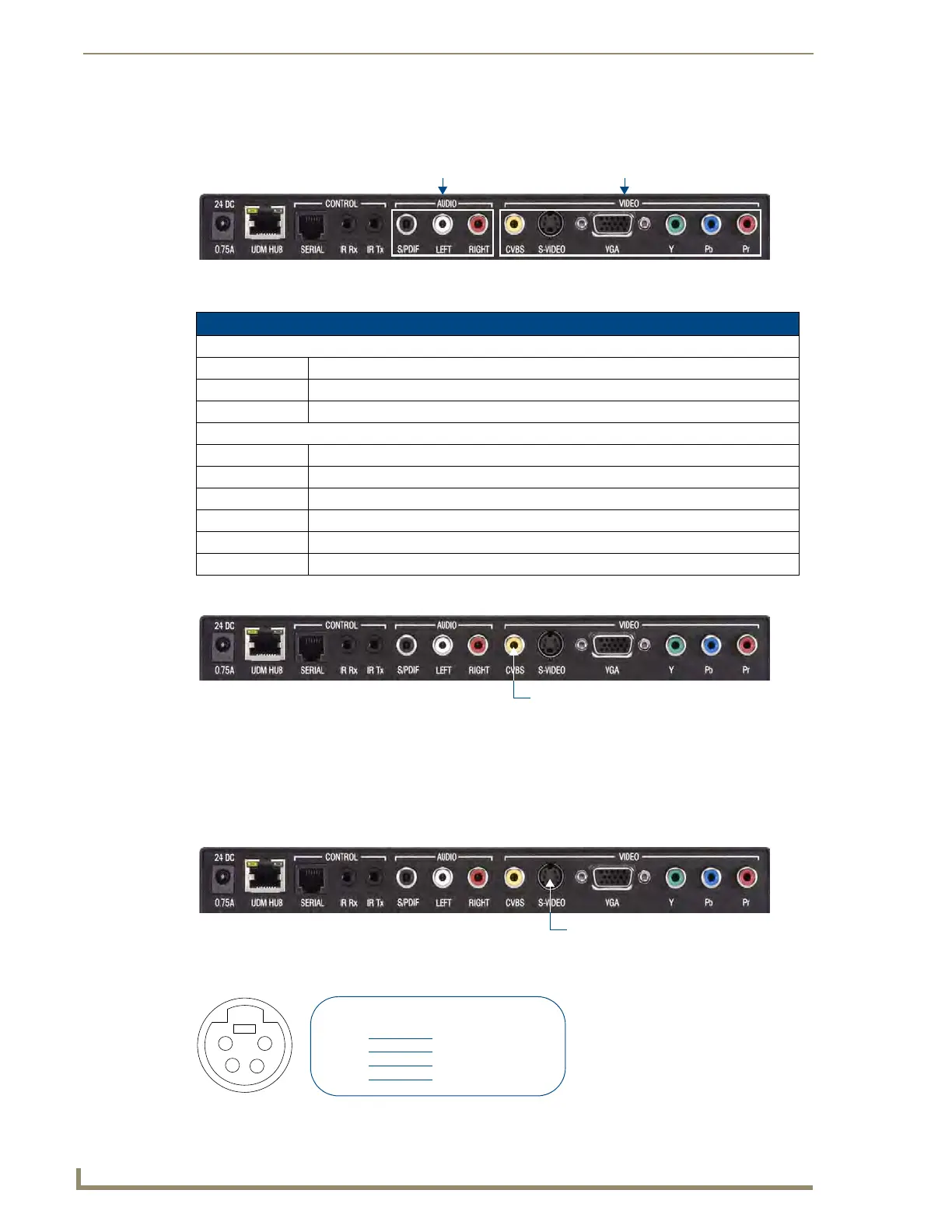
The rear of the UDM-RX02N has two sets of output connectors: AUDIO and VIDEO (FIG. 44).
Each of these sets of outputs has connections for Digital Audio, Analog Audio (L & R) and Video:
CVBS (Composite) Video Output Port
1.
Attach a composite cable to the CVBS connector on the UDM-RX02N (FIG. 45).
2. Run the other end of the composite cable to the Composite connector on the display device and establish
a firm connection.
3. If the display device has audio feeds, connect its audio to the audio connectors on the UDM-RX02N.
S-VIDEO Video Output Port
FIG. 47 describes the pinouts on the S-VIDEO connector:
FIG. 44 UDM-RX02N - AUDIO and VIDEO Output Connectors
UDM-RX02N Output Connectors
Audio:
SPDIF Digital audio
Left Analog audio left
Right Analog audio right
Video:
CVBS Composite Video Blanking & Sync analog video
S-Video S-Video
VGA HD 15 female connector for VGA format
Y Analog component video output: Y
Pb Analog component video output: Pb
Pr Analog component video output: Pr
FIG. 45
UDM-RX02N - CVBS Port
FIG. 46 UDM-RX02N - S-VIDEO Port
FIG. 47 S-Video Pinouts
AUDIO connectors VIDEO connectors
CVBS (Composite) Video Output Port
1
2
3
4
S-Video Pinouts
Input Pin
1
2
3
4
VGA
Ground Y
Ground C
Chrominance (Color)
Luminance (Intensity)


 To Next Page
 Loading...