- 36 -
Maintenance
5. Troubleshooting - Detection and Repair
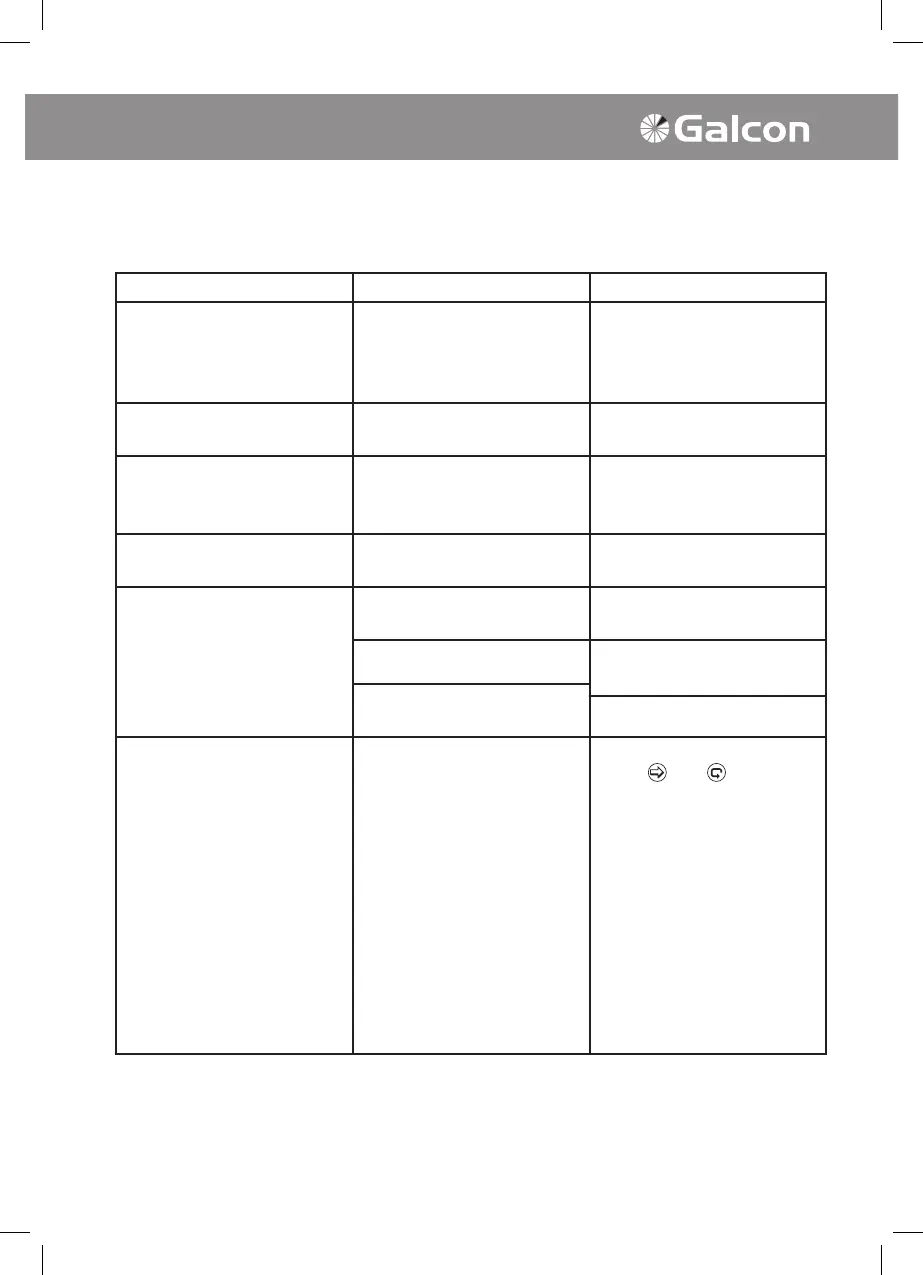
Problem Cause Repair
Valve will not open in
automatic program/
Computerized manual
operation
Disconnection of valve control
cable
Carefully check wire
connections and valve control
cable
Blinking drop in line with one
of the valves on display panel
Short-circuit in valve control
cable/solenoid
Check wire connections/
replace solenoid
Controller cannot be
programmed/Display does not
appear
Problem in power circuit and
impaired battery
Check power source/
transformer or replace battery
Sensor icon blinking and valve
does not open
Short circuited sensor Replace sensor or repair
connection
Valve will not close Operating handle on valve in
OPEN position
Turn valve handle to AUTO
closed position
Dirt and scale in valve Clean valve
Problem in valve (e.g. torn
diaphragm)
Replace valve
Faulty controller activity Defective Memory * Operate RESET mode:
Press
and
simultaneously for 4 seconds.
All controller programs will
be deleted. On screen
display will appear showing
the programs that have been
deleted. The process has
been completed. Number of
controller stations and model
number will appear on screen.
Controller must be
reprogrammed.
• Note: This operation will cancel all of the programs previously programmed in the
controller.



 To Next Page