- 8 -
Installation and Wiring Instructions
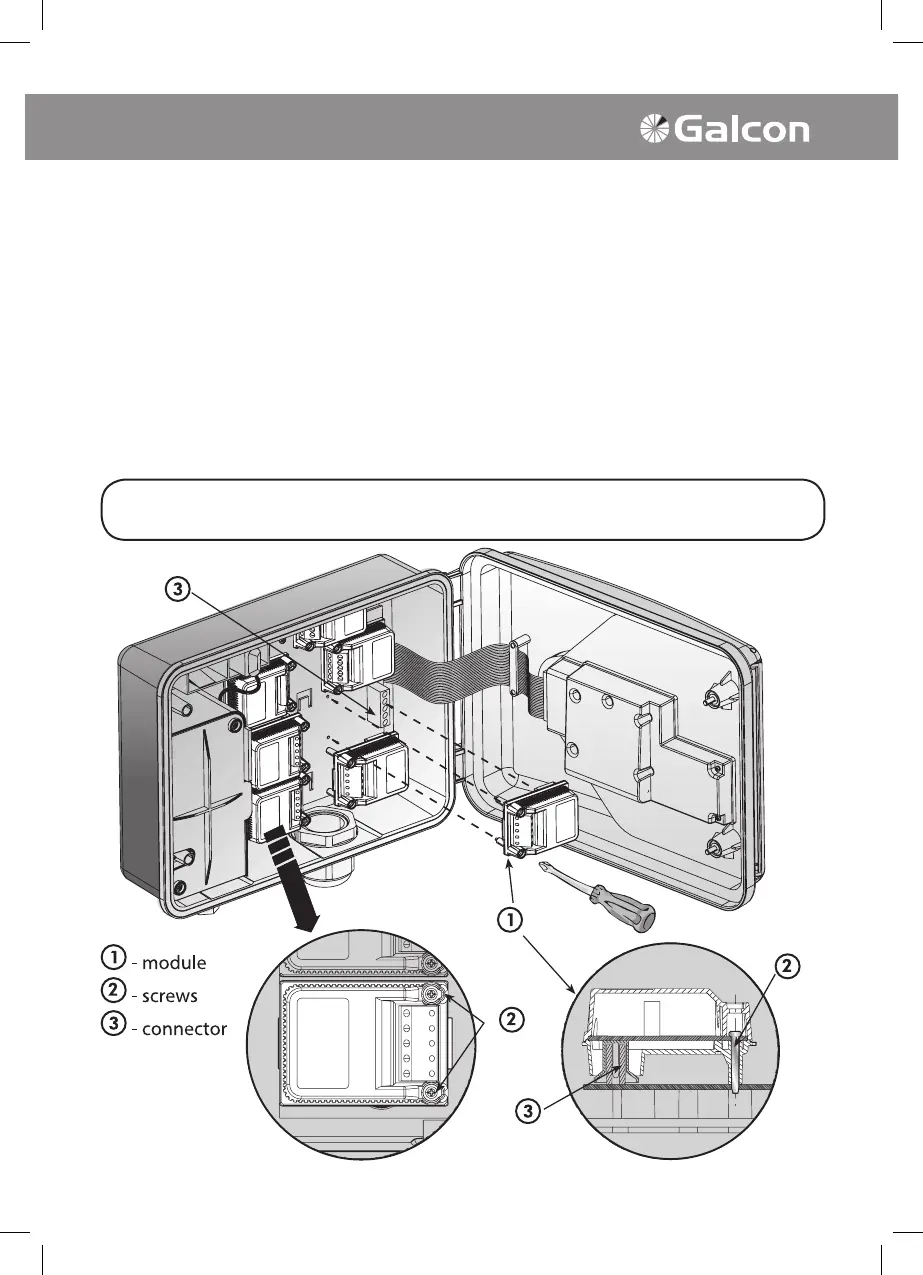
2. Adding or Replacing 4 Valve Module
Attention: Modules may be added or replaced only in the AC-800248 Model
In order to add or replace a 4 valve module the following procedures must be performed:
1. Turn selector to Testing mode.
2. Turn off electricity.
3. Wait one minute.
4. Remove battery.
5. With a "cross-head" screwdriver, open screws
on front of module.
6. Add or replace module with a push or pull as
shown in illustration.
7. Fasten screws at front of module.
8. Replace battery in position.
9. Turn on electricity.
* The number of valves the controller will now
operate will appear on the LCD display.
* The current time must be set.
THE PROGRAMS INSTALLED IN THE CONTROLLER WILL BE STORED
DESPITE CUTOFF FROM ELECTRICITY VOLTAGE (MEMORY OF 20 YEARS!)



 To Next Page