4-4 File Menu File Management
4-10 PN: 10580-00251 Rev. T MS2712E/13E User Guide
Save Menu
Key Sequence: Shift > File (7) > Save Measurement
Key Sequence: Shift > File (7) > Save
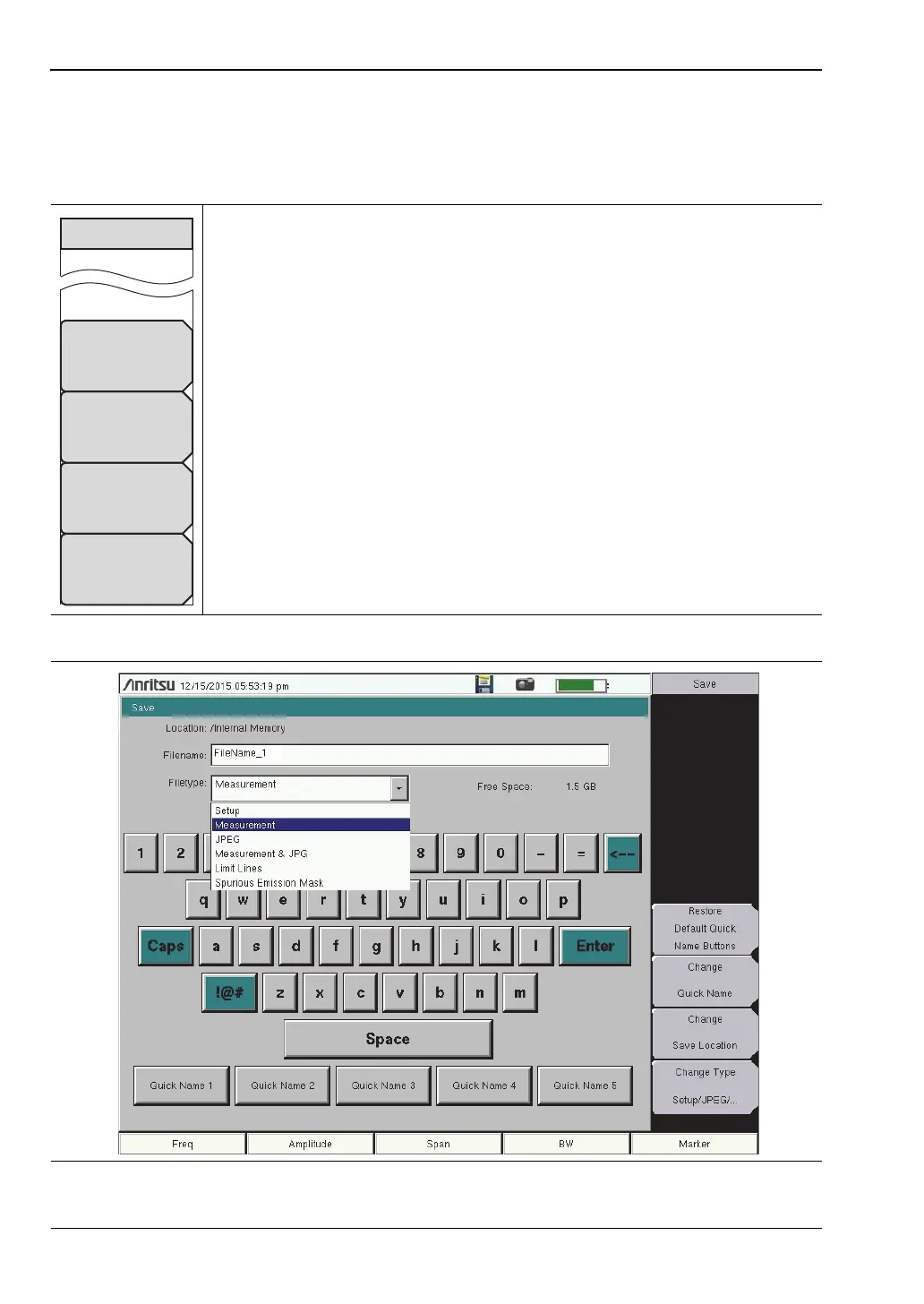
Restore Default Quick Name Buttons: Press this submenu key to undo
any Quick Names previously entered and return all Quick Name buttons to
factory defaults.
Change Quick Name: Press this key to change the Quick Names at the
bottom of the touch screen keyboard (see Figure 4-11). Select the Quick
Name to edit, then press Enter. Type the new Quick Name and press Enter
again. The new Quick Name is displayed on the button below the keyboard.
Change Save Location: Press this submenu key to open the
“Save Location Menu”, where you can set the location of the destination file
for saved data.
Change Type
Setup/JPEG/... Press this submenu key to open the Select File Type list
box and the “File Type Menu”.
Figure 4-10. Save Menu
Figure 4-11. Save Dialog Box
Change
Save Location
Change Type
Setup/JPEG/...
Change
Quick Name
Restore
Default Quick
Name Buttons
Save














 To Next Page