88
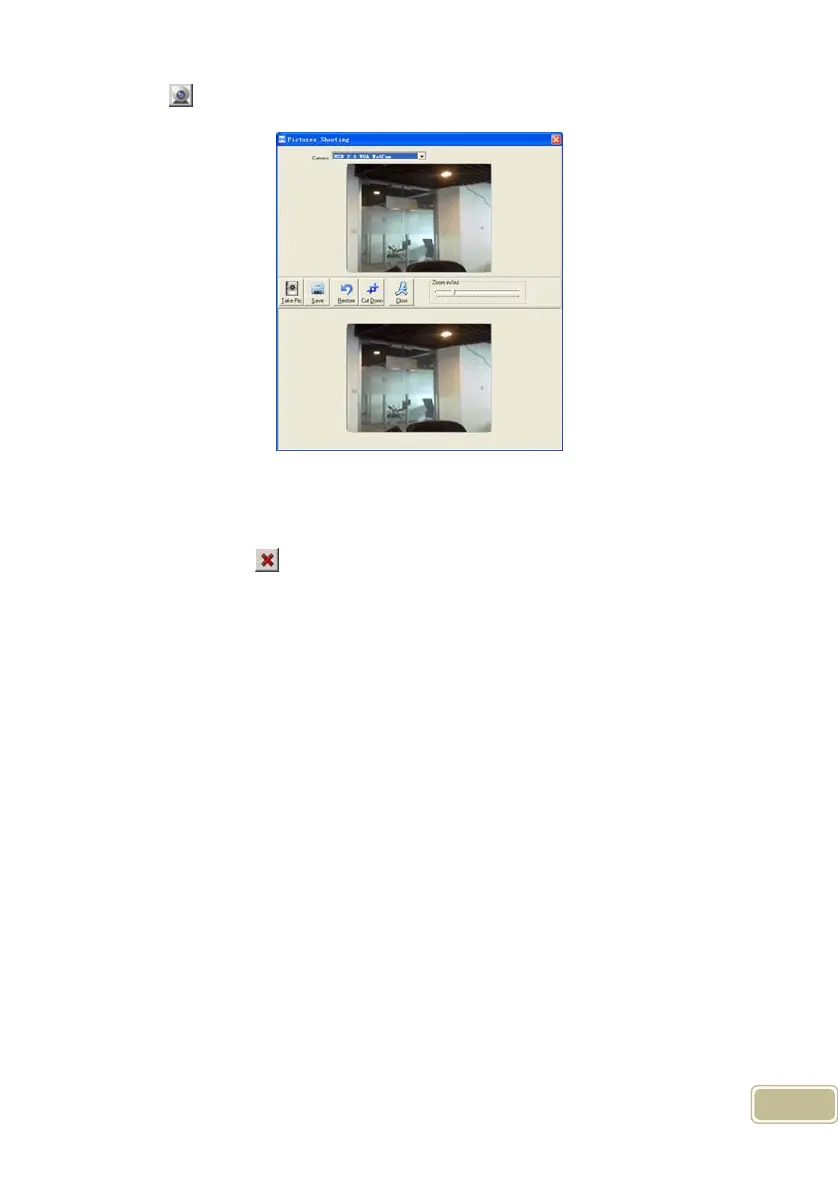
Click [ ] button, open [Pictures shooting] window as following,
Choose camera equipment, and click the button [Take Pic] to take a photo.
Edit the photo by [Cut-down] function and then click the button [Save] to save.
Click the button [
] to delete the employee photo.
5.3.2 Modify Employee
Modify employee operation is to modify the employee information in the window
[Add/Modify employee Info]
5.3.3 Delete Employee
Delete the employee from the database.
Choose employee from employee info list (you can choose some or all the
employee by using the button [Shift] or [Ctrl] on your computer’s keypad). Click
[Delete Employee] to delete the selected employee.
5.3.4 Transfer Department
Choose the employee and then click the button [Transfer Department]. The
window [Employee Transfer] pops up:



 To Next Page