Apex Instruments, Inc.
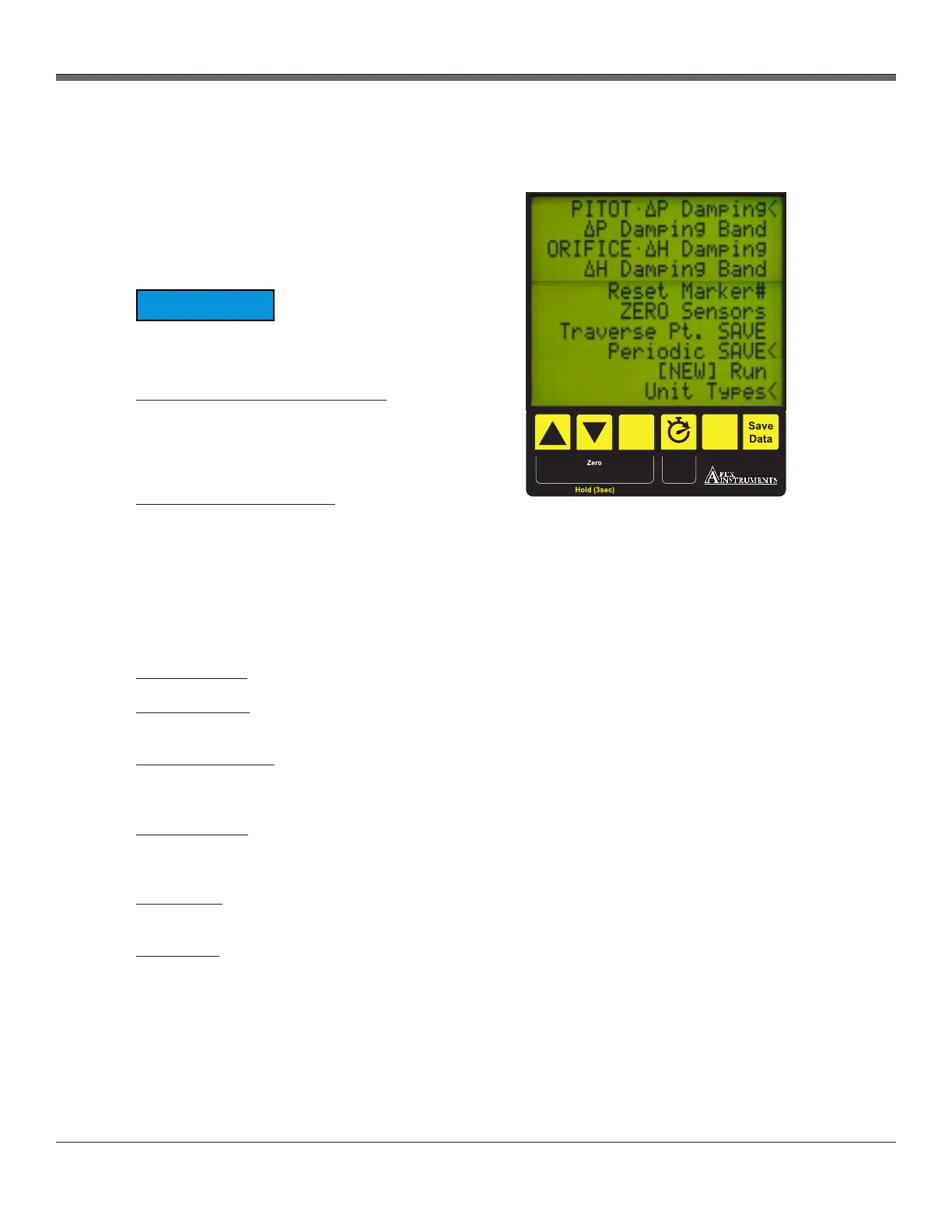
The menu on the XD-502 console allows the
operator to set data averaging values, change
units and provide TC offsets. The menu can be
accessed by pressing and holding the Previous
Screen (Menu) button for 3 seconds.
An abbreviated menu will appear if the run timer
is not at 0:00.
Pitot-ΔP and Orifice-ΔH Damping: “Block size”
is the averaging rate of the transducer readings.
Each “block” is equal to a sample every 1/4
second. Four damping “blocks” would be a 1
second averaging period.
ΔP and ΔH Damping Band: A tolerance based
on the full scale of the measuring transducer. The
ΔH transducer used in the XD-502 sampling
console has a range of 5” H O and the ΔP
2
transducers have a range of 1” and 10” H O. To
2
ensure that the data stream displayed is smooth,
the damping band should be configured to restart after an outlier is measured. For example, ΔH values
could be averaging out at 1.00” H O. If the damping band is set to 10% (of full scale), any reading
2
outside of 0.95 to 1.05” H O would start a new average.
2
Reset Marker#: Resets the marker number back to 0.
ZERO Sensors: Resets the zero point for all transducers, ΔP and ΔH. Ensure that no pressure is
being applied to the sensors.
Traverse Pt. SAVE: Sets a timer for the console to save a data point to memory in sync with traverse
points in the sample run. This time should be set up to match the sample traverse point time at each
point.
Periodic SAVE: Sets a timer for the console to save a data point to memory in sync with traverse
points in the sample run. This time should be set up to match the sample traverse point time at each
point.
[NEW] Run: Allows the user to start a new run from a fresh data slot. The user is prompted to choose
the data slot and if the data slot has data in it already, will be prompted to confirm the overwrite.
Unit Types: Allows the user to change unit types displayed on the console. There are 3 options
included:
3
Imperial: Vol. – ft , Press. – Inches H O, Temp. – °F
2
3
Metric: Vol. – m , Press. – mm H O, Temp. – °C
2
3
Metric Pa: Vol. – m , Press. – Pascal, Temp. – °C
Fig. 4 Menu Overview
3.1 User Control Overview cont.
3.1.3 Menu overview
NOTICE
XD-502 Digital Console
ACTUAL
SLOT
LOCATION
TBD
Select
Menu
DGM
Zero
Timer
Previous
Screen
Insert
Note
19


 To Next Page