XD-502 Digital Console
Apex Instruments, Inc.
41
3.6.14 Utility screen overview cont.
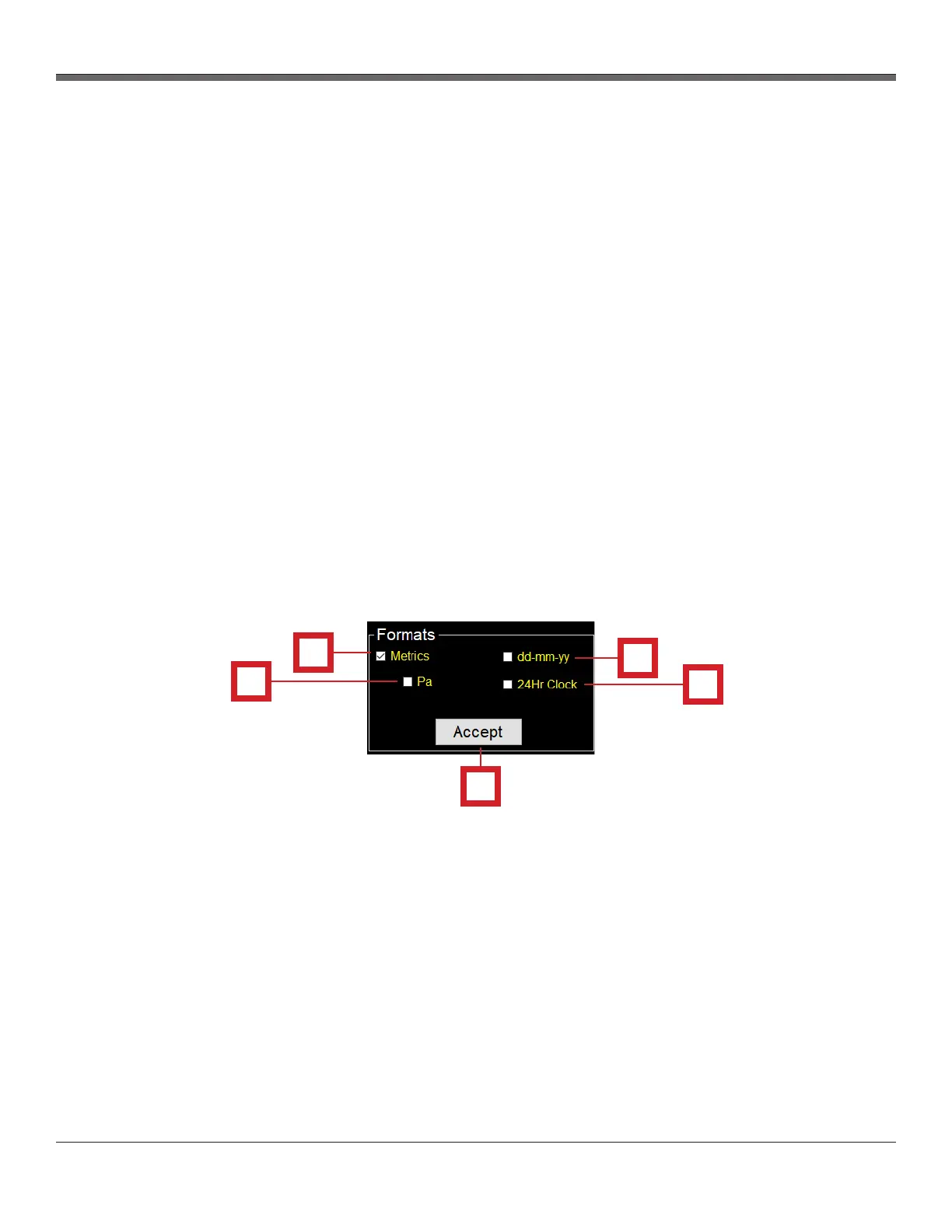
Fig. 24 Formats Panel Overview
Formats section - The Formats section allows the user to modify and update settings related to
measurement units.
1. Metrics checkbox
- Clicking this checkbox will change all units to metric in both the software and on the console. If
this box is unchecked, all units will be imperial.
2. Pa checkbox
- Clicking this checkbox will change pressure to Pascals (Pa or kPa)
3. dd-mm-yy checkbox
- Clicking this checkbox will change the date used in both the software and firmware to the
dd-mm-yy format. If this box is unchecked, all dates will be displayed in the mm-dd-yy format
instead.
4. 24Hr Clock checkbox
- Clicking this checkbox will change all times used in both the software and firmware to the
24 hour clock format (e.g. 7:00PM will display as 19:00). If this box is unchecked, times will be
displayed in the 12 hour format.
5. Accept button
- Saves and stores all of the Formats settings. If not pressed, the console reverts to previously
set settings.
4
5
1
2
3


 To Next Page