XD-502 Digital Console
Apex Instruments, Inc.
30
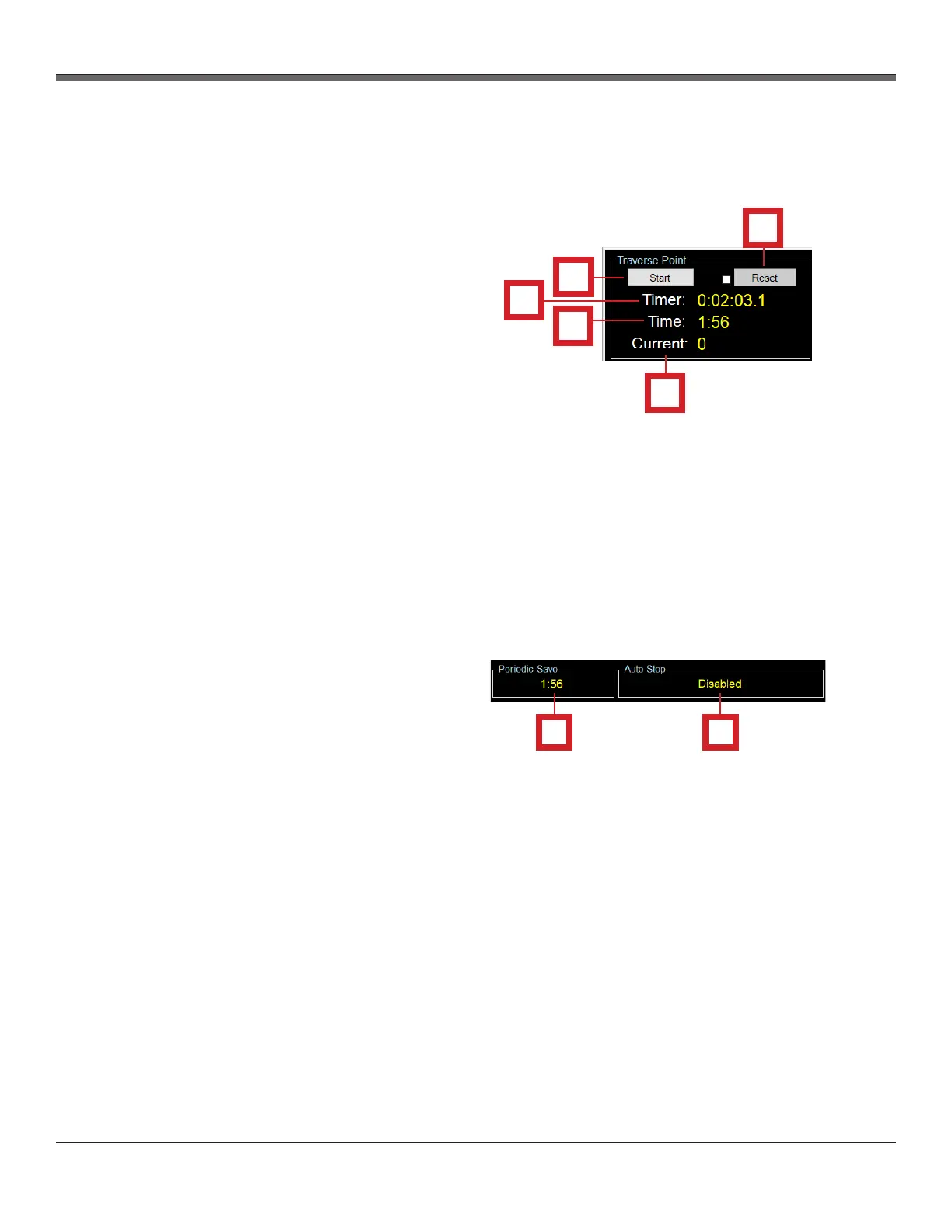
3.6.6 Traverse Point section overview
1
2
3
4
5
Fig. 12 Traverse Point Section
The Traverse Point section of the Main screen
allows the user to control the timer on the console.
The Traverse Point section features the following
buttons/tabs:
1. Start/Stop Timer button
- Starts and stops the timer (a data point
can optionally be saved using this button)
2. Timer Reset button and checkbox
- Resets the main run timer
3. Sample Timer
- Displays current elapsed time for a run or
leak test
4. Time
- Displays a countdown timer until the next
traverse point
5. Current
- Displays current traverse point
1
2
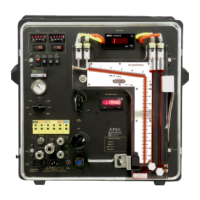
3.6.7 Periodic Save and Auto Stop section overviews
The Periodic Save and Auto Stop sections allow
the user to view data and time settings at a
glance.
The Periodic Save and Auto Stop sections
feature the following information:
1. Periodic Save Timer Countdown
- Shows time until the next periodic data
save is performed in the background
(configured under Traverse Point menu)
2. Auto Stop Status
- Disabled | Indicates that the timer must
be manually operated
- Enabled | Indicates that the timer will stop
after the designated number of traverse
points
Fig. 13 Periodic Save and Auto Stop Sections


 To Next Page