SEL
SEL
SEL
SEL
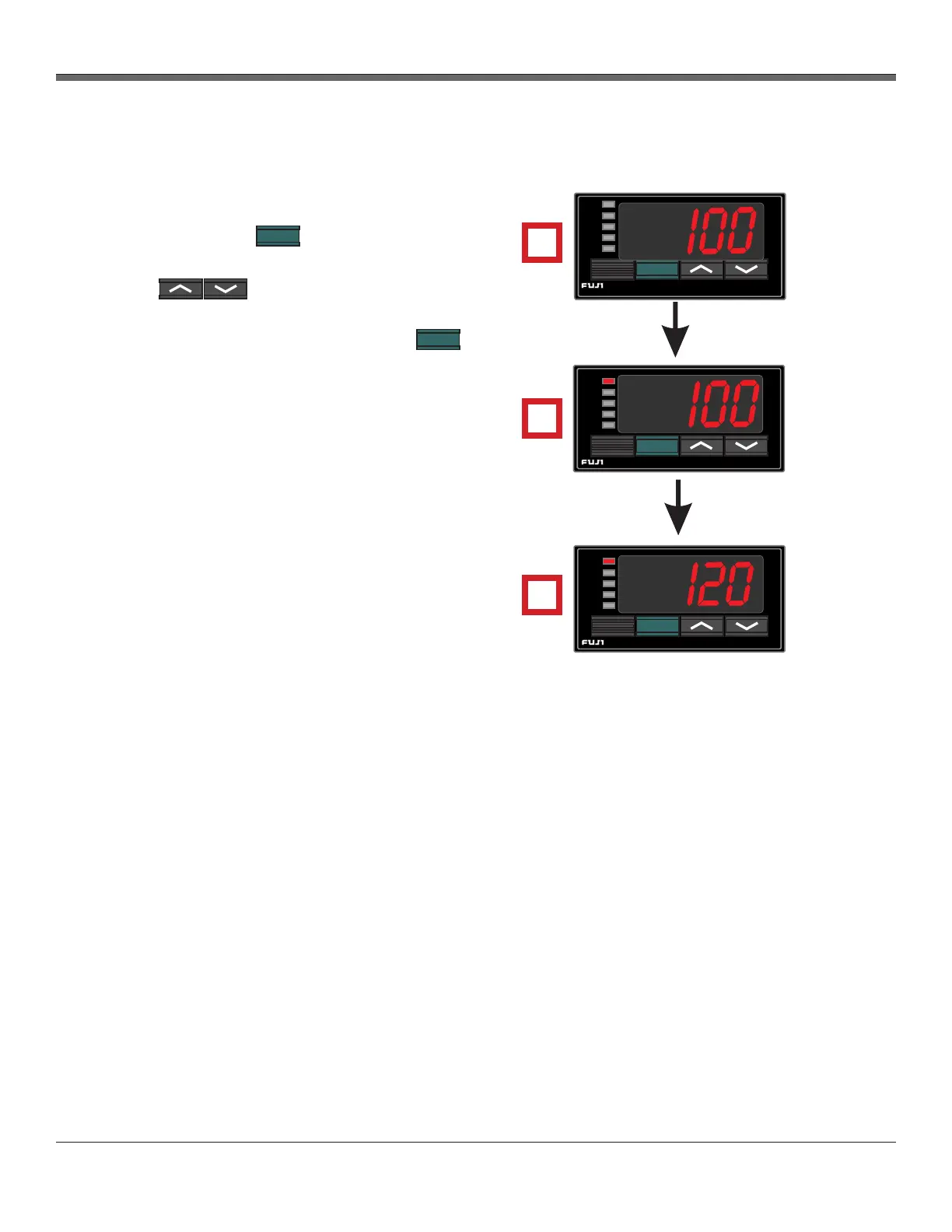
1. The current temperature of the equipment is
shown on the Fuji controller. To change the set
value (SV) press once.
2. Current value is displayed and SV is lit. Press
the to increase or decrease the
displayed value (set value).
3. After the new setting is entered, press
to lock in the value and return to the C1
(control 1) display.
Repeat procedure to check value if necessary.
SV
C1
C2
AL1
AL2
SEL
°C
SV
C1
C2
AL1
AL2
SEL
°C
SV
C1
C2
AL1
AL2
SEL
°C
3.5 Setting the Temperature Controller
3.5.1 Set value setting
Fig. 7 Temperature
Controller Configuration
1
2
3
XD-502 Digital Console
Apex Instruments, Inc.
26
Zero DGM
Aux Stack Probe Oven Filter Exit DGM DGM In
Corrected
Corrected
5432.0 5432.0 5432.0 5432.0 5432.0 1831.8 78.1 78.4
+ + + + + + + +
+
Un-corrected 3000.0 3000.0 3000.0 3000.0 3000.0
999.9
25.6 25.8
Thermocouples
+
Barometric Pressure
Vacuum
Dry Gas Meter
Serial Numbers
Pressure Transducers
29.35 99.40
00.00
29.35 99.40
in Hg
KPa
KPa
Offset
Corrected
Kpa
High
Low
Corrected
Calibrations
Current
Value
ADC Value (0-900mm)
Zero
Span
kPa
mmHg
inHg
(xxx)
Block
Size
(1-250)
Band %
(0.0-24.9)
Span
Sensor
Reading
Correction
Value
(x.xx)
Save
Hold
Save
Save To ConsoleSave To File Load From File
Counts Per Rotation
Scaling Factor
mmHg inHg
Console
DGM
DGM Total Volume
Total Hours
Offset
0.0
0.0 0.0 0.0 0.0 0.0 00.0 00.0
Enable
DGM Raw
Pulse Count
Console History
AC Line Filtering: 50Hz 60Hz
958
0
0.000
0.00
13,534
101.8
7.1 L
1200
√ √
√
3000.0 3000.0 3000.0 3000.0 3000.0
999.9
25.6 25.8


 To Next Page