XD-502 Digital Console
Apex Instruments, Inc.
33
4
5
6
7
8
1
2
3
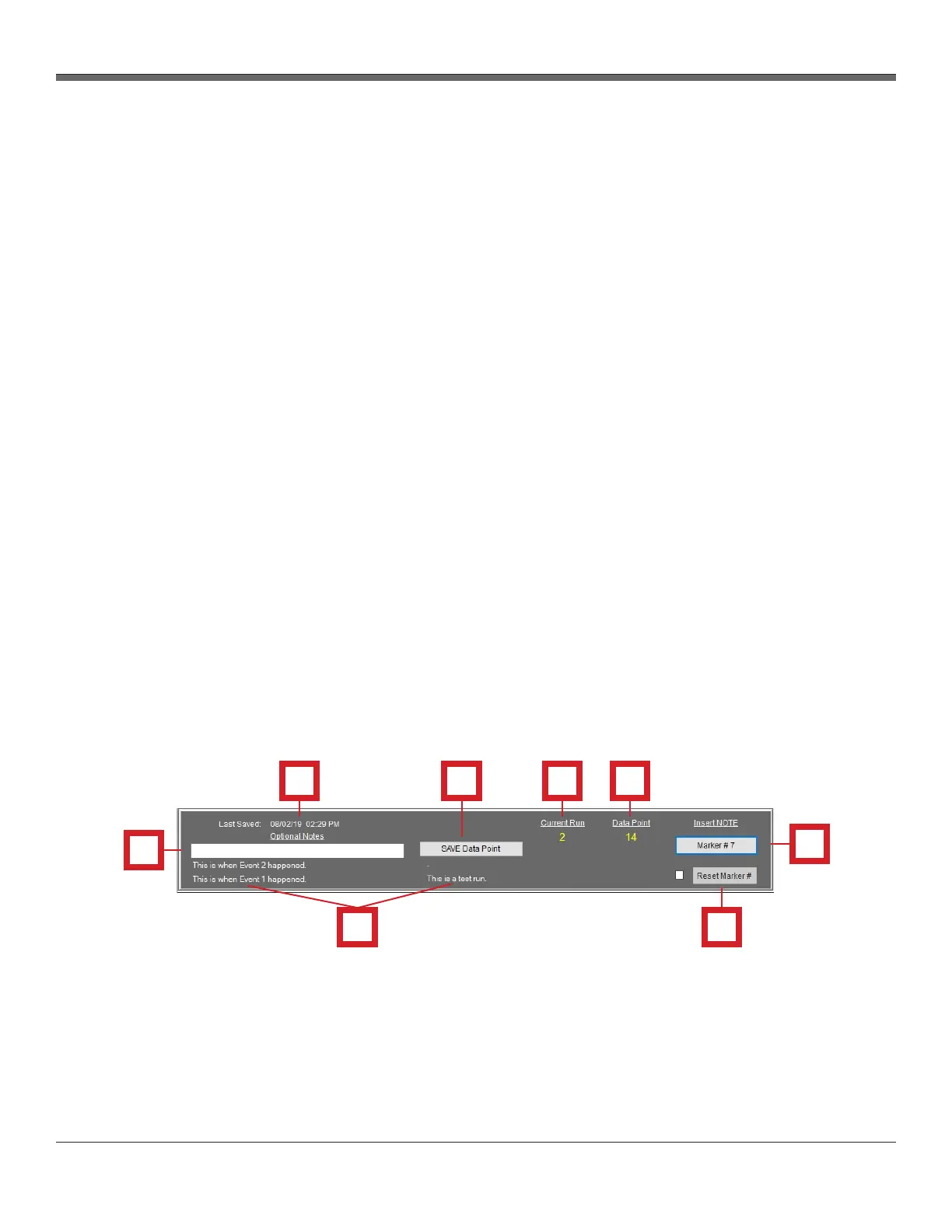
3.6.10 Data Point and Note Saving menu section overview
The Data Point and Note Saving menu is the section of the software where the user can save data
points manually and insert notes for reference. This section of the software is available at the bottom
of the window from any of the software screens.
Data Point and Note Saving menu section
1. Last Saved data point
- Displays date and time of the last data point save
2. Optional Notes text box
- The user can type a quick, or elaborative, note in this box to attach to the next saved data point
- The note will accompany that data point save in the exported spreadsheet
3. Previous Optional Note
- Below the optional notes box, a text field displays previous optional notes that were saved
manually
4. SAVE Data Point button
- When clicked, the software saves a data point to storage at that time
5. Current Run number
- Displays the current run number (1-16)
6. Data Point number
- Displays the current data point number for the run
7. Marker Note button
- When clicked, the software saves a data point at that time with an iterative number to be used
as a marker. The user would keep track of what each marker number was for during the run.
8. Reset Marker # checkbox and button
- Resets the marker number back to 0. Must check the box to the left before clicking the button.
Fig. 15 Data Point and Note Saving Menu


 To Next Page