XD-502 Digital Console
Apex Instruments, Inc.
39
3.6.14 Utility screen overview cont.
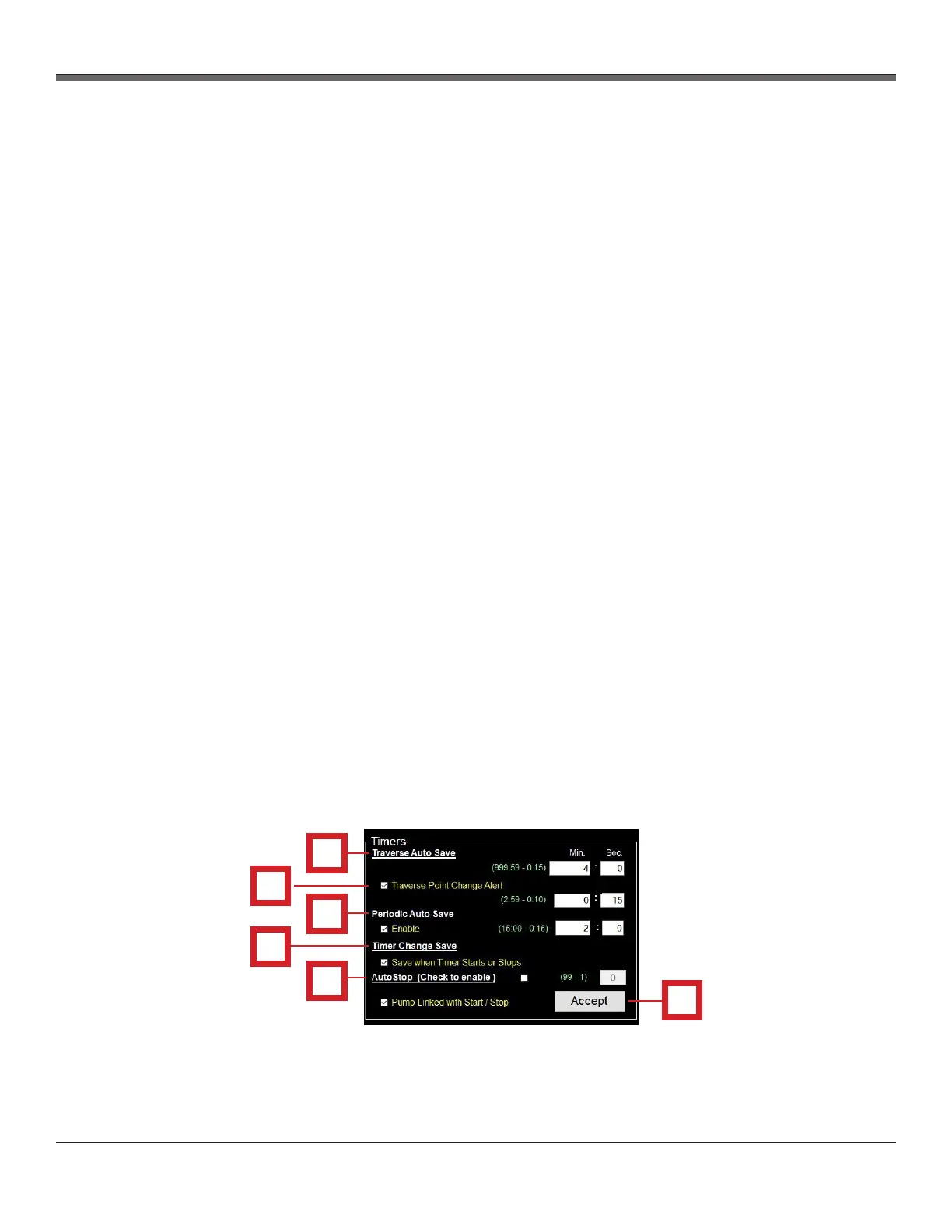
Timers section - The Timers section of the Utility screen allows the user to modify and update settings
related to time-based data point saving.
1. Traverse Auto Save settings
- Minutes and Seconds fields: Allows the user to specify the amount of time of traverse points in
minutes. This will allow the console to save at each new traverse point after a point change and
will be clarified in the final data.
2. Traverse Point Change Alert settings
- Enable checkbox: Allows the user to enable and disable the option of traverse point change
alert to flash the timer in the software to alert the user of an upcoming point change (also
flashes the LCD screen on the console)
- Minutes and Seconds fields: Allows the user to specify the amount of time in seconds before
each traverse point change
3. Periodic Auto Save settings
- Enable checkbox: Allows the user to enable and disable the option of periodic auto save
- Minutes and Seconds fields: Allows the user to specify the timer increments in which
background data is saved during the run. This data can be collected every so often (i.e. 30
seconds) to collect more data than single traverse point readings and is done in the
background with no alerts
4. Timer Change Save settings
- Save when Timer Starts or Stops checkbox: Allows the user to enable/disable the option. When
this option is enabled, the system will save a data point each time that the timer is started or
stopped by the user.
5. AutoStop (Check to enable) settings
- Enable checkbox: When enabled, the timer will stop after the designated number of traverse
points. When disabled, the timer must be manually operated.
- Value field: Allows the user to designate the number of traverse points
6. Accept button
- All changes in the Timer Settings box are not saved until this Accept button is clicked. If the
user does not click this button, all previous settings are still in effect.
Fig. 22 Timers Settings Panel Overview
1
2
3
4
6
5


 To Next Page