Status Indicators
A.4.2
PWR-D2-3041-DC-BLUE
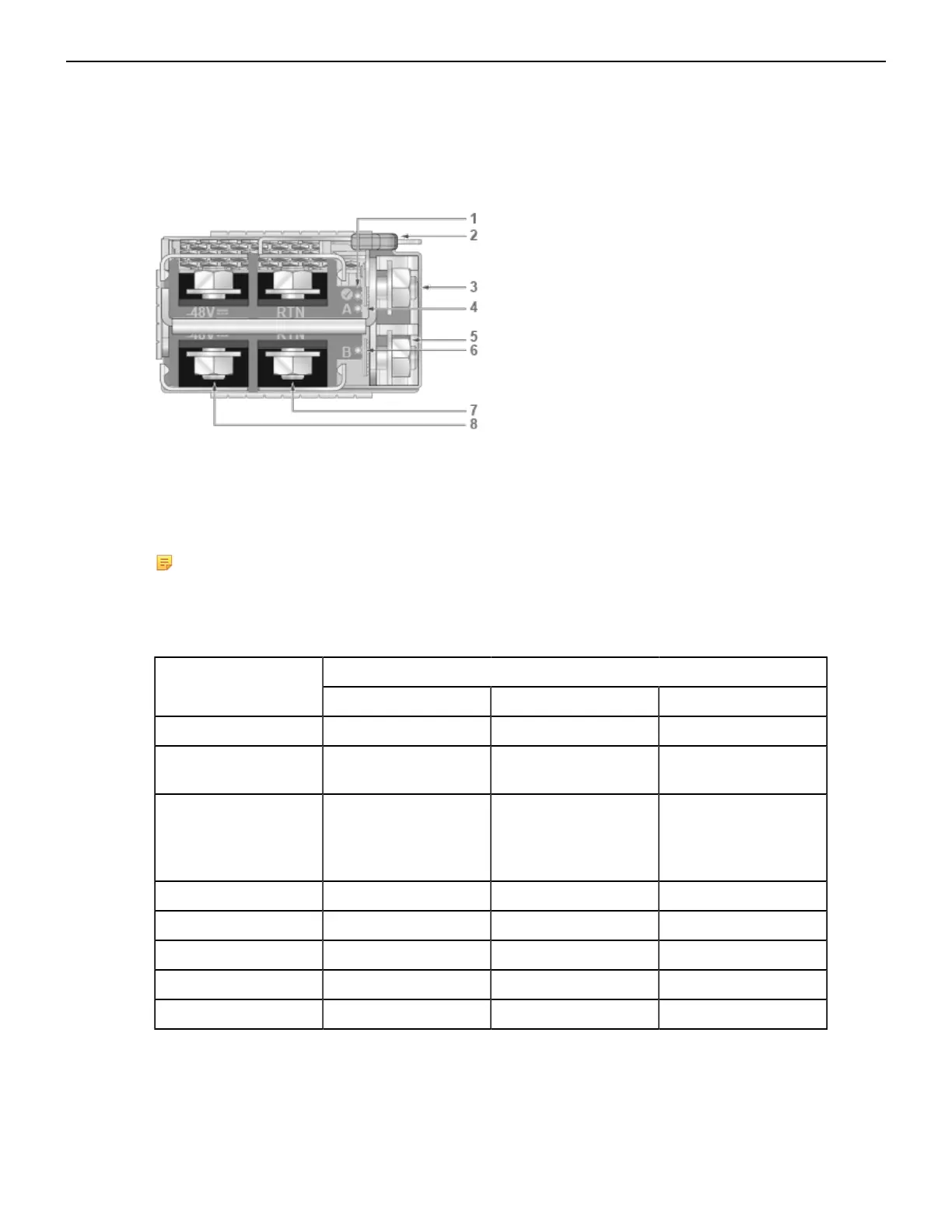
The power supply status LEDs are on the power supply modules. Figure 29: PWR-D2-3041-DC-BLUE
Power Supplies displays all the LEDs on the PWR-D2-3041-DC-BLUE DC power supply.
Figure 29: PWR-D2-3041-DC-BLUE Power Supplies
1 Status LED (Output) 4 Input_A LED 7 Battery return terminal
2 Release 5 Protective earth terminal 8 -48V terminal
3 GND terminal 6 Input_B LED
Note: Release lever color indicates airflow direction.
DC Power Supply Status LED States interprets the DC power supply setup for LED status indicators.
Table 15: DC Power Supply Status LED States
LED NamePower Supply Status
Input_A Input_B Output
Normal Operation Green Green Green
No DC Input - Single
PSU
Off Off Off
No DC Input - Parallel
PSUs
(Standby Mode 2)
Yellow Yellow Off
Standby Mode 1 Green Green Blinking Green
(1)
Input_A Fail Yellow Green Green
Input_B Fail Green Yellow Green
Power Supply Fault Green Green Yellow
Boot Loader Off Off Blinking
(2)
1
1 Hz, 50% Duty Cycle.
2
1 Hz, 50% Green, 50% Yellow.
3
States can be combined.
45



 To Next Page