Note: You may want to save the blank for future use as needed. The blank is needed for the
switch to operate normally if a power supply slot is not populated.
F.3 Fabric and Fan Module (Fabric Module)
The fabric and fan modules are hot-swappable. They are accessible from the rear of the switch (Rear
Panel). You must take into account that the module you are inserting is compatible with the switch and
the module that you are replacing. Perform the following steps to remove and replace a fabric and fan
module, or a fan-only module, if your switch supports one.
Note: The DCS-7816 switch has twelve fabric modules, each of half height.
F.3.1 Removing Fabric Module
1. Put on a grounded, anti-static ESD strap.
2. Loosen the two Phillips screws on fabric module.
Note:
The DCS-7812R3-FM fabric module has green latch release buttons. Use
these instead.
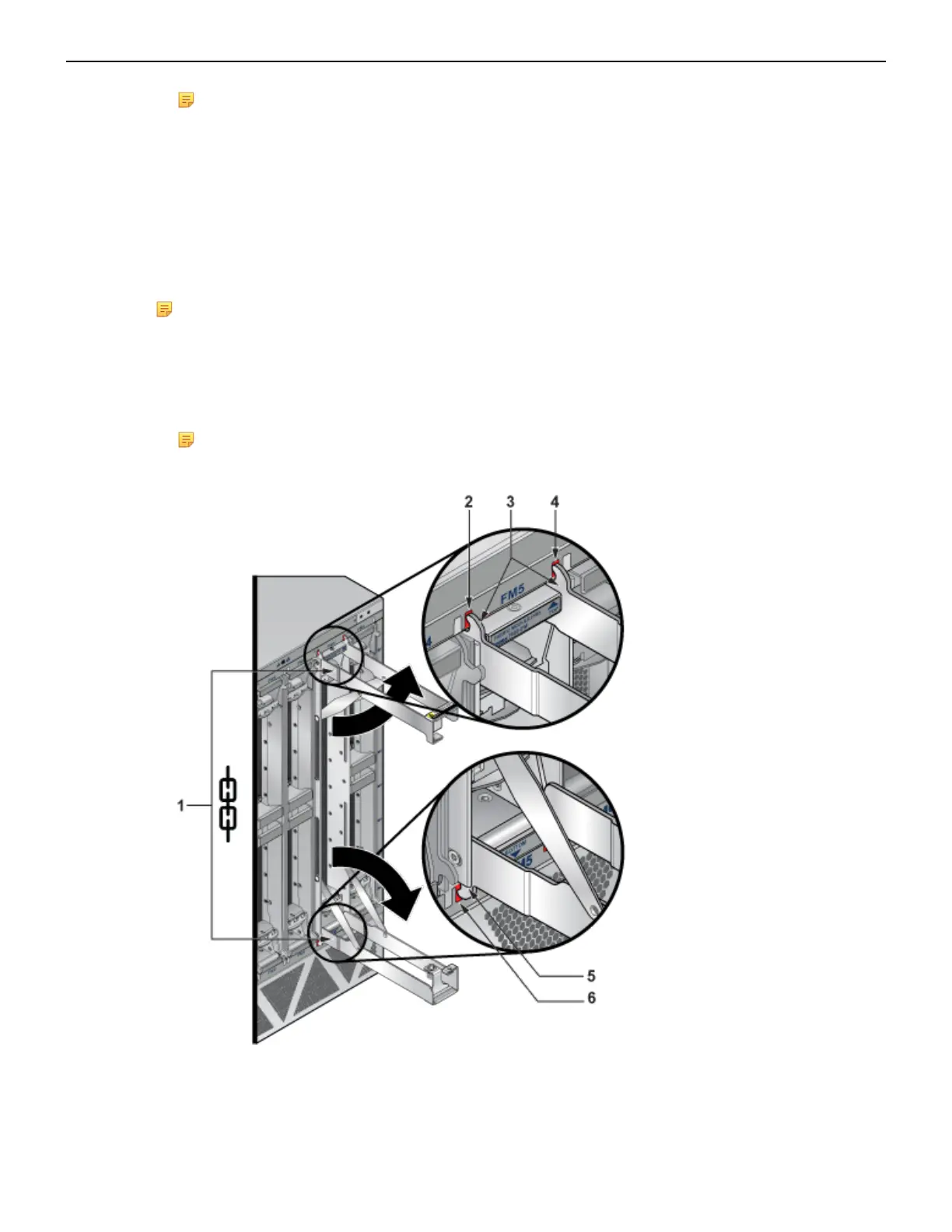
3. Pull out the ejector levers on the fabric module.
1 Fabric module ejector levers 3 Fabric module ejector claws 5 Fabric module ejector claw
2 Claw position on chassis 4 Claw position on chassis 6 Claw position on chassis
64



 To Next Page