23
MAIN SCREEN
Note: After 30 minutes* the display will automatically go into sleep
mode, which turns the display off. This is normal operation. Touch
anywhere on the screen to wake the panel up.
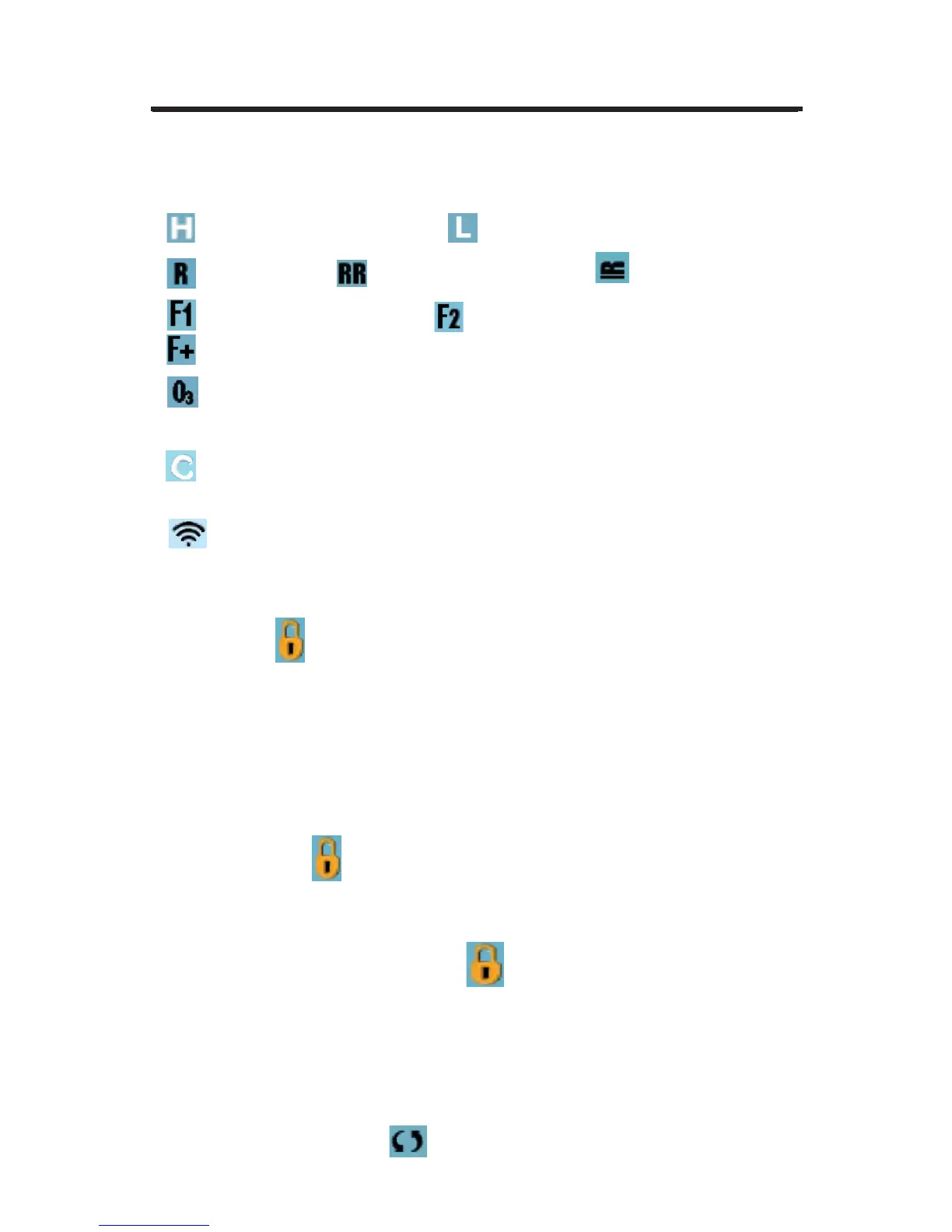
1. = High Temperature Range. = Low Temperature Range.
2. = Ready Mode. = Ready And Rest Mode. = Rest Mode.
3. = Filter Cycle 1 is running. = Filter Cycle 2 is running.
= Filter Cycles 1 and 2 are both running.
4. = Ozone is Running. If you don’t see the icon that means the Ozone
is OFF.
5. = Cleanup Cycle is Running.
Note: Not all systems that can run a Cleanup Cycle display this icon.
6. = Wi-Fi icon just indicates that the Wi-Fi link is connected. It does
not indicate signal strength.
NOTE: Not all systems that support Wi-Fi display this icon.
7. Lock Icon:
When displayed, indicates the panel is in a locked mode. To unlock or
lock a setting or panel lock, rst press the corresponding icon on the Lock
Screen, then press and hold the word “Lock” for 5+ seconds until the text
and icon change to the opposite state.
There are 2 lock icons that can be shown on the title bar of most screens.
A tall skinny one
representing a settings lock is applied.
It is shown on screens that are affected by the settings lock.
And the standard lock icon Padlock which represents the Panel being
locked. If both settings and panel are locked, only the panel lock will show
since the settings lock doesn’t do much in that situation.
When the panel is locked, the Settings Screen will only show items not
affected by that lock (System Info and Lock Screens).
8. = Invert (or ip) Screen.







 To Next Page