22
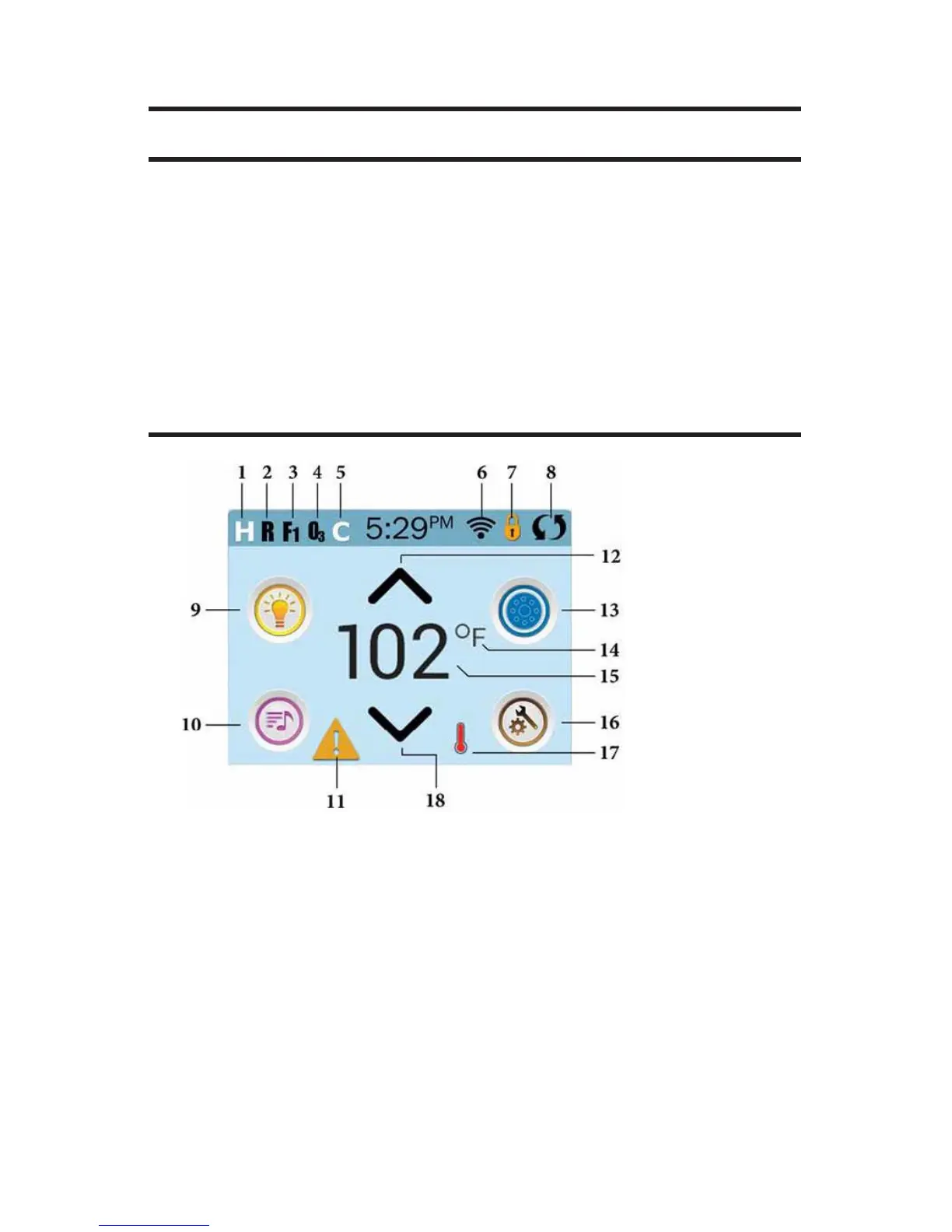
MAIN SCREEN
SPA STATUS
Important information about spa operation can be seen on the Main
Screen. Most features, including Set Temperature adjustment, can be ac-
cessed from this screen. The actual water temperature can be seen, and
the Set Temperature can be adjusted. Time-of-Day, Ozone and Filter sta-
tus is available, along with other messages and alerts. The selected Tem-
perature Range is indicated in the upper left corner. The Spa Equipment
Control Icon will spin if any pump is running.
A Lock icon is visible if the panel or settings are locked.
ICON SPECIFICATIONS
1. H = High Temperature Range 2. R = Ready Mode
3. F1 = Filter Cycle 1 Running 4. O3 = Ozone Running
5. C = Cleanup Cycle 6. Wi-Fi Signal Indicator
7. Lock Indicator Icon 8. Invert Screen
9. Light Icon = Turns On/Off
10. Music Icon = Press To Enter Music Screen
11. Message Waiting Indicator 12. Set Temperture Up
13. Spa Equipment Control Icon 14. Temperature Scale (F/C)
15. Current Water Temperature
16. Settings Icon
17. Heat Indicator
18. Set Temperature Down







 To Next Page