Chapter 1: Product Introduction
1-4
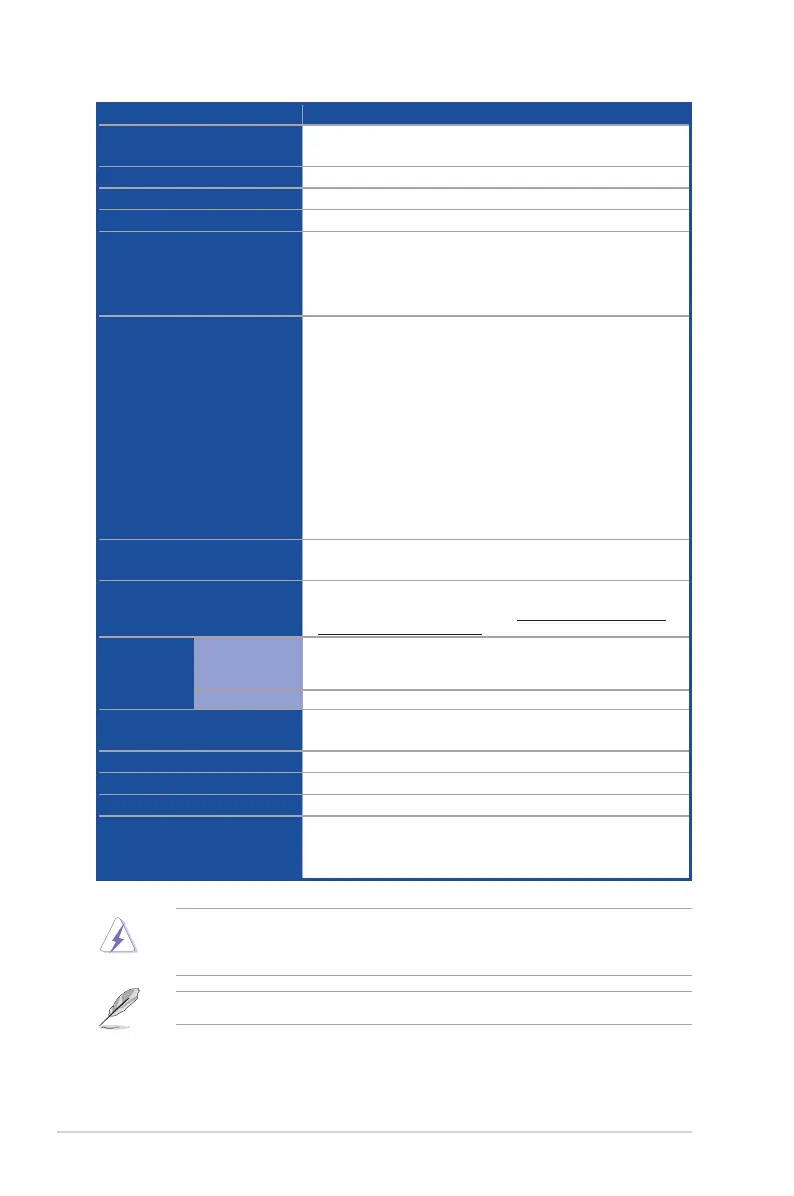
Model Name ESC4000A-E12
Networking
2 x Gigabit LAN ports (Intel
®
I350)
1 x Dedicated Management port
VGA
AST2600 64MB
Graphics
Up to 4 dual-slot or 8 single-slot GPU cards
Front I/O ports
4 x USB 3.2 Gen 1 ports
Rear I/O ports
2 x USB 3.2 Gen 1 ports
2 x Gigabit LAN ports (RJ45)
1 x Management port (RJ45)
1 x VGA port
Switch/LED
Front Switch/LED:
1 x Power Switch/LED
1 x Location Switch/LED
1 x Message LED
1 x Q-Code/Port 80 LED
2 x LAN LED
Rear Switch/LED:
1 x Power switch/LED
1 x Location LED
1 x Message LED
Security
TPM-SPI module (optional)
PFR module (optional)
OS Support
Windows
®
Server, RedHat
®
, SuSE
®
, CentOS, Ubuntu, Vmware
* Please find the latest OS support from https://www.asus.com/event/
Server/OS_support_list/OS.html
Management
Solution
Out of Band
Remote
Hardware
On-Board ASMB11-iKVM for KVM-over-IP
Software
ASUS Control Center
Dimension
800mm x 439.5mm x 88.9mm (2U)
31.50” x 17.30” x 3.5”
Net Weight Kg
24 kg (excluding CPU, DRAM, and HDD)
Gross Weight Kg
33 kg (including packing, excluding CPU, DRAM, and HDD)
Power Supply
1+1 Redundant 2600W 80 PLUS Titanium CRPS-R Power Supply
Environment
Operating temperature: 10° ~ 35°
Non-operating temperature: -40° ~ 70°
Non-operating humidity: 20% ~ 90% (Non-condensing)
Specifications are subject to change without notice.
Always use PSUs with the same watt and power rating. Combining PSUs with different
wattage (e.g. 1 x 2200 W + 1 x 2600 W) may yield unstable results and potential damage to
your system.














 To Next Page