2-17
ASUS ESC4000A-E12
2.5.1 Installing a PCIe expansion card
The onboard PCI Express slot on the motherboard comes pre-installed with a riser card that
supports two x16 slots (1 x Gen5 x16 link, 1 x Gen5 x8/x16 link) for full-height/half-length
PCIe cards and one x8 slot (Gen5 x0/x8 link) for installing low-profile/half-length PCIe cards.
2.5 Expansion slots
Make sure to unplug the power cord before adding or removing expansion cards. Failure to
do so may cause you physical injury and damage motherboard components.
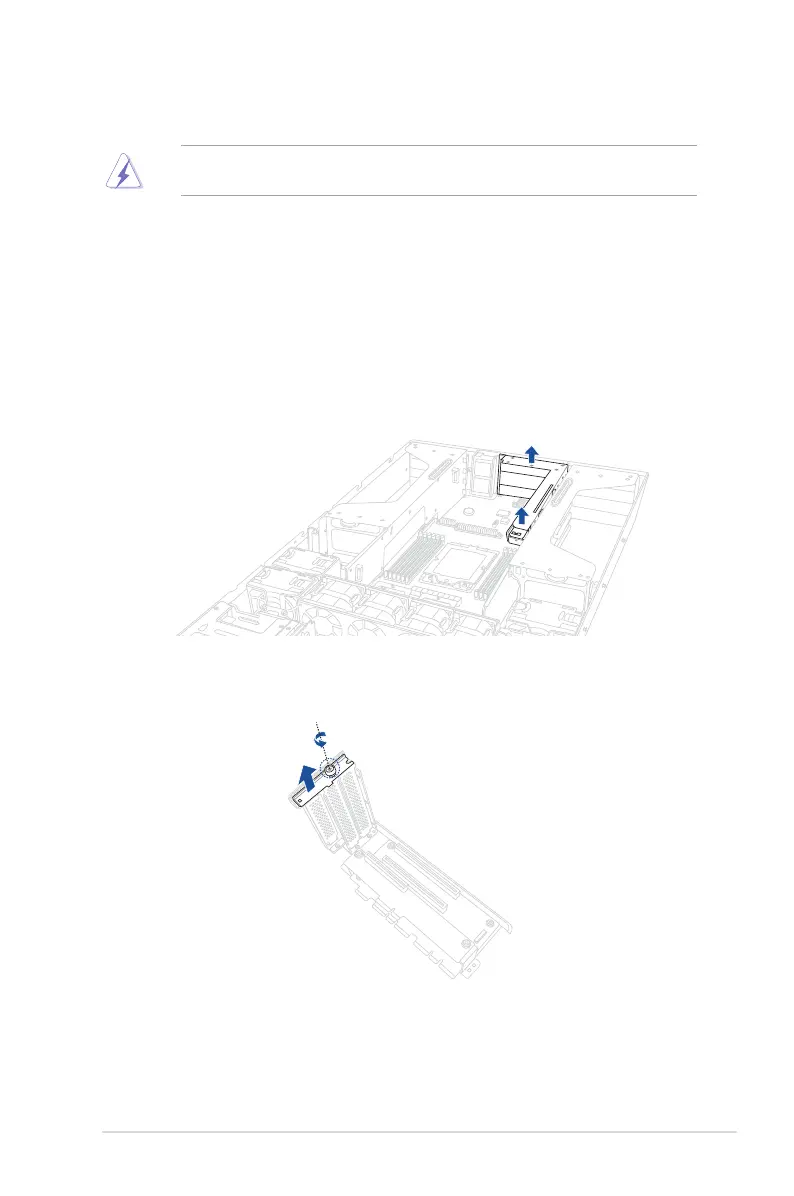
To install PCIe expansion cards to the riser card:
1. Firmly hold the riser card, then pull it up to detach it from the PCIe slot on the
motherboard.
2. Remove the screw from the PCIe lock on the riser card, then remove the PCIe lock
from the riser card.














 To Next Page