Chapter 2: Hardware Setup
2-14
2.4 Storage devices
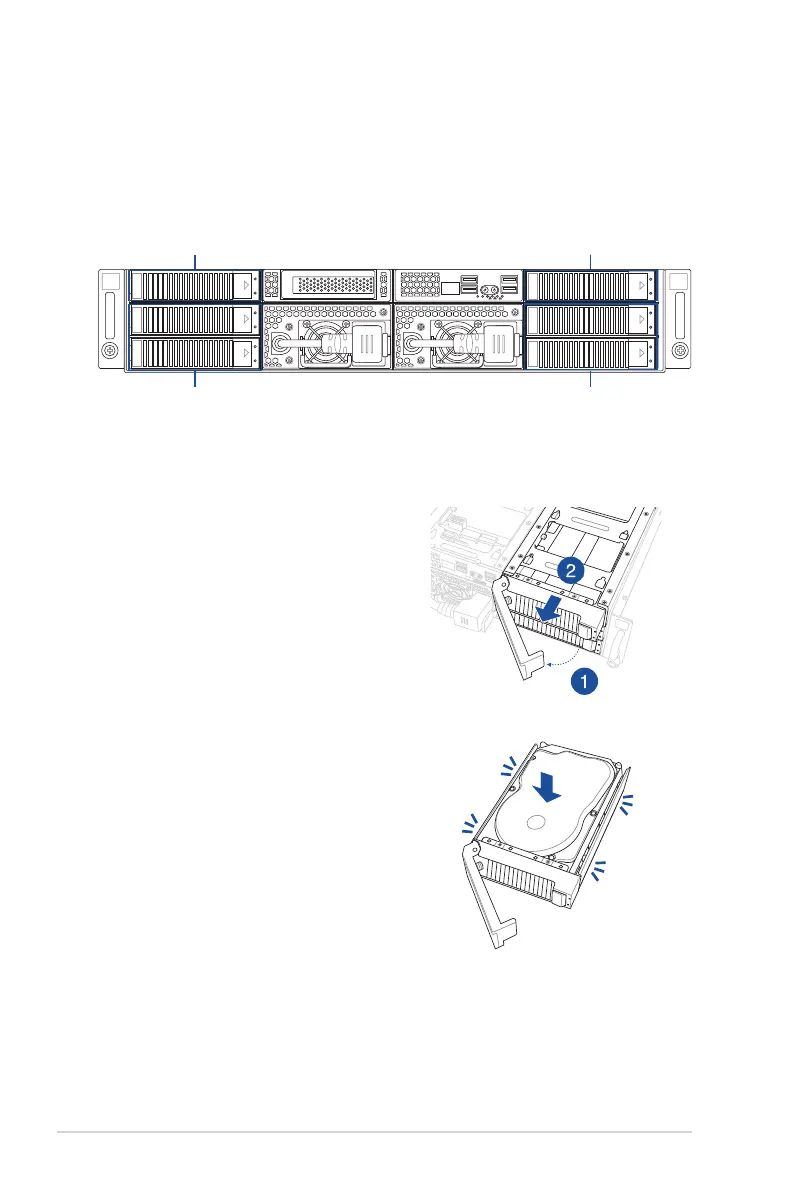
The chassis supports the following storage configurations:
• 2 x 2.5-inch storage devices and 4 x 3.5-inch storage devices
• 6 x 2.5-inch storage devices
1. Press the spring lock.
2. Pull the tray lever outwards to remove
the drive tray.
3. Prepare the SATA/SAS storage device,
then insert it into the tray until it clicks
into place.
2.4.1
Installing a 3.5-inch SATA/SAS storage device.
1
2
Storage bay 1 (2.5-inch)
Storage bay 3 and 4
(2.5-inch or 3.5-inch)
Storage bay 2 (2.5-inch)
Storage bay 5 and 6
(2.5-inch or 3.5-inch)














 To Next Page