Chapter 2: Hardware Setup
2-44
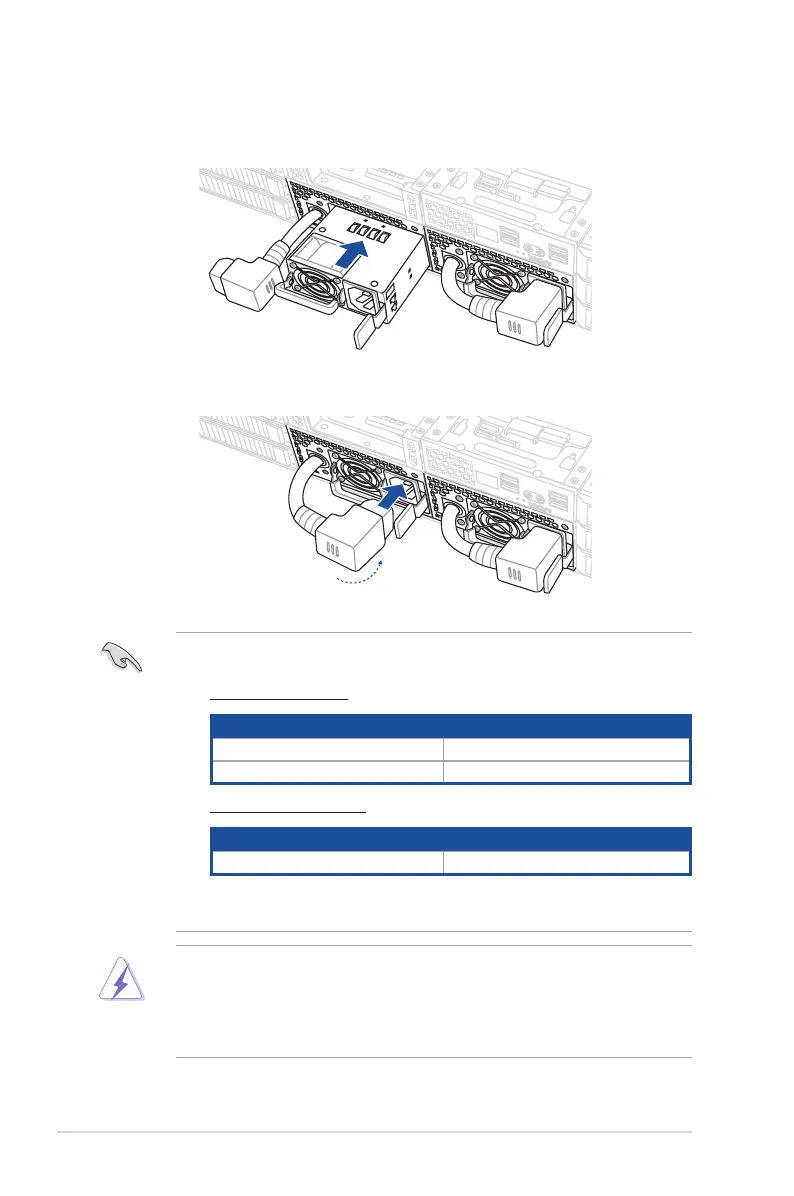
4. Prepare the replacement PSU.
5. Align and insert the replacement PSU into the empty PSU bay until it clicks in place.
6. Reconnect the PSU power cable.
• The system automatically combines the two power supply modules into one. The
combined output power varies with input voltages. Refer to the table below for details.
2600W (Air-cooled SKU)
Input Voltage Max. Output Power (Watt) per PSU
100V-127Vac, 13.8A, 50/60Hz 1000W
220-240Vac, 16A, 50/60Hz 2600W
2600W (Liquid-cooled SKU)
Input Voltage Max. Output Power (Watt) per PSU
220Vac, 16A, 50/60Hz 2600W
• To enable the hot-swap feature (redundant mode), keep the total power consumption
of the system under the maximum output power of an individual power supply module.
• Always use PSUs with the same watt and power rating. Combining PSUs with different
wattage (e.g. 1 x 1620 W + 1 x 2000 W) may yield unstable results and potential
damage to your system.
• For a steady power input, use only the power cables that come with the server system
package.














 To Next Page