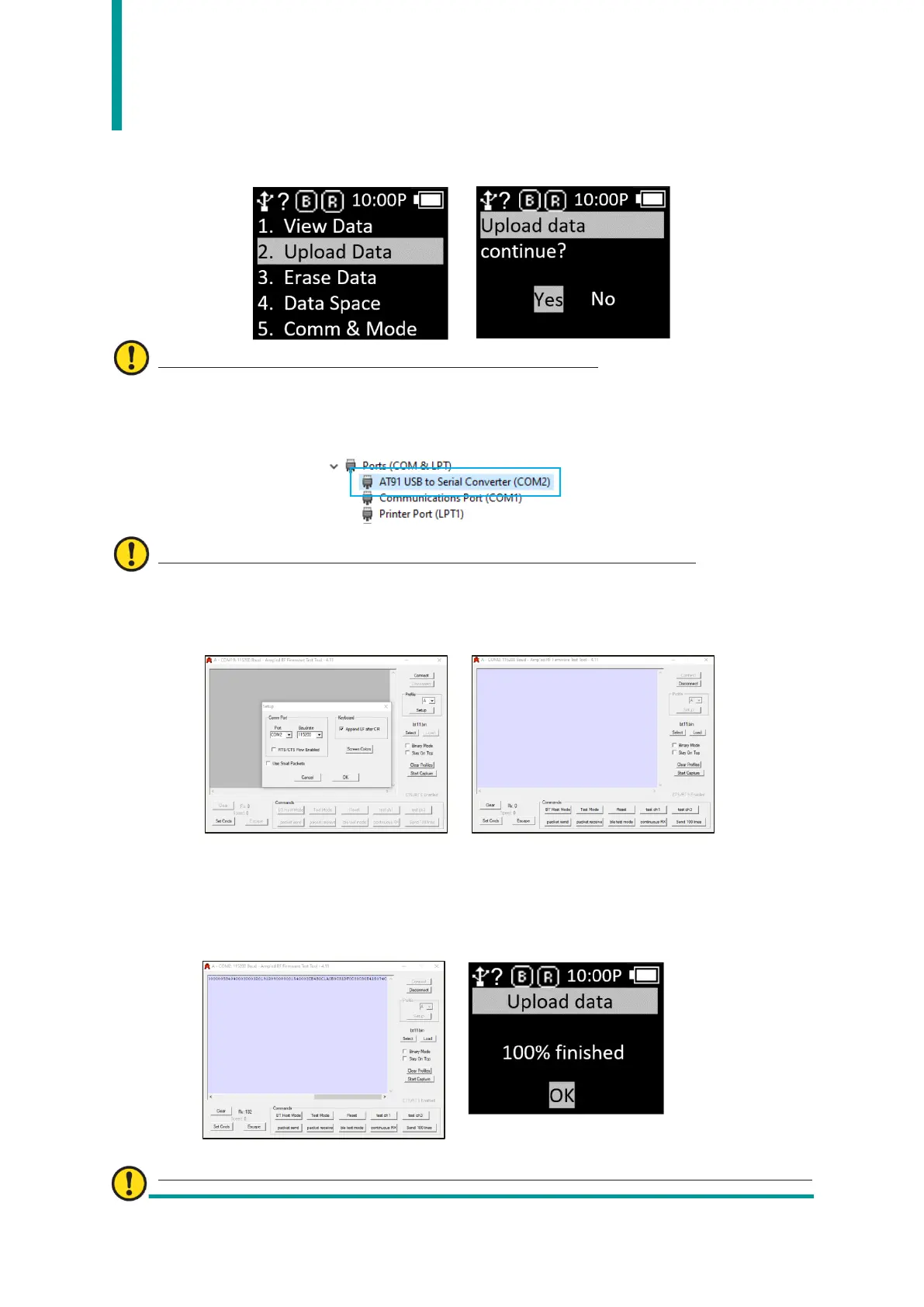
- In ‘Scan Mode’, press ‘◀ Button’ for 2 seconds to enter ‘Scan Setting Mode’.
- Select ‘2. Upload Data’ menu.
User must proceed to the next step without pressing ‘YES’.
- Connect to Windows Host with USB cable. The COM Port information assigned to Device
Manager in Control Panel is displayed.
The assigned COM port number varies depending on the host situation.
- Set the assigned COM port number to the app that user wants to transmit, and place the
cursor.
- Enter ‘Yes’ in the ‘Upload data continue?’ message of the device.
- As the % of transmitted data is displayed on the device screen, the data stored in the
Host is transmitted. When transmission is complete, the message ‘100% finished’ is
displayed on the device.
Unlike ‘HID’ mode, since there is no terminator, data is output continuously without line



 To Next Page