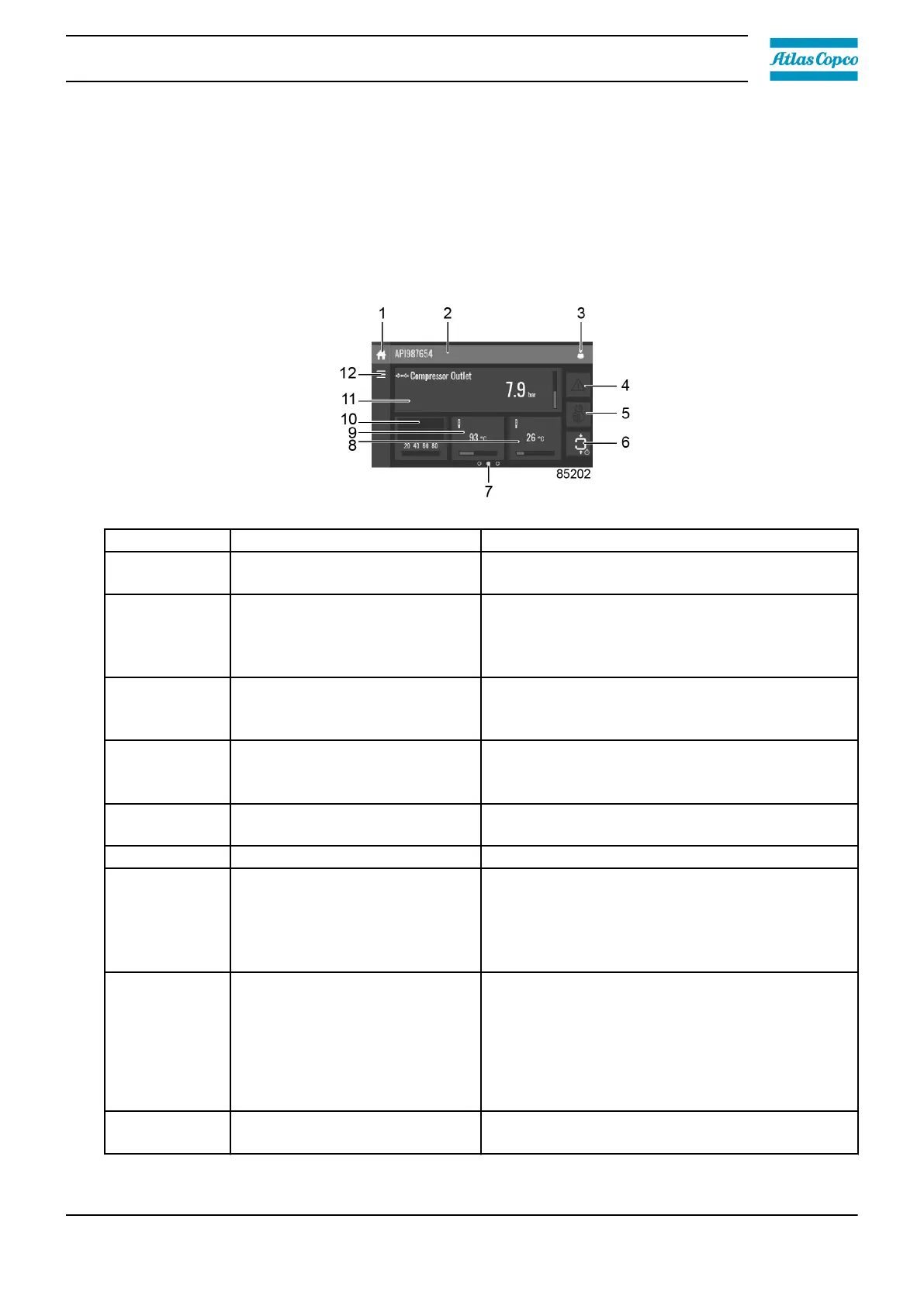
3.4 Main screen
Function
The main screen is the screen that is shown automatically when the voltage is switched on. It is
switched off automatically after a few minutes when there is no touch input.
Description
Reference
Designation Function
1 Home button
The home button is always shown and can be
tapped to return to the main screen.
2 Screen information
On the main screen, the screen information bar
shows the serial number of the machine. When
scrolling through menus, the name of the
current menu is shown.
3 Access level button
The access level button is always shown and
can be tapped to change the current user
access level.
4 Alarm button
The alarm button can be tapped to show the
current alarms. If an alarm occurs, the icon on
the button will be red.
5 Service button
The service button can be tapped to show the
service information.
6 Status This icon shows the current status of the unit.
7 Page indicator
Indicates which page you currently see. The
middle indication is the main screen, left is the
menu screen and at the right the quick access
screen.
Swipe left or right to go to another screen.
8, 9, 10, 11
These fields can contain a
certain value, depending on the
type of the unit.
Tap the field to view the type of measurement.
This will be shown in the screen information bar.
Examples of values shown:
• Temperature
• Pressure
• Purity level
12 Menu button
The menu button is always shown and can be
tapped to go to the menu.
Instruction book
2920 7219 10 31



 To Next Page