Reference Function Description
8 Auto Restart
Auto restart can be activated by tapping this
icon.
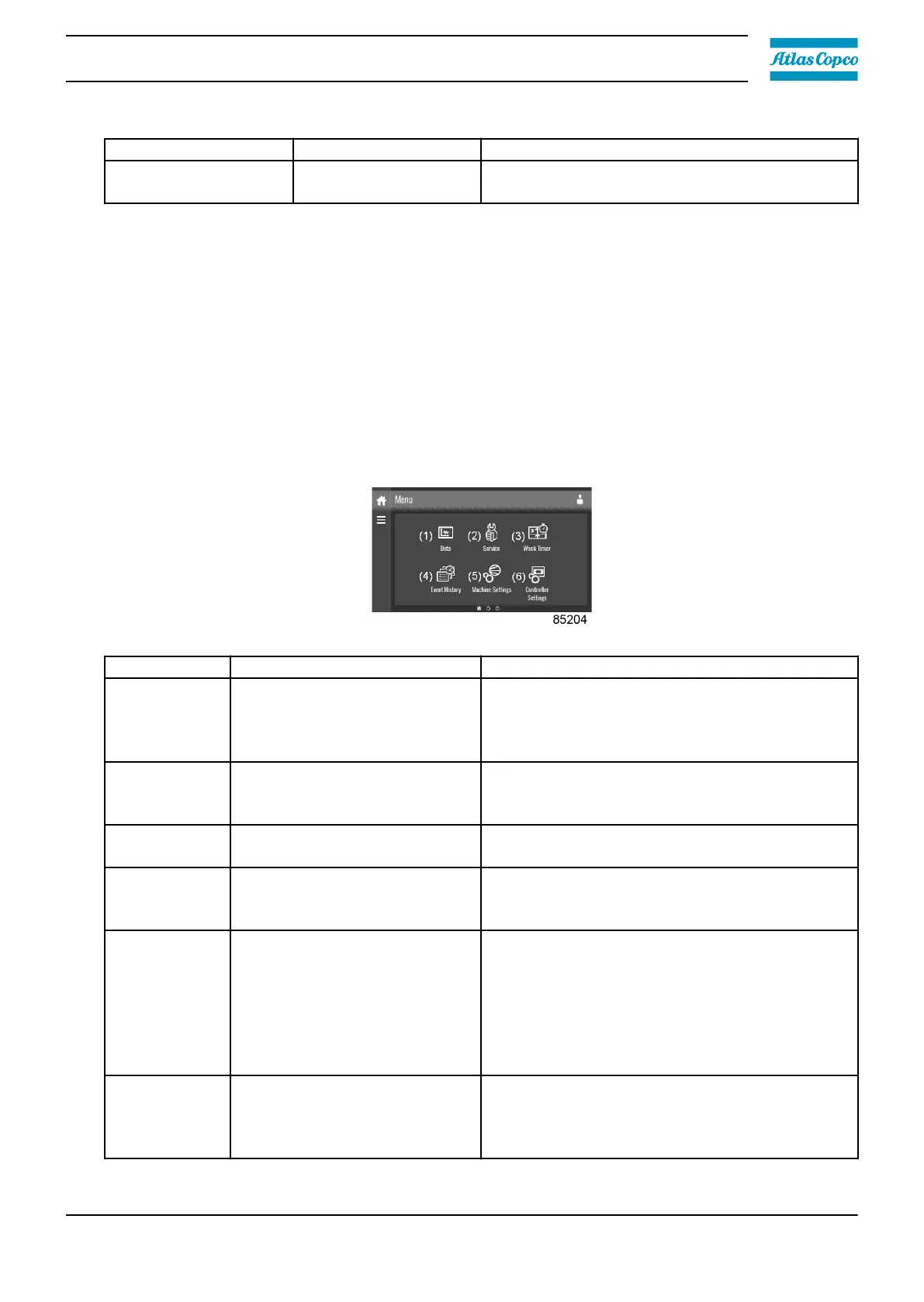
3.6 Menu screen
Function
This screen is used to display the different menus where settings can be viewed or changed.
Procedure
The menu screen can be viewed by tapping the menu button or by swiping right, starting from the
main screen.
Description
Reference Designation Function
(1) Data
The data menu contains the status of the unit,
information about the inputs, outputs and
counters. The auxiliary equipment can also be
viewed through this menu.
(2) Service
The service menu contains the service
information. The "clean screen" function can be
used to clean the touchscreen.
(3) Week timer
Multiple week timers and a remaining running
time can be set through this menu.
(4) Event history
In case of an alarm, the status information of the
unit is saved and can be viewed through this
menu.
(5) Machine settings
Alarms settings, regulation settings and control
parameters can be changed through this menu.
Auxiliary equipment parameters can also be
changed.
The automatic restart function can be set
through this menu. This function is password-
protected.
(6) Controller settings
Network settings, localisation settings and a
user password can be set through this menu.
There is also a help page available and the
controller information can be shown.
Instruction book
2920 7219 10 33



 To Next Page