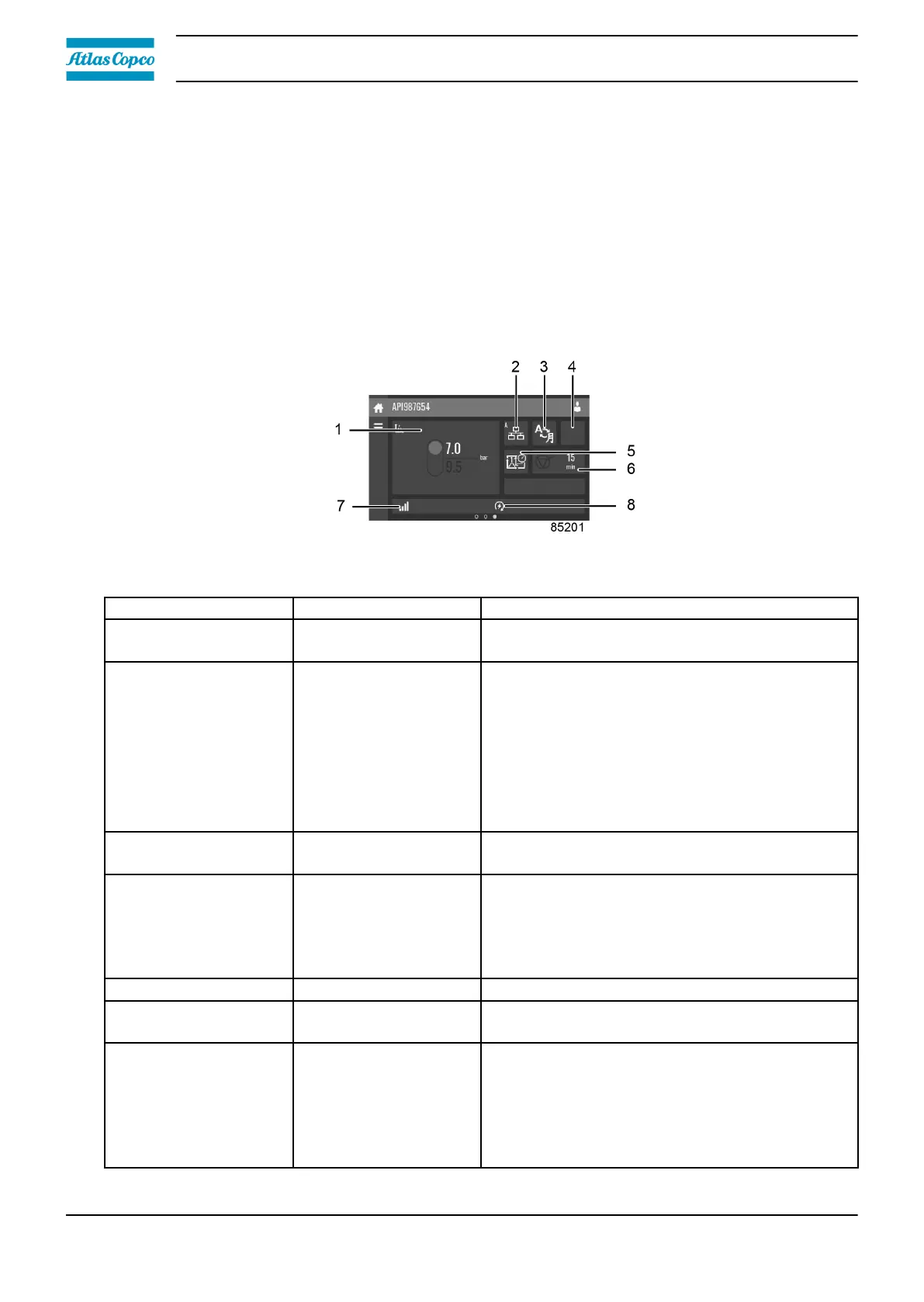
3.5 Quick access screen
Function
The screen is used to directly access some frequently used functions.
Procedure
The quick access screen can be viewed by swiping left, starting from the main screen.
Description
Through this screen, several important settings can be viewed and modified.
Reference Function Description
1 Setpoints
Several setpoints can be modified by tapping
this icon.
2 Control mode
The control mode can be changed by tapping
this icon.
• Local control via start/stop buttons
• Remote control via digital input(s)
• LAN control via the network.
When in remote or LAN control, the start/stop
buttons on the controller will not work.
3
Display language
The display language of the controller can be
changed by tapping this icon.
4 Operation mode
When tapped, the operation mode can be
chosen between manual and automatic. When
manual mode is selected, the controller will
switch to automatic mode automatically after 24
hours.
5
Week timer Week timers can be set by tapping this icon.
6
Remaining running
time
The remaining running time can be set and
modified by tapping this icon.
7 Internal SmartBox
The reception quality of the internal antenna can
be monitored.
Each bar represents 25% reception strength. If
the four bars are filled, the reception strength is
100%. If only one bar is filled, the reception
strength is just 25%.
Instruction book
32 2920 7219 10



 To Next Page