Reference Description
(1) Rotation control check
(2) Electro-pneumatic controlled compressors
(3) Compressors with Touch controller
A compressor equipped with a phase sequence relay will not start if the phase sequence is
wrong. In that case, reverse two of the incoming electric lines to solve the issue.
A wrong phase sequence will be indicated on the display as a motor overload. See section
Controller functions for more information.
5.2 Starting
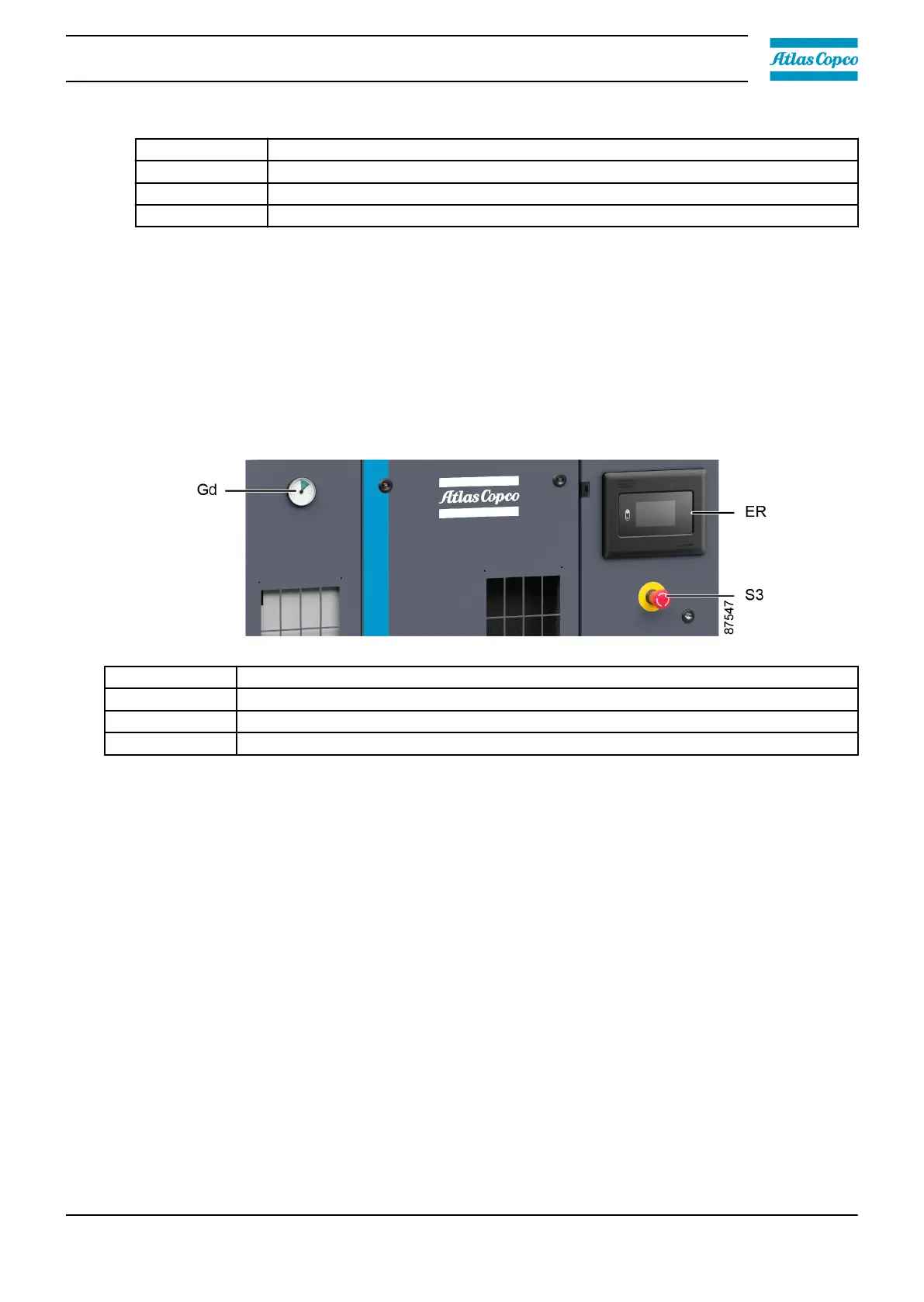
Control panel
Reference Description
ER Touch controller
Gd Dew point gauge
S3 Emergency stop button
Procedure
1. Close the manual condensate drain valve(s) if present.
2. Open the air outlet valve (AV).
3. Switch on the voltage.
4. Press the start button on the Touch controller.
5. The motor starts and stops automatically depending on the air pressure.
6. On Full-Feature units, the dew point of the refrigerant dryer will be reached after a few minutes.
7. On compressors equipped with an additional membrane or desiccant dryer, the latter will start
drying the compressed air. Note that at the first start-up, it can take several minutes before its
dew point has stabilized to a final value.
5.3 During operation
Procedure
1. Check the display to check pressure setting.
2. On Full-Feature units, check the display or the temperature gauge (Gd) on the control panel to
check the dew point.
Instruction book
2920 7219 10 59



 To Next Page