• Information
• Main Chart
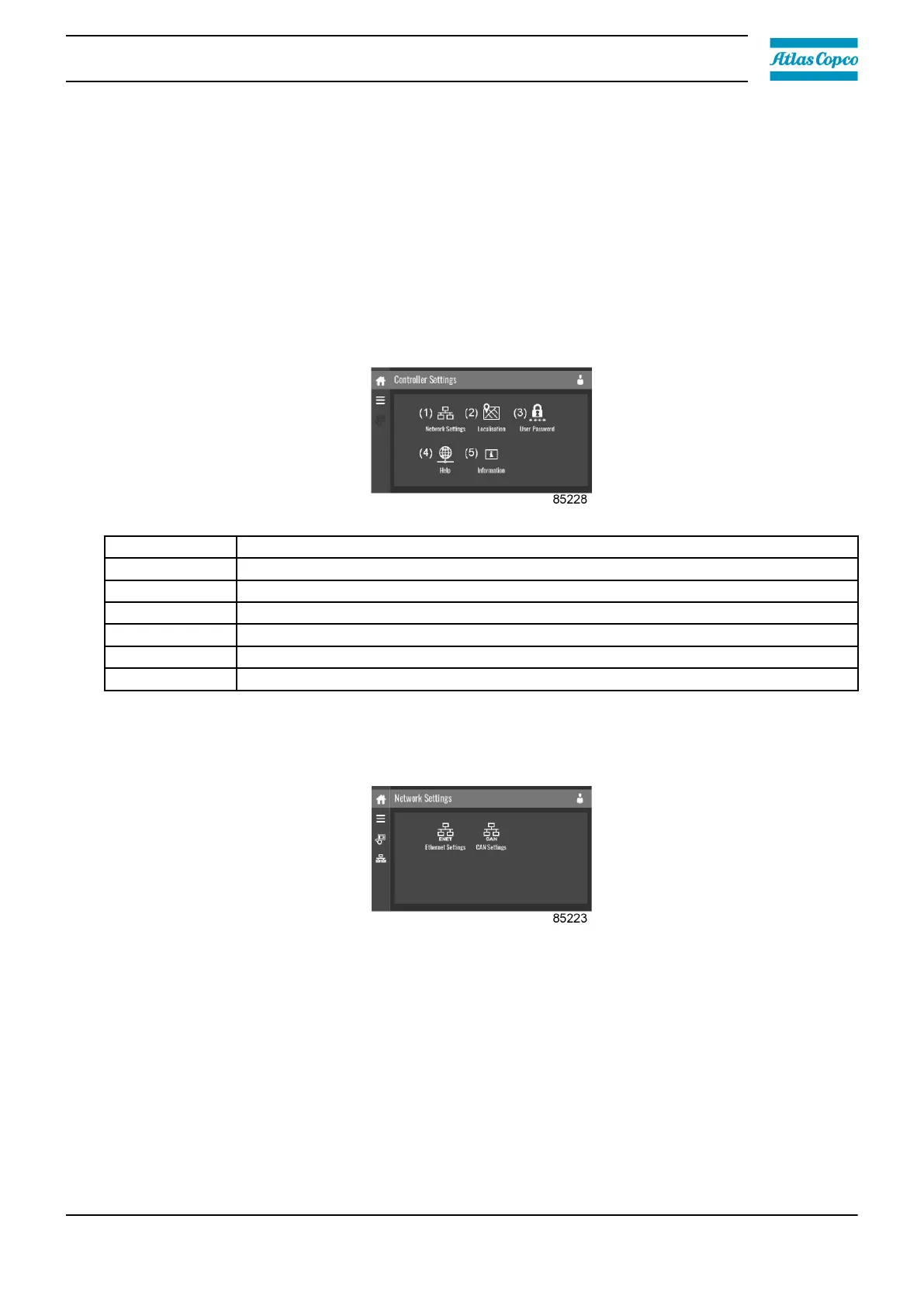
These submenus can be entered by tapping the icons.
Procedure
To enter the Controller Settings menu screen:
1. Tap the Menu button.
2. Tap the Controller Settings icon.
Description
Reference Description
(1) Network Settings menu
(2) Localisation menu
(3) User Password menu
(4) Help menu
(5) Information menu
(6) Main Chart
Network settings menu
Tap the Network Settings icon to enter the Network Settings menu.
Ethernet Settings
The list of Ethernet Settings is shown. When ethernet is turned off, the settings can be modified.
CAN Settings
The list of CAN Settings is shown. When CAN is turned off, the settings can be modified.
Modify a setting
When tapping a list item, a selection screen pops up. The user can modify the setting by tapping ‘–’
or ‘+’ and can confirm by tapping ‘V’ or decline by tapping ‘X’.
Change a selection
Instruction book
2920 7219 10 43






 To Next Page