16
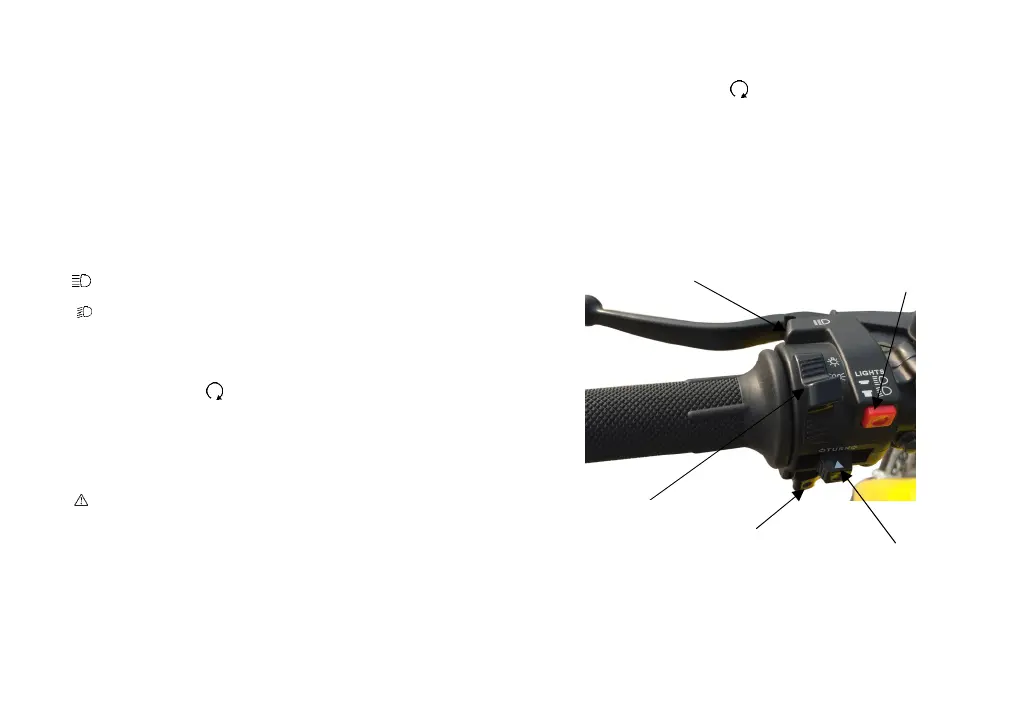
3. Switches on left handlebar
•
Light changing switch
Position indicator shows its position to the nearby Vehicles; and
reminding other vehicles when wait at crossroad, to avoid Confu-
sion.
•
Far and Near Light Lamp Instruction
Press the button, the use of far and near light switch can control the
distance light
( )headlight on full beam
( )headlight on lower beam
•
Directional switch
Use indication switch when turning Left and right.
If put main Switch on“ ” position, the indicator will wrinkle.
Slide Direction indicator can stop the turning signal Operation.
(R)Turn Right
(L)Turn Left
Caution
When finished turning, the direction indicator switch will not be back
to original position automatically, please switch it manually.
Driving with light on will obstruct traffic.
•
Horn button
When the main switch at “ ”, press horn button, it will make a
sound.
•
Overtaking lamp switch
According to Ultra Lights, headlights flashing, to indicate the vehicle
in front to overtake.
Far and Near Light Lamp Instruct
Overtaking lamp switch
Directional Switch
Light changing switch



 To Next Page