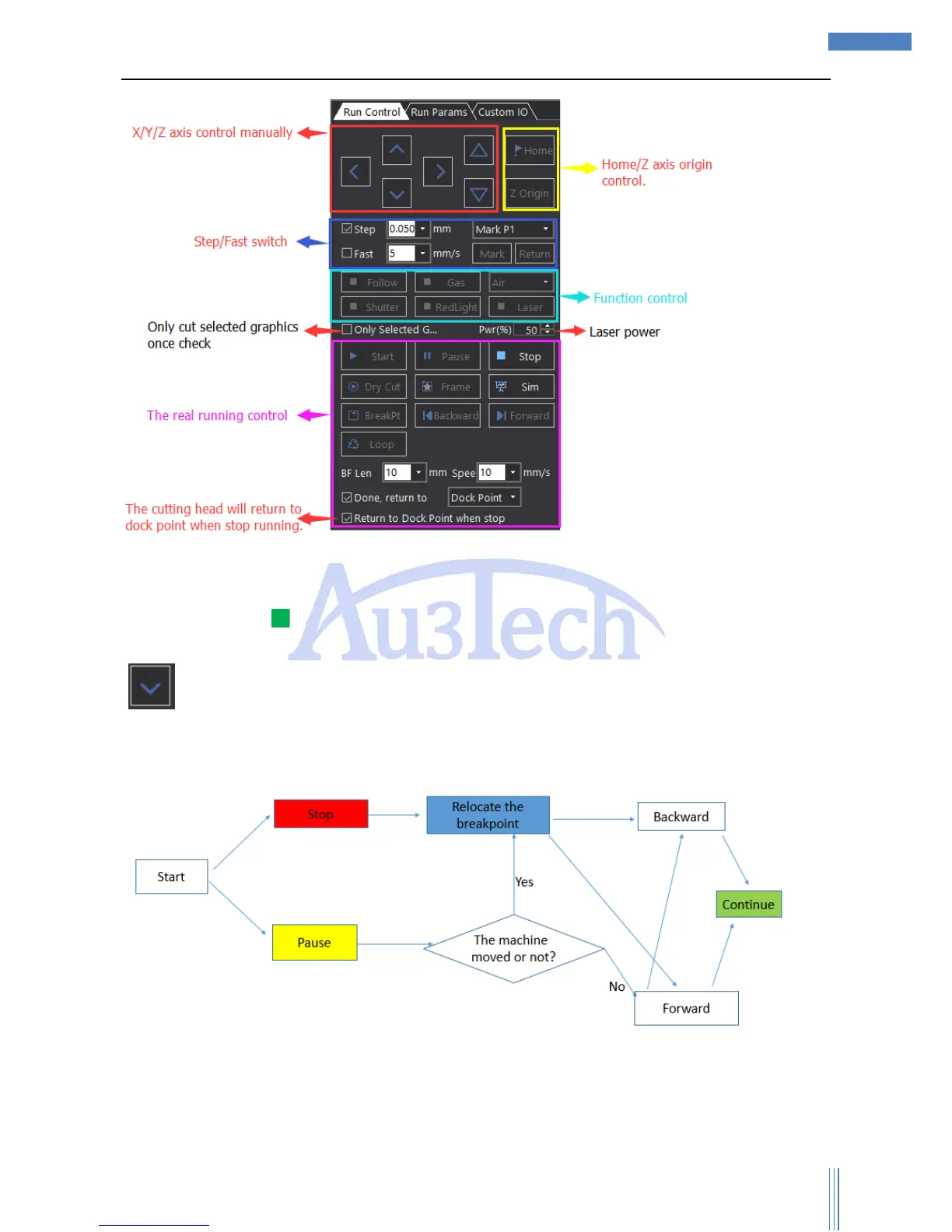
SC1000 supports controlling X/Y/Z axis to move manually. User can set up the moving
pattern/speed by SC1000 (Step/Fast).
User can control some functions separately: Follow/Gas/Air/Shutter/Red-light/Laser.
If the greenlight “ ” of the button goes on, which means the function has been done. About “Laser”,
Mouse Left to open the laser, release it to shut the laser. While other functions need to be switched by
“ ”;
You can reference the chart below to know the running control logic:
1) User can “Pause”/”Stop” the cutting process during cutting. If you choose “Pause”, SC1000 will
stop at the moment and reserve the current cutting information and user can release “Pause” to
continue the cutting (User also can move the cutting head by “Backward”/”Forward” to the proper
location before continuingly cutting.) If user moved the cutting machine after “Pause”, please



 To Next Page