Copyright © WUHAN AU3TECH TRADING CO., LTD
SC1000 Fiber Laser Cutting CNC System User’s Manual Version: V1.00
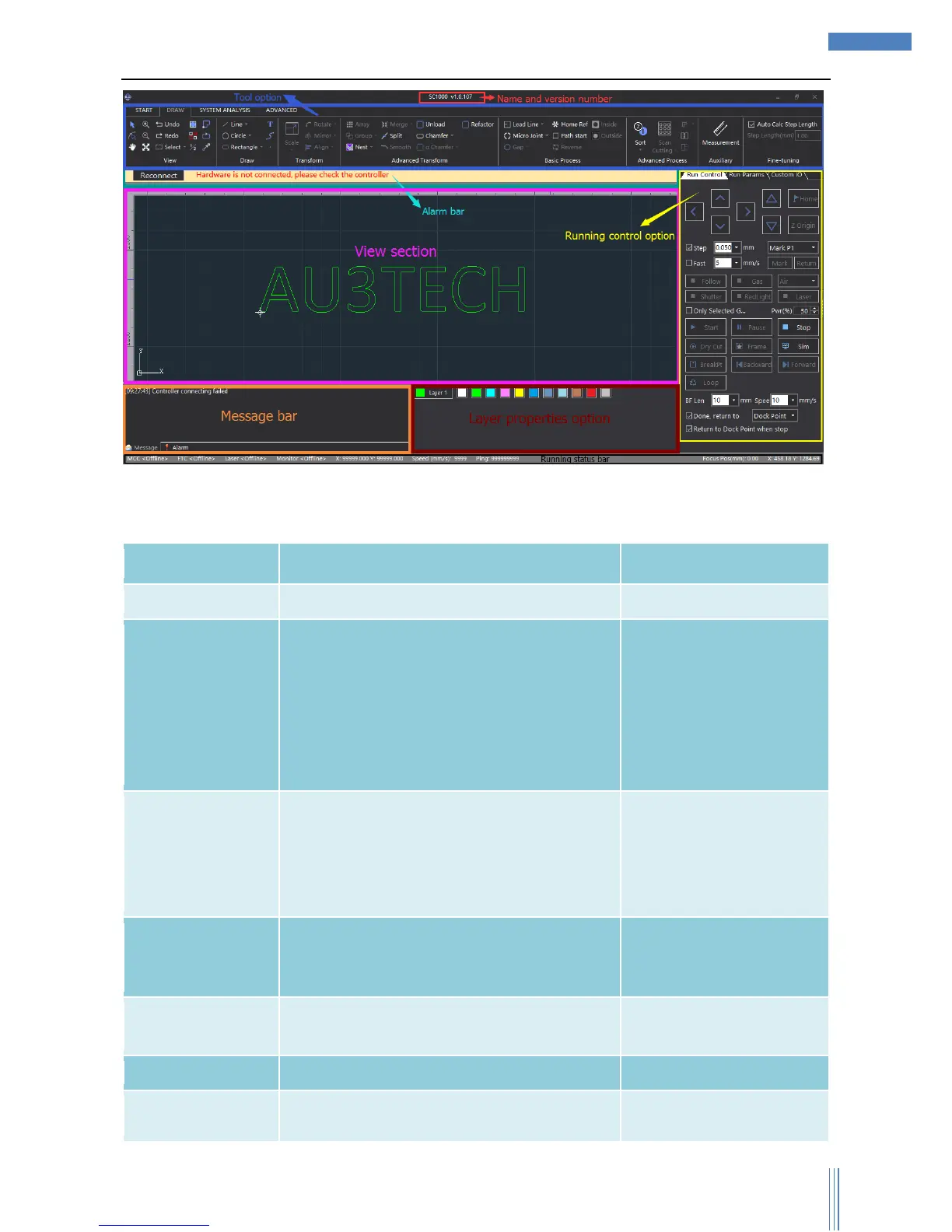
UI design is very clear, from up to down: title option, tool option, alarm option, view option, running
control option, message bar, graphic parameters option, and status bar. The functions of each section
shows as below:
Display software’s name and version number.
Mainly collects the tools needed for software
operation, it has four submenu:
START/DRAW/SYSTEM
ANALYSIS/ADVANCED. User can do graphic
drawing, graphic editing, graphic
transformation, adding lead line, monitoring
running status, configuration machine tool.
Display the current system alarm.
Alarm will be displayed in
pop-up window, and once
the alarm is cleared, the
pop-up window will be
gone.
Graphic drawing/displaying section, machine
tool’s width displaying section. (机床幅面显示
区).
Run all kinds of cutting actions through
software.
Display the current running status in scrolling.
Set up layer properties such as layer process,



 To Next Page