17
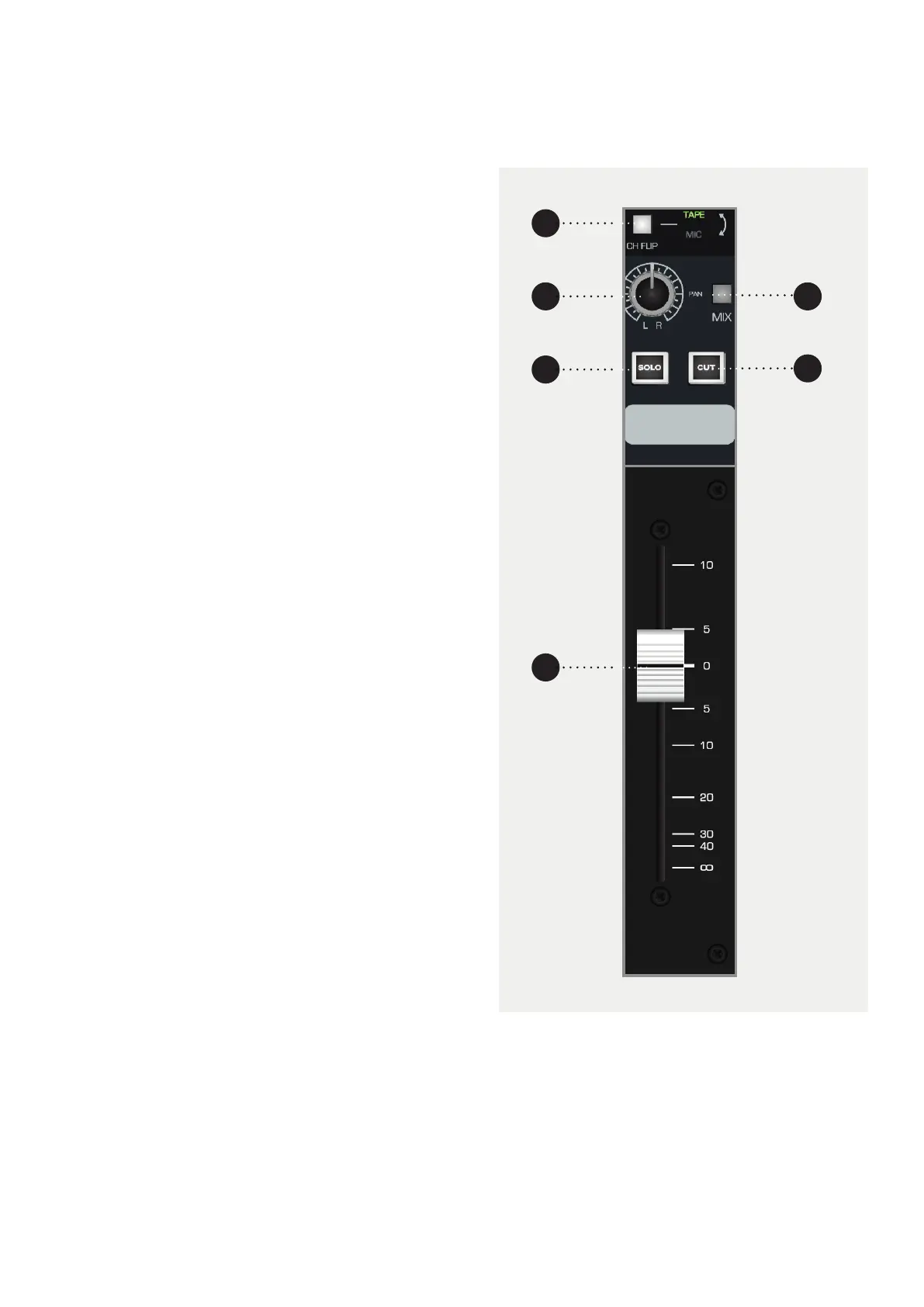
Long Fader (LF)
The Long Fader operates on the LF signal path and
is mainly used for creating the monitor mix and the
final stereo mix.
The fader is expected to operate around the 0dB
mark with 10dB of gain in hand, allowing the signal to
be increased or decreased in level.
When setting levels, start with the fader at the 0dB
position, then adjust the input sensitivity control to the
correct level.
1 CH Flip will flip the channel path onto the Long
Fader and the playback path onto the Short Fader.
2 PAN places the signal in the stereo field by
balancing the signal between the left and right
channels.
3 MIX. Pressing this button sends this channel to the
mix bus. To minimise the noise floor of the console,
this should be disengaged if the channel is not in
use.
4 SOLO Mutes every channel except channels that
are soloed.
5 CUT will cut the Short Fader output of that particular
channel.
6 FADER controls the amount of signal being sent
out of the Long Fader path.
6
2
4
1
5
3



 To Next Page