27
Live Room & Foldback
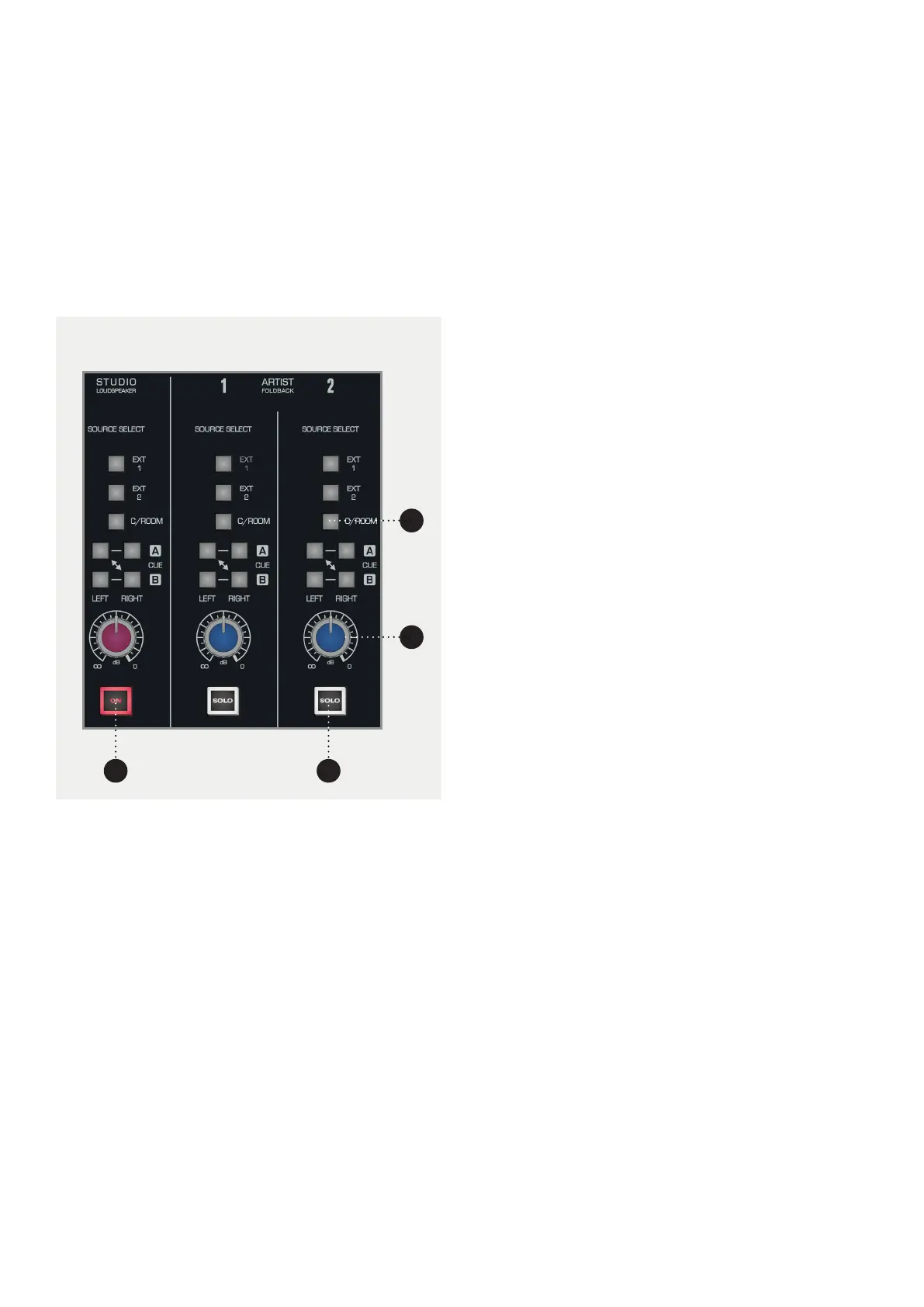
The Studio Loudspeaker and Artist Foldback section
allow you to route signal to performers from various
sources on the console. In all cases, the same
sources are available.
1
2
3
4
1 SOURCE SELECT
• EXT 1
Takes signal from External Input 1.
• EXT 2
Takes signal from External Input 2.
• C/ROOM
Takes signal from the Control Room Outputs so your
artist hears what you are hearing.
• CUE A
Takes signal from the Cue A bus. This can either be
sent to the left or right channel so you can setup
stereo or mono foldback.
• CUE B
Takes signal from the Cue B bus. This can either be
sent to the left or right channel so you can setup
stereo or mono foldback.
2 dB KNOB. This allows you to control the overall
volume of the foldback on the particular foldback
channel. Levels can be adjusted from -inf to 0dB.
3 STUDIO LOUDSPEAKER ON. Turns the studio
loudspeaker in the live room on and o.
4 ARTIST FOLDBACK SOLO. Cuts all other sources
apart from those that are also soloed.



 To Next Page