36
Power Supply
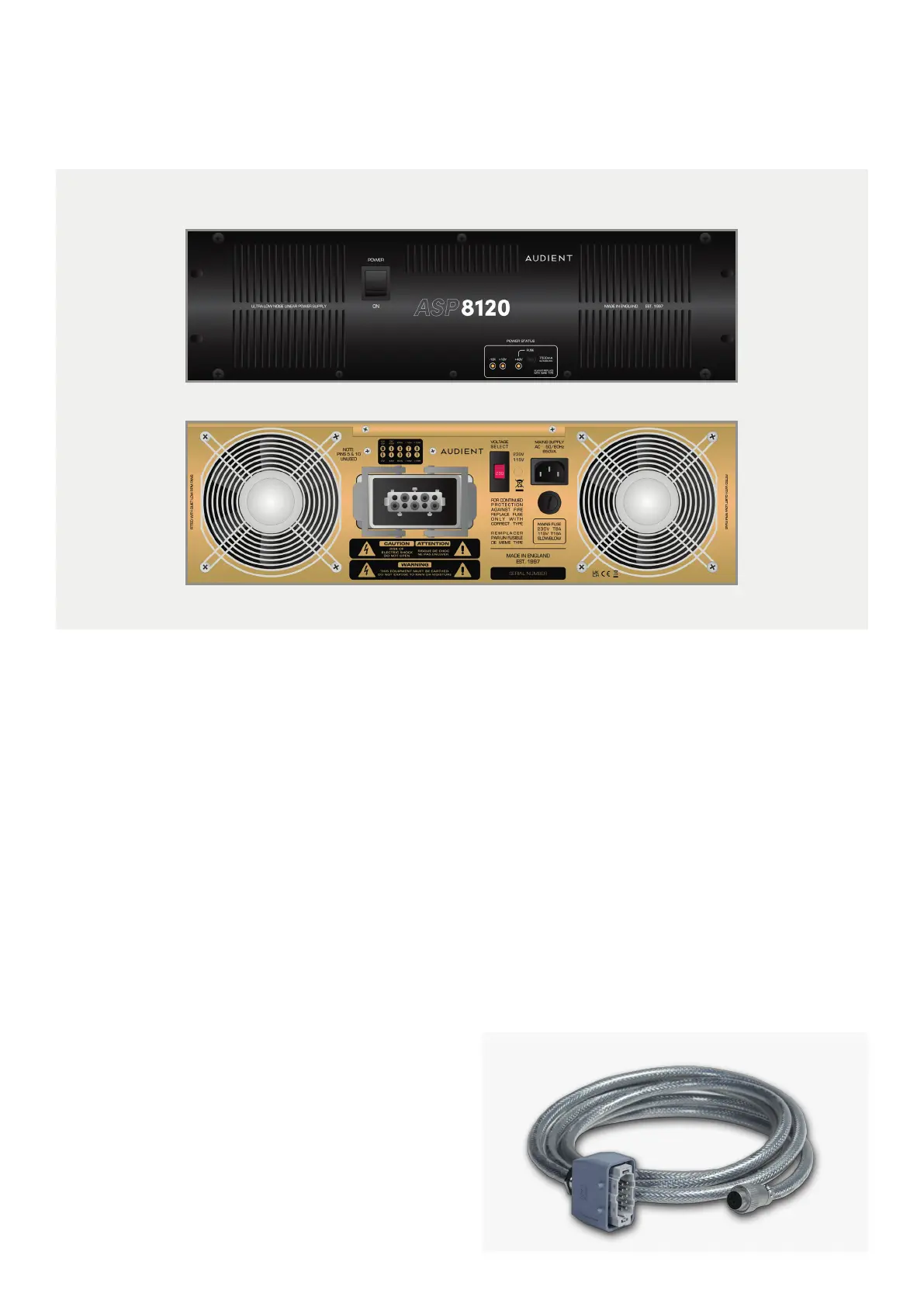
To connect the console’s power cable, simply push the
connector into the socket and then pull the two retaining
arms over the connector until you feel a small click.
Ensure that the two cooling fans aren’t restricted in
any way, otherwise it could cause the power supply to
overheat. The unit doesn’t require any space above or
below it when racked up and can be placed directly on
the floor. The console is supplied with 4 meter, shielded
power cable.
The power supply uses extremely low noise fans
and transformers, meaning that the PSU can be
placed in the same room as the console without
producing distracting noises. The LED indicators
show the current status of the +18V, -18V and +48V
Power rails, if the LEDs are lit then it means that the
rails are working as they should. Similar power rail
indicators can be found in the master meter section
of the console.
Should you need to replace the fuse on the front
panel of the PSU, be sure to use a 500mA Slow Blow
type fuse.
On the rear of the power supply you will find a IEC
socket, a mains voltage selector, a mains fuse and
the connector for the console power cable. Before
powering on the power supply, make sure that the
voltage selector switch is set to the position that
reflects your country’s mains voltage.
The console is powered by the ASP8120 Ultra, rack-mounted power supply. On the front you will
find the power switch for the entire console, three LED indicators and the +48V fuse.



 To Next Page