26
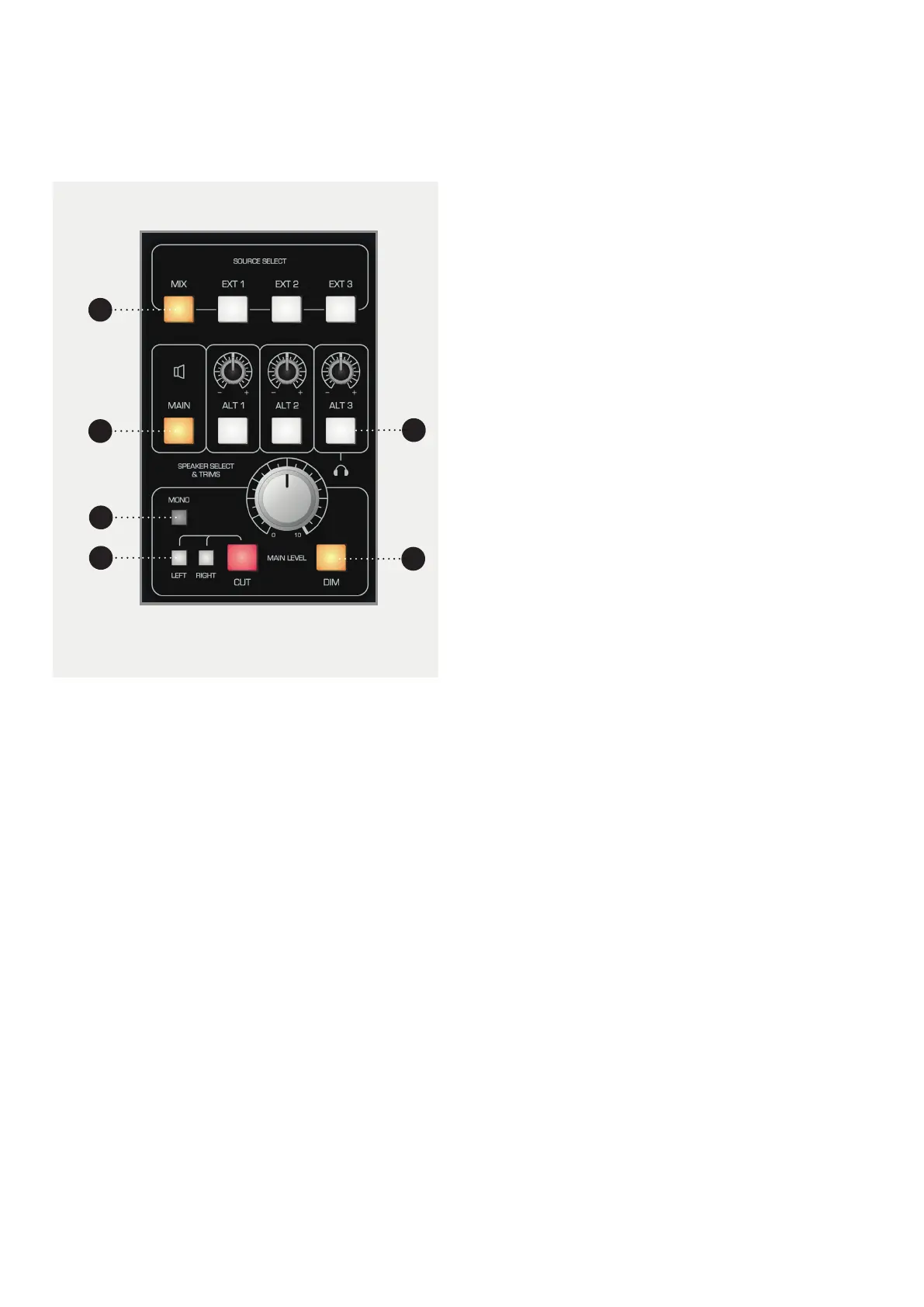
1 SOURCE SELECT BUTTONS. Allows you to select
which source you would like to monitor in the
control room. Mix takes audio from the Mix Bus
and Ext 1-3 takes audio from the three external
inputs found in the Master Section rear connector
panel.
2 MAIN. Sends your selected source to the device
connected to the Main Output of the ASP8024-
HE, normally the main monitors.
3 ALT 1-3. Sends your selected source to one of
the Alt Monitor Outputs, often used for smaller
monitors or ‘grotboxes’. Switching to Alt 3 will
send the output to the built in headphone output
found in the Master Meter section.
4 MONO. Sums the left and right channels of the
monitor output to mono in order to check the
mono compatibility of a mix.
5 LEFT, RIGHT, CUT. Allows you to cut either the
left, right or both monitors.
6 DIM. Reduces the level of the main output by a
set amount. Dim will be switched in automatically
when talkback is used to reduce the possibility of
feedback.
Control Room Monitoring
The Control Room Monitoring system is one of the most
used systems in a studio. Typically there are several
sets of loudspeakers with a main pair and one or more
alternate pairs. These are sometimes referred to as
Near, Far and Mid field monitors depending on their
proximity to the listening position.
1
2
4
5
6
3



 To Next Page